(as published in Itworldcanada.ca)
http://www.itworldcanada.com/blog/the-demise-of-excess-access-a-eulogy-for-traditional-vpn/96655
Once upon a time, in a world where mobile meant "laptop" or "remote home PC", Corporate network connectivity came in two flavours: 1) Dial-up modem, with it's clunky protocols and achingly slow speeds, and 2) Corporate VPN client over Internet.
Internet VPN seemed like a godsend in comparison to Dial-up. Basically it's purpose was to provide a secure network connection between your remote PC/Laptop (the entire device) and your Corporate network. Whether old-school IPSec or the more recent SSL encapulation, the transport was secured. Username/password, and optionally a One Time password or Security Token would be used to provide Two Factor Authentication (2fa).
Seems secure? Right? I mean, authentication and transport security are covered.. what else is there?
Dynamic Access Policies were then created to define a set of rules, similar to firewall rules, that describe what applications (port/protocol) on the remote users PC could talk to what servers/services in the data center.
In general, this worked fine if there were less than a hundred employees in the company, you had no third party users, no application was ever upgraded, and nobody changed roles.
In practice, policies are defined loosely to allow for Convenience rather than Security. Realistically, large numbers of PC's have unfettered access to the corporate network, as if they were sitting at their desk. (We'll get into THAT issue in a future blog.)
Well then we started worrying about Viruses, worms, trojans... basically Malware residing on the remote PC. What stops them from propagating into the corporate network? How do we know the end user has applied all the appropriate patches, and is running the most current AntiMalware (And that it's signatures are up to date!)?
Network Access Control was added to the VPN client to assess the endpoint (laptop or PC) and determine it's "security posture" based on patch status and running AntiMalware applications.
But this wasn't enough to satisfy the Audit or Risk departments, so you had to install Intrusion prevention appliances and network anti-malware inside the network to remediate anything that was missed on the endpoint...
AND... we still have all those remote endpoints, with pretty much open access to our entire corporate network...
In the meantime...
As a result of the explosion of Tablets and smart phones, alternate solutions arose for many of the very services we require daily as part of our VPN dependency. An entire industry arose to service BYOD or Bring Your Own Device. Tablets and Smart phones are managed through various means, but typically now applications running on those devices are segregated or "sandboxed" from one another to reduce the risk of eavesdropping and data capture.
The Future of Enterprise Remote Connectivity:
Today, there is absolutely NO REASON to use VPN for your Corporate Email service. All enterprise grade email clients utilize strong local authentication, integrate with industry standard Single Sign On, and use strong transport encryption. Whether you are an Exchange/Outlook or Domino/Notes user, for this use case, VPN is merely a hindrance to productivity, and a complexity that costs your company both in Capex and Opex.
Similarly, there is absolutely NO REASON to use VPN for your Corporate VOIP or Instant messaging. These services also integrate cleanly into Enterprise Single Sign On, and provide for secured, encrypted transport.
If you NEED, and I stress NEED, a corporate desktop, then there are many highly secure NON VPN solutions available, such as Microsoft's Remote Desktop Gateway, Citrix Access Gateway, or VDI via VMWare's Horizon View. Some Legacy Applications may still require this model for a few years to come.
Are you using Cloud Services through VPN? If you are using VPN to get to your corporate Cloud applications like SalesForce, SAP, Concur,ServiceNow, Microsoft Office 365, or Taleo, you are simply adding an extra network loop to an already secured connection. These services already use Enterprise Single Sign On, and provide for secured, encrypted transport.
Containerization technologies like Bromium will transform application development for the laptop environment, and allow Laptops to join the realm of Managed Devices in a Mobile Device Strategy. Soon your Enterprise Mobile Application Management suite will package and manage apps for Windows and OSX as well as iOS, Blackberry and Android.
Write Once, Run Anywhere has been a mantra used by vendors such as Oracle for well over a decade. It is finally approaching a maturity level that will see it in action everywhere. Most large applications today are being developed using frameworks that abstract the presentation layer, and allow the designers to write various "front ends" specific to the device, while the rest of the application is identical across platforms.
So aren't you just replacing one remote access solution with several niche appliances?
In a quick answer, sort of... Service specific appliances, such as SIP gateways provide a much more robust and secure means on managing this specific traffic, and many companies already have them in place for internal branch to branch connectivity.
I'm not suggesting that the future of remote connectivity is free and unfettered access to your Corporate Network. Quite the opposite in fact. I'm suggesting that 2/3 of what employees access today via traditional VPN, already has BETTER and MORE SECURE means of connectivity through their native infrastructure, and that the remaining 1/3 is on track to be replaced with technologies that will allow the remote applications to be secured on any device from phone to tablet to laptop.
In today's world of high profile Data Breaches, Zero Day Attacks, and Significant Operating System vulnerabilities, we cannot allow the Excess Access that traditional VPN affords.
References:
WindowsSecurity.com: Death of VPN
VPN Clients are Dead in the Cloud
The Evolution …. and Death of the VPN
The Death of the VPN
Microsoft Technet: Overview of Remote Desktop Gateway
App Wrapping is A Form of Containerization
Forrester: Containerization Vs. App Wrapping - The Tale Of The Tape
Showing posts with label AD Integration. Show all posts
Showing posts with label AD Integration. Show all posts
Saturday, 4 October 2014

Wednesday, 27 February 2013
SAMBA 4: Active Directory Domain Controller? Absolutely!
1991 was an extremely productive year....
On one hand Linus Torvalds introduced the Linux Kernel that would turn the Computing world on it's head and challenge commercial Operating Systems for the next two decades.
On the other hand, and in a completely unrelated event, Andrew Tridgell would develop "netbios for unix" soon to be known as Samba. It wasn't until a couple years later that you would commonly find Samba on a typical Linux Distribution.
From the official Samba site: What is Samba?

Samba is used commercially in some small NAS filer appliances, and as stand alone file and print servers. It has been packaged and supported for every Commercial UNIX version on the market. It is included in every Linux Distribution. It allows Mainframes to share files "natively" with a Windows environment.
Samba has been able to provide Windows Domain Controller functionality for some time now, albeit under limited scope. Samba 3.x was able to provide for a very decent Windows NT4 Primary Domain Controller (PDC), but was not able to fill all of the roles of a true Active Directory PDC. It could however, substitute as a Backup Domain Controller (BDC).
Enter Samba V4!
As of Version 4, introduced in December 2012, you are able to create a fully functional Active Directory Primary Domain Controller and then use Microsoft's Administration tools to manage it from your Windows 7 workstation!
Note: In the first release of v4, there were issues with directory and file replication that prohibited standing up a redundant pair of Linux or Unix based Samba Domain Controllers. These issues have been corrected as of v4.0.3 in January 2013.
It is now possible to build an entirely redundant Active Directory Domain on Linux / Samba 4 Domain Controllers.
Although there are still a few issues with "Cross Forest Trusts", most small and medium size businesses in the free world are able to function within a single Active Directory domain anyway.
Samba 4 now supports all typical Active Directory features, including Group Policy and Roaming Profiles. They can also integrate with Microsoft Exchange servers (or better yet OpenChange ).
According to the official Samba site, Samba 4 was build with documentation and some assistance from Microsoft themselves:
There are several good articles already on just how to build a functional Active Directory Domain Controller using SAMBA 4 on Linux. I'm not going to go into the details here, but you can read:
I was able to create two Virtual AD Domain controllers (One PCD, One BDC), set up the domain, join a couple workstations, a print queue, and file server in the space of an afternoon.
I'll definitely admit it's not an "out-of-the-box" exercise, but when I got to use Microsoft's tools for managing Users, Groups, OUs, Group Policy.... the reality set in that this is now ready for prime time...
Further Reading:
Samba Team Releases Samba 4.0
HOWTO to set up Samba as an Active Directory compatible Domain Controller
Samba4 joining a domain as a DC
Samba4 as AD domain controller on Centos 6
Samba 4 AD Domain with Ubuntu 12.04
http://www.alexwyn.com/computer-tips/centos-samba4-active-directory-domain-controller
On one hand Linus Torvalds introduced the Linux Kernel that would turn the Computing world on it's head and challenge commercial Operating Systems for the next two decades.
On the other hand, and in a completely unrelated event, Andrew Tridgell would develop "netbios for unix" soon to be known as Samba. It wasn't until a couple years later that you would commonly find Samba on a typical Linux Distribution.
From the official Samba site: What is Samba?
Samba is software that can be run on a platform other than Microsoft Windows, for example, UNIX, Linux, IBM System 390, OpenVMS, and other operating systems. Samba uses the TCP/IP protocol that is installed on the host server. When correctly configured, it allows that host to interact with a Microsoft Windows client or server as if it is a Windows file and print server.

Samba has been able to provide Windows Domain Controller functionality for some time now, albeit under limited scope. Samba 3.x was able to provide for a very decent Windows NT4 Primary Domain Controller (PDC), but was not able to fill all of the roles of a true Active Directory PDC. It could however, substitute as a Backup Domain Controller (BDC).
Enter Samba V4!
As of Version 4, introduced in December 2012, you are able to create a fully functional Active Directory Primary Domain Controller and then use Microsoft's Administration tools to manage it from your Windows 7 workstation!
Note: In the first release of v4, there were issues with directory and file replication that prohibited standing up a redundant pair of Linux or Unix based Samba Domain Controllers. These issues have been corrected as of v4.0.3 in January 2013.
It is now possible to build an entirely redundant Active Directory Domain on Linux / Samba 4 Domain Controllers.
Although there are still a few issues with "Cross Forest Trusts", most small and medium size businesses in the free world are able to function within a single Active Directory domain anyway.
Samba 4 now supports all typical Active Directory features, including Group Policy and Roaming Profiles. They can also integrate with Microsoft Exchange servers (or better yet OpenChange ).
According to the official Samba site, Samba 4 was build with documentation and some assistance from Microsoft themselves:
The Samba 4.0 Active Directory Compatible Server was created with help from the official protocol documentation published by Microsoft Corporation and the Samba Team would like acknowledge the documentation help and interoperability testing by Microsoft engineers that made our implementation interoperable.
"Active Directory is a mainstay of enterprise IT environments, and Microsoft is committed to support for interoperability across platforms," said Thomas Pfenning, director of development, Windows Server. "We are pleased that the documentation and interoperability labs that Microsoft has provided have been key in the development of the Samba 4.0 Active Directory functionality."
There are several good articles already on just how to build a functional Active Directory Domain Controller using SAMBA 4 on Linux. I'm not going to go into the details here, but you can read:
I was able to create two Virtual AD Domain controllers (One PCD, One BDC), set up the domain, join a couple workstations, a print queue, and file server in the space of an afternoon.
I'll definitely admit it's not an "out-of-the-box" exercise, but when I got to use Microsoft's tools for managing Users, Groups, OUs, Group Policy.... the reality set in that this is now ready for prime time...
Now.... Somebody please script this build!!!
Further Reading:
Samba Team Releases Samba 4.0
HOWTO to set up Samba as an Active Directory compatible Domain Controller
Samba4 joining a domain as a DC
Samba4 as AD domain controller on Centos 6
Samba 4 AD Domain with Ubuntu 12.04
http://www.alexwyn.com/computer-tips/centos-samba4-active-directory-domain-controller
Producing a documented and tested automated procedure for configuring Ubuntu Linux 12.04
http://serverfault.com/questions/tagged/samba4
http://serverfault.com/questions/tagged/samba4
Remote Server Administration Tools for Windows 7
Samba Team Releases Samba 4.0 - 1st Free Software Active Directory Compatible Server
SAMBA 4 Domain Controller on Ubuntu Linux
Kaspersky Anti-Virus 5.5 for Samba Servers
Artica For Samba Appliance
Open Sorce for z/OS and OS/390 UNIX
FreeIPA is an integrated Identity and Authentication solution for Linux/UNIX
Samba Team Releases Samba 4.0 - 1st Free Software Active Directory Compatible Server
SAMBA 4 Domain Controller on Ubuntu Linux
Kaspersky Anti-Virus 5.5 for Samba Servers
Artica For Samba Appliance
Open Sorce for z/OS and OS/390 UNIX
FreeIPA is an integrated Identity and Authentication solution for Linux/UNIX
Monday, 14 January 2013
Active Directory: UNIX integration just makes sense!
Ok guys, put your OS bigotry aside for a moment, and think this through.
All large enterprises inherently have an extensive Active Directory infrastructure to services from simply consolidated management of Windows Servers, to managing the user accounts of your employees on their workstations and shared storage, to providing authentication to VPN and applications. We have all invested heavily on redundancy and security, following Microsoft's guidelines and practises for managing this Enterprise Directory Service.
All large enterprises also have extensive UNIX or Linux implementations in the data centre. Some enterprises are now finding out about the features and functionality that a Apple MAC workstation can bring to the front office. Yes, UNIX Directory Services are also decades old, but to date most UNIX systems are typically managed with their own /etc/passwd: /etc/group user stores. Separate profiles are maintained per server, making provisioning or worse *deprovisioning* a bit of a nightmare.
Imagine the ability to enforce user id synchronization across ALL of your systems, not just Windows! Imagine being able to update a password policy or "Business Use" message across all systems and users... Not just Windows. Imaging having all of your security logging and reporting in one place! Imagine being able to offload "user management" from your UNIX sysadmins!

Active Directory is arguably the most prevalent Network Directory Service on the planet. It has matured significantly over the past 20 some odd years, and provides a more robust and secure Enterprise Directory Service than NIS or raw LDAP.
AD facilitates management of host devices as well as user and service accounts on them. An Active Directory Domain controller can provide DNS/DHCP and NTP time services with simple intuitive GUI interfaces. Business Continuity or Disaster Recovery are inherent in it's redundant replication design. It is extensible, and more importantly had strong provisions for auditing and logging. Active Directory Group Policy management is fully supported for both UNIX hosts and users in most commercial integration suites.
For the past dozen years or so, I have been watching the various vendors in the UNIX space that provide Active Directory integration, and they have all come a long way. They have all taken the burden out of what used to be a very painful, full day exercise, to enroll a UNIX server into AD. They have also made it relatively easy to synchronize users in the UNIX system with their associated Active Directory accounts.
Today, the process of enrolling a UNIX server into Active Directory is as easy as finding the UNIX host in the Management console of your favorite tool (I'll get into the players in this space shortly), validating that the ssh is installed on the HOST, and that you have enough privilege to install the kerberos authentication module, and that the HOST can reach the directory service through the standard MS AD ports.
 You then confirm that you want the machine to "join" the domain, and it will automatically be placed into the appropriate OU for UNIX servers in your AD structure. You can then select how you want user accounts to me merged/migrated with Active Directory.
The easiest way is to associate your users' Windows credentials with their user account in UNIX. This simple, guided process is launched the first time a user authenticates to the UNIX platform after enrollment. They will be asked for their UNIX credentials first, then asked to valide that the Active Directory account provided is accurate. They will then be asked to validate their Active Directory credentials. From this point forward, when that user logs into the UNIX machine, they will be authenticating back to the AD store, and all logon/logoff, and password reset functionality will be provided for by the Enterprise Active Directory.
The next step is migrating your UNIX groups into Active Directory. In a similar process, you can migrate entire UNIX groups over to your Active Directory, or alternately find an existing Security Group within Active Directory and merge the two.
Take advantage of the Infrastructure you already own and manage, while reducing your UNIX Identity and Access Management workload.
Here, in no particular order, are the products that will open this rich world of administration bliss:
Coming soon to your favorite blog (This one of course!) Replace your Windows Domain Controllers with CENTOS/SAMBA4 and never look back!
http://www.interopsystems.com/learningcenter/Native_LDAP_native_Kerberos_and_AD_services.htm
All large enterprises inherently have an extensive Active Directory infrastructure to services from simply consolidated management of Windows Servers, to managing the user accounts of your employees on their workstations and shared storage, to providing authentication to VPN and applications. We have all invested heavily on redundancy and security, following Microsoft's guidelines and practises for managing this Enterprise Directory Service.
All large enterprises also have extensive UNIX or Linux implementations in the data centre. Some enterprises are now finding out about the features and functionality that a Apple MAC workstation can bring to the front office. Yes, UNIX Directory Services are also decades old, but to date most UNIX systems are typically managed with their own /etc/passwd: /etc/group user stores. Separate profiles are maintained per server, making provisioning or worse *deprovisioning* a bit of a nightmare.
Imagine the ability to enforce user id synchronization across ALL of your systems, not just Windows! Imagine being able to update a password policy or "Business Use" message across all systems and users... Not just Windows. Imaging having all of your security logging and reporting in one place! Imagine being able to offload "user management" from your UNIX sysadmins!
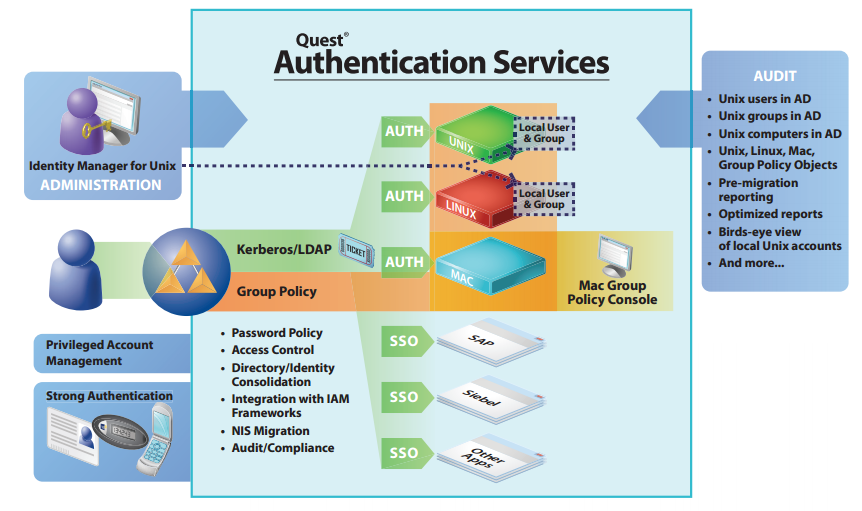
Active Directory is arguably the most prevalent Network Directory Service on the planet. It has matured significantly over the past 20 some odd years, and provides a more robust and secure Enterprise Directory Service than NIS or raw LDAP.
AD facilitates management of host devices as well as user and service accounts on them. An Active Directory Domain controller can provide DNS/DHCP and NTP time services with simple intuitive GUI interfaces. Business Continuity or Disaster Recovery are inherent in it's redundant replication design. It is extensible, and more importantly had strong provisions for auditing and logging. Active Directory Group Policy management is fully supported for both UNIX hosts and users in most commercial integration suites.
For the past dozen years or so, I have been watching the various vendors in the UNIX space that provide Active Directory integration, and they have all come a long way. They have all taken the burden out of what used to be a very painful, full day exercise, to enroll a UNIX server into AD. They have also made it relatively easy to synchronize users in the UNIX system with their associated Active Directory accounts.
Today, the process of enrolling a UNIX server into Active Directory is as easy as finding the UNIX host in the Management console of your favorite tool (I'll get into the players in this space shortly), validating that the ssh is installed on the HOST, and that you have enough privilege to install the kerberos authentication module, and that the HOST can reach the directory service through the standard MS AD ports.

The easiest way is to associate your users' Windows credentials with their user account in UNIX. This simple, guided process is launched the first time a user authenticates to the UNIX platform after enrollment. They will be asked for their UNIX credentials first, then asked to valide that the Active Directory account provided is accurate. They will then be asked to validate their Active Directory credentials. From this point forward, when that user logs into the UNIX machine, they will be authenticating back to the AD store, and all logon/logoff, and password reset functionality will be provided for by the Enterprise Active Directory.
The next step is migrating your UNIX groups into Active Directory. In a similar process, you can migrate entire UNIX groups over to your Active Directory, or alternately find an existing Security Group within Active Directory and merge the two.
Take advantage of the Infrastructure you already own and manage, while reducing your UNIX Identity and Access Management workload.
Here, in no particular order, are the products that will open this rich world of administration bliss:
Coming soon to your favorite blog (This one of course!) Replace your Windows Domain Controllers with CENTOS/SAMBA4 and never look back!
http://www.interopsystems.com/learningcenter/Native_LDAP_native_Kerberos_and_AD_services.htm
Subscribe to:
Posts (Atom)