Search This Blog

Thursday, 18 July 2013

CDN: Content Delivery Networks in the Context of Security


In Information Security, we very frequently discuss the merits and challenges of Confidentiality and Integrity, but alas, Availability regularly takes the back seat...

 In today's world of Dynamic Web Content, 24/7 uptime requirements, expectations of immediately downloads, and Customers that come to you from anywhere around the world, Content Deliver Networks are fast becoming a commodity service.


 In our Enterprise Reference Architecture, we have all been taught to remove single points of failure.  A High Availability (HA) environment consists of:
  • Duplicate Network Switches with redundancy protocols
  • Duplicate routers with redundancy protocols
  • Duplicate firewalls with Heartbeat
  • Redundant ISP circuits from two different providers
  • redundant power supplies in all critical infrastructure, supplied from...
  • Redundant street power from two separate grids
  • Cluster or HA servers for critical systems such as Corporate Websites 
These are all wonderful in a fair and decent world.... However... 

Where your Company's Image / Brand / Reputation meets your consumers, at your WebServers... there a higher level of risk, and a greater requirement for un-interrupted availability.


Enter the Content Delivery Networks (CDN)

(from http://ikuna.com)

 Content Delivery Networks provide a Geographically Disperse Web Service to replicate the content of your Web Servers, and provide that to your Customers in a highly available mode.
 

Most of the CDN providers use a subscription based approach with initial trial periods to evaluate their services.   Almost all of them provide:


 Introducing a CDN service to front your Critical Corporate websites not only makes sense, but will greatly enhance your Disaster Recovery and Business Continuity programme.


Content Delivery Network Providers:  
(nowhere near a compete list, and with mergers and aquisitions... )


References:


Friday, 12 July 2013

Security Appliances: In-band or out-of-band?


Do we need to place our Security Appliances inline? 


In a typical Corporate DMZ, such as a Public Internet Landing Zone, where private internal network traffic and public Internet traffic meet, you would find several security products or appliances to monitor, log , and manage that transition of data.

Almost all companies employ corporate Firewalls at the very perimeter where your network connects to the Internet.  These would have rules designed to block inbound traffic, except that which is destined to your Web, FTP, or Mail servers, and to only allow outbound traffic that meets your corporate security policy, ie: HTTP/HTTPS, mail, ftp.

Between the firewall  and the internal corporate network (intranet) you may (should!) find any of several Security Appliances to filter, inspect, log, and ultimately pass or block traffic based on it's content, source, destination or type.


Network Intrusion Detection / Prevention systems look for malicious, malformed or erroneous traffic that could impact the security of the network and ultimately corporate data.  Rules are evaluated against the traffic flowing in and outbound to ensure compliance.  Non-compliant traffic can be actively blocked.

Web URL filtering or Content filtering applies a set of rules to validate whether an individual can gain access to a particular site or service on the Internet.  These are typically used on "Code of Conduct" compliance.
  
Botnet / Malware Control Appliances like Damballa or FireEye  inspect traffic source/destination, comparing against known Command and Control networks  and can download and inspect the content of attachments for malicious payload and remove where appropriate.

Data Loss Prevention Infrastructure may inspect the content of traffic passing in and out of the network, and block or quarantine any messages or attachments that are deemed to contain Corporate Sensitive Data.

The question is, how best to inject these appliances into the corporate network to provide the best security coverage without compromising availability. 

There are five primary ways in which Network Traffic can be provided to Analysis or Security tools:


Comparing these is the purpose of this particular discussion.


SPAN or Mirror:
  • SPAN (Switched Port ANalyzer) ports are a feature of virtually every managed switch on the market, ie: they are free.  Most switches have at least two SPAN ports available.
  • A SPAN port is remotely configurable, allowing you to change which physical ports or VLANs on a switch are mirrored to the port being monitored. However, when traffic levels on the network exceed the output capability of the SPAN, because of duplex aggregation, the switch is forced to drop packets. (*see note below)
  • Layer 1 and 2 errors are also not mirrored, and therefore never reach the port being monitored.  Bad or malformed packets are dropped, ie: not monitored.  
  • If all you are doing is monitoring network traffic for compliance, this may do, but for forensics, legal, data loss, Anti-Malware, or Intrusion Prevention, this is not your solution.


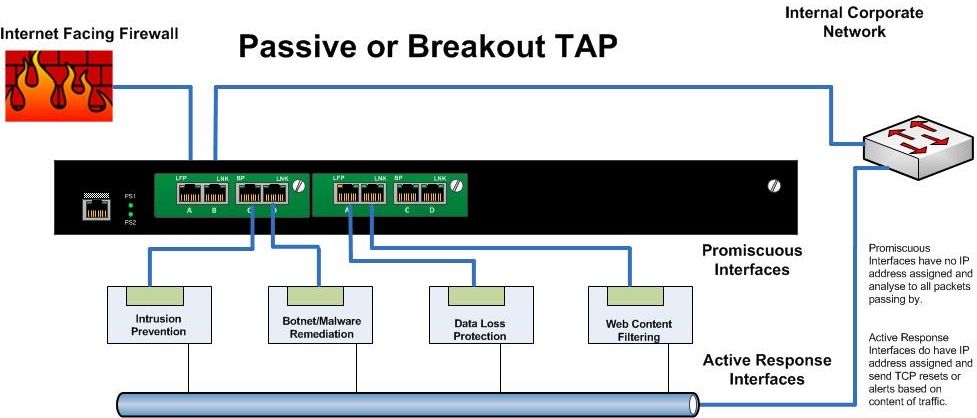
Breakout or Passive TAPs
  • These are the simplest type of TAP (Test Access Point). Typically these would have have four to eight ports. Two for Ethernet in and out and the remainder as "monitoring ports". The network traffic is sent between the input and output ports unimpeded.  The network segment does not “see” the TAP.  At the same time the TAP sends a copy of all the traffic to monitoring ports of the TAP.
  • The problem is that a Breakout TAP does not allow the Security Appliance to directly affect the passing traffic. 
  •  For monitoring purposes, it is fantastic, but if you need to actively manage or block traffic.... this is not your solution.


Daisy Chaining Inline Appliances
  •  An efficient and inexpensive way to allow your security appliances to inspect and make immediate decisions on all traffic.
  • However it comes at the great cost of adding several points of failure in your egress zone.  
  • If any one appliance fails, or stops passing traffic, the entire segment is down. This is typically unacceptable.


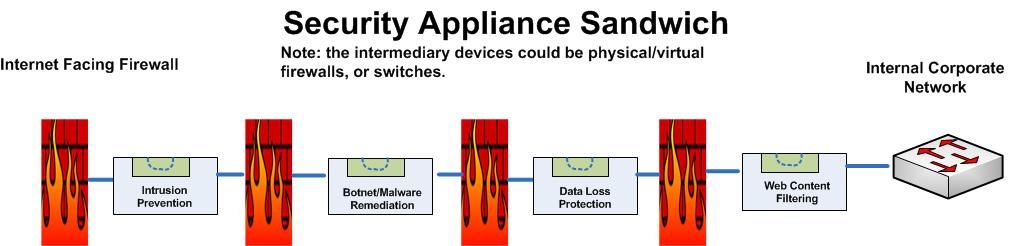
The Appliance Sandwich
  • Otherwise known as a Firewall Sandwich uses other network equipment like firewalls or switches to provide for failover mechanisms between appliances. 
  • This is a very costly method of providing redundancy, and actually adds several points of failure to the design.
  • The firewalls in this approach will want to manage traffic according to their rules rather than providing ALL passing data to the security appliances. This has the high probability of failing to identify malicious traffic.  It's not like malicious code follows rules....


And finally...


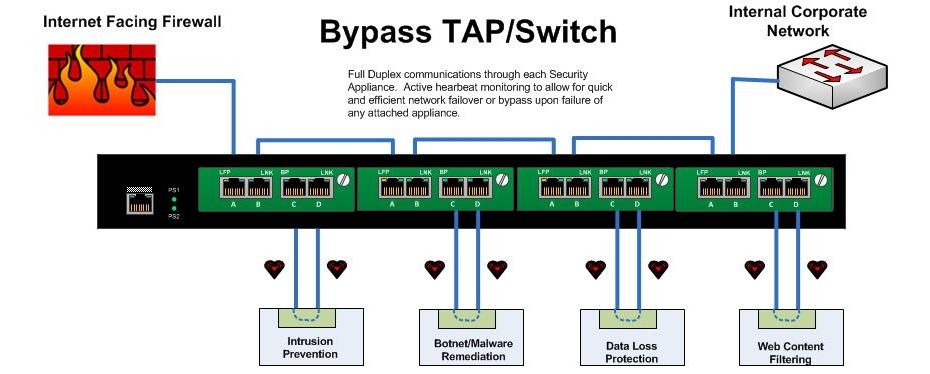
Bypass TAPs
  • A Bypass Tap or Switch will allow you to place Security Appliances into the network while removing the risk of introducing a point of failure. 
  • With a bypass TAP, failure of the inline device, reboots, upgrades, or even removal and replacement of the device can be accomplished without taking down the network. 
  • In applications requiring inline tools, bypass TAPs save time, money and network downtime.
  • In a high availability design, ie: your infrastructure from the switch to the firewall and router, is completely redundant, the bypass unit can be configured to actively manage link states up and downstream to force natural failover and failback upon  appliance failure.
  • The bypass unit can also be configured - as it's name states - to pass traffic beyond the failed appliance un-inspected if that is required. 
  • Failure modes are decided as part of the architecture, and are automatic. The Bypass Switch sends heartbeat packets through each connected appliance, and upon failure to receive the heartbeat through the appliance can opt to bypass that particular appliance or force a failover to the secondary stream.


In short:  
 Terminate your Internet connection in an HA pair of firewalls. Each these firewalls would connect to the upstream corporate switch via a multiport Bypass Switch.   Security/Monitoring/Logging/Forensics/Compliance tools can be inserted into this Bypass switch without loss of network. Any failure of an attached appliance would automatically trigger a natural network failover both up and downstream.


The advantages of TAPs compared to SPAN/mirror ports are:

  • TAPs do not alter the time relationships of frames – spacing and response times are especially important with RTPs like VoIP and Triple Play analysis including FDX analysis.
  • TAPs do not introduce any additional jitter or distortion nor do they groom the flow, which is very important in all real-time flows like VoIP/video analysis.
  • VLAN tags are not normally passed through the SPAN port so this can lead to false issues detected and difficulty in finding VLAN issues.
  • TAPs do not groom data nor filter out physical layer errored packets.
  • Short or large frames are not filtered/dropped.
  • Bad CRC frames are not filtered.
  • TAPs do not drop packets regardless of the bandwidth.
  • TAPs are not addressable network devices and therefore cannot be hacked.
  • TAPs have no setups or command line issues so getting all the data is assured and saves users time.
  • TAPs are completely passive and do not cause any distortion even on FDX and full bandwidth networks.
  • TAPs do not care if the traffic is IPv4 or IPv6; it passes all traffic through.


From Cisco’s own White Paper – On SPAN port usability and using the SPAN port for LAN analysis
Cisco warns that “the switch treats SPAN data with a lower priority than regular port-to-port data.” In other words, if any resource under load must choose between passing normal traffic and SPAN data, the SPAN loses and the mirrored frames are arbitrarily discarded. This rule applies to preserving network traffic in any situation. For instance, when transporting remote SPAN (RSPAN) traffic through an Inter Switch Link (ISL), which shares the ISL bandwidth with regular network traffic, the network traffic takes priority. If there is not enough capacity for the remote SPAN traffic, the switch drops it. Knowing that the SPAN port arbitrarily drops traffic under specific load conditions, what strategy should users adopt so as not to miss frames? According to Cisco, “the best strategy is to make decisions based on the traffic levels of the configuration and when in doubt to use the SPAN port only for relatively low-throughput situations.”

Resources:

NetworkWorld: Security appliances should be in-line rather than out of band
NetworkInstruments: Tap vs SPAN port
http://www.lovemytool.com/blog/2007/08/span-ports-or-t.html
Juniper Networks: Optimize Network Access and Visibility Without Introducing a Point of Failure

http://blog.anuesystems.com/tag/lovemytool/
CISCO: Using the Cisco Span Port for San Analysis
CISCO: Catalyst Switched Port Analyzer (SPAN) Configuration Example
Benefits and Limitations of SPAN Ports
IXIA: To SPAN or to TAP - That is the question
NetworkInstruments: Analyzing Full-Duplex Networks
WikiPedia: Network Tap
SANS: Egress Filtering For a Better Internet
Net Optics, Inc. Introduces iBypass for Fail-Safe IPS Security Deployments
Overcoming Challenges with SPAN and TAP limitations
Active Internet Traffic Filtering: Real-Time Response to Denial-of-Service Attacks
Hardware tap vs port mirroring - Any limitations?
Has Your Network Outgrown SPAN Ports?
Load Balancing 101: Firewall Sandwiches
Your Firewall Sandwich Gives Me Indigestion
Sandwich Mode Insanity Reaches New Levels of Breakage
Security Best Practices
Public DMZ network architecture
proceranetworks.com: Carrier-grade, hardware-based bypass solution
IBM: 10 Gb Network_Active_Bypass
IBM pfd: 10GB Network Active Bypass Unit overview
Detailed Modes of Proventia Network Active Bypass
Intelligent Bypass switches


The Players in this Space:

GarlandTechnology ( http://www.garlandtechnology.com )
Network Critical  ( http://www.networkcritical.com ) 
Gigamon ( http://www.gigamon.com )  
Net Optics ( http://www.netoptics.com )
DATACOM ( http://www.datacomsystems.com )
Network Instruments ( http://networkinstruments.com )
Silicom-USA  (http://www.silicom-usa.com)
Procera Networks ( http://www.proceranetworks.com )
Net Equalizer (http://www.netequalizer.com )
IBM Proventia ( http://www-03.ibm.com/software/products/us/en/network-active-bypass/)


Saturday, 13 April 2013

Comparing Cloud Enterprise SSO

There are a few very strong players currently in the Enterprise Single Sign On practice:  And there are some Up and Comers...

If you want a maintenance free - Five-9s solution, where the Identity Service Provider has a strong relationship with an array of the Current Cloud  Service Providers, and you need to empower your end users from ANY device anywhere in the world, and you still have legacy applications that you want to leverage, then I highly recommend that you stay with The Strong Players:

If you are a small to medium sized shop, geographically localized, have a handful of cloud services on your roadmap, have a relatively homogenous platform requirements (ie: you are a Windows only shop),  then the Up and Comers category may suit the bill:

Finally, if you have a strong development team, you run all of your own infrastructure, you have not made a commitment to Cloud Server Providers, but do have a few services that you need access to, then you might want to look at the Build Your Own Federation Toolsets. 

Microsoft has gone to great lengths to make ADFS look like a Single Sign On strategy, but again, unless you want to build everything yourself, and base it on an existing Active Directory, this is simply a toolset.  For any useful integration with Non-Microsoft infrastructure such as simple LDAP (any ldap provider but Microsoft), you need to provide 3rd party connectors.


As far as a holistic view of Cloud based Authentication and Security, only Okta and Symantec O3 seem to have thought through the endpoint connectivity issues.  Both provide the ability to proxy authenticated traffic  to your corporate backend without the requirement for traditional VPN clients. Regardless of the endpoint device (corporate or personal, laptop or tablet...) they still conduct granular NAC validation to provide an application view, specific to your credentials and the device/location you are coming from.


The Strong Players: (in their own words)

Okta
Okta is an enterprise grade identity management service, built from the ground up in the cloud and delivered with an unwavering focus on customer success.
With Okta IT can manage access across any application, person or device. Whether the people are employees, partners or customers or the applications are in the cloud, on premises or on a mobile device, Okta helps IT become more secure, make people more productive, and maintain compliance.
The Okta service provides directory services, single sign-on, strong authentication, provisioning, workflow, and built in reporting. It runs in the cloud on a secure, reliable, extensively audited platform and integrates deeply with on premises applications, directories, and identity management systems.


Aveksa
Taking a business-driven, rather than an IT-driven approach to identity and access management (IAM) fundamentally changes how organizations approach their IAM challenges, and dramatically improves the value they can obtain.

Specifically, with business-driven identity and access management solutions, companies can empower the business owners to take ownership of identity and access control, provide consistent, full business context across Identity and Access Management systems, connect to the full set of key applications and data resources, and significantly lower the total cost of ownership while scaling to modern enterprise environments.

Symantec O3
Symantec O3 is a unique cloud security platform that provides single sign-on and enforces access control policies across web applications. Symantec O3 helps enterprises migrate to Software as a Service (SaaS) applications while ensuring that proper risk management and compliance measures are in place to protect enterprise data and follow regulations.

Symantec O3 improves security without getting in the way of usability. With Symantec O3, end users only have to login once, across all of their web applications. It works equally well for both cloud-based and internal web application use cases.

In short, O3 enables enterprise IT to embrace the cloud while retaining visibility and control – simplifying the use of cloud applications for both enterprise IT staff and for users.
Ping Identity
Multiservice, Standalone Identity Bridge Accommodating the most diverse and advanced enterprise use cases, PingFederate enables outbound and inbound solutions for single sign-on, federated identity management, mobile identity security, API security and social identity integration. Tier 1 SSO extends employee, customer and partner identities across domains without passwords, using only standard identity protocols (SAML, WS-Fed, OpenID).
Extending PingFederate
PingOne Identity as a Service PingFederate can be deployed standalone or in conjunction with PingOne Cloud Access Services for faster and more flexible employee access to SaaS applications. Eliminate passwords in the Cloud by recommending PingOne Application Provider Services for SAML-enabled applications in minutes.
Integrations Easily integrates with over 80 existing enterprise and cloud technologies including portals, web access management systems, strong authentication systems, Web application environments, custom applications, cloud identity providers and SaaS applications, eliminating lengthy integration projects and meeting tight deadlines.

Simplified
  Symplified is a comprehensive cloud identity solution that enables IT and security organizations to simplify user access to applications, regain visibility and control over usage and meet security and compliance requirements.
Single Sign-OnSymplified’s Single Sign-On seamlessly and securely connects your users to applications, whether the apps are in the cloud or behind the firewall.
Employees, partners, and customers expect easy and secure access to the business applications they use on a daily basis. Symplified significantly enhances security and control for your business while providing a better user experience for your employees, thereby improving productivity and reducing help desk requests associated with multiple user accounts.
And because of Symplified’s unique architecture, you can seamlessly bridge your on premise infrastructure and applications to the cloud without the need to manage multiple systems or risk replicating sensitive user information outside your control.
The Up and Comers: (in their own words)

Centrify SSO for SaaS
Centrify's industry-standard solution delivers a single, unified architecture for sign-on.
  • For SaaS apps, Centrify addresses these challenges with true single sign-on directly to Active Directory. A cloud service facilitates secure single sign-on and controls access through a security token service, which authenticates users to the portal with Kerberos, SAML, or an Active Directory username/password; then automates logins through a one-click interface when users select from their list of authorized SaaS applications.
  • For on-premise apps, native authentication modules plug seamlessly into the underlying Centrify Agent on the managed application host systems, eliminating the need for separate authentication servers, providing single sign-on for SAP NetWeaver, Java and web applications and databases such as DB2.

Sailpoint AccessIQ

SailPoint AccessIQ delivers the convenient access to cloud, web and mobile applications that business users want, along with the controls that IT needs to minimize risk. It empowers users with an intuitive App Launchpad for one-click, single sign-on (SSO) to cloud and web applications from any device – at work, home or on the go with mobile devices. And it provides IT with the visibility and controls required to apply security policy, detect violations and ensure regulatory compliance. Application visibility also helps business units control monthly subscription expenses by promptly deprovisioning unused or unauthorized cloud application accounts.
EmpowerID
Corporate to Cloud Single Sign-on
EmpowerID SSO Manager is a Cloud Single Sign-On and Identity Federation platform that supports all of the standard identity protocols - SAML, OpenID, WS-Trust, WS-Federation, and OAuth.
SSO Manager enables employees, consumers, customers, and partners to access cloud and corporate applications using a single username and password. Federated SSO allows users who are authenticated against one directory to access additional applications and services without re-authenticating when a trust relationship has been established.

 Intel Cloud SSO
 Intel Cloud SSO is an identity as a service (IDaaS) outsourced solution that removes the complexity and burden of maintaining your own identity infrastructure for user to cloud access.
By leveraging a solution backed by three trusted providers-Intel, McAfee, and Salesforce, you gain assurance that your user's cloud identity is enterprise class secure. Gone are the days of insecure password based log-ins, expense help desk password resets, and IT managed cloud provider integrations for SSO.
Intel Cloud SSO is designed for fast, simple deployment by Salesforce or IT administrators that are not security or identity experts. By partnering with Salesforce to deploy on Force.com, we take advantage of native platform capabilities that make configuration a breeze and deliver ready connectivity to hundreds of popular cloud applications.


The Build Your Own Federation Toolsets: (in their own words)

Microsoft ADFS  ( a tool in the Windows Identity Foundation)
Microsoft Active Directory Federation Services 2.0 (AD FS) helps IT professionals efficiently deploy and manage new applications by
  • Reducing custom implementation work
  • Helping establish a consistent security model
  • Facilitating seamless collaboration between organizations with automated federation tools
AD FS 2.0 includes built-in interoperability via open industry standards and claims, and implements the industry Identity Metasystem vision for open and interoperable identity.

 Quest ESSO 
 Enterprise Single Sign-on is the industry’s leading enterprise single sign-on (SSO) solution, basing application and system user logins on existing Active Directory identities. It requires no hard-to-manage infrastructure and streamlines both end-user management and enterprise-wide administration of single sign-on.

SecureAuth
Set Up Unified Single Sign-On (SSO) for Web, Cloud and VPN Resources with SecureAuth Identity Provider™ (IdP)
Now you can minimize the number of passwords your users have to remember by providing a single logon to all on-premise web and cloud-based applications without APIs or application modifications. SecureAuth IdP abstracts user data from your native directory so multiple applications can be securely accessed simultaneously using the same credentials.
When two-factor authentication is required, you can easily add this feature to the SSO experience and the same credentials will be used to support web, cloud and VPN resources. With SSO from SecureAuth IdP, your users don’t have to juggle multiple credential sets and administrators aren’t flooded with calls to reset forgotten passwords.

FreeIPA
FreeIPA is an integrated Identity and Authentication solution for Linux/UNIX networked environments. A FreeIPA server provides centralized authentication, authorization and account information by storing data about user, groups, hosts and other objects necessary to manage the security aspects of a network of computers.

  • FreeIPA is built on top of well known Open Source components and standard protocols with a very strong focus on ease of management and automation of installation and configuration tasks.
  • Multiple FreeIPA servers can easily be configured in a FreeIPA Domain in order to provide redundancy and scalability. The 389 Directory Server is the main data store and provides a full multi-master LDAPv3 directory infrastructure. Single-Sign-on authentication is provided via the MIT Kerberos KDC.
  • Authentication capabilities are augmented by an integrated Certificate Authority based on the Dogtag project. Optionally Domain Names can be managed using the integrated ISC Bind server.
  • Security aspects related to access control, delegation of administration tasks and other network administration tasks can be fully centralized and managed via the Web UI or the ipa Command Line tool.
  • Authentication Protocols (Claims Providers) available "Out-of-the-Box"
    SAML 1.1 SAML 2.0 LDAP RDBMS Oauth OTP/CERT OpenID WS-Fed PAM Kerberos Custom
    Okta Yes Yes Yes Yes Yes Yes Yes Yes Yes Yes Yes
    Aveksa Yes Yes Yes Yes Yes Yes Yes
    Symantec O3 Yes Yes Yes Yes Yes Yes Yes Yes Yes Yes Yes
    Ping Identity Yes Yes Yes Yes Yes Yes Yes
    Simplified Yes Yes Yes Yes Yes Yes Yes
    Centrify SSO Yes Yes Yes Yes Yes Yes Yes Yes Yes
    Sailpoint AccessIQ Yes Yes Yes Yes Yes Yes Yes
    EmpowerID Yes Yes Yes Yes Yes Yes Yes
    IntelCloud SSO Yes Yes Yes Yes Yes Yes Yes
    MS ADFS Yes Yes Yes Yes
    Quest ESSO Yes Yes Yes Yes Yes Yes Yes Yes
    SecureAuth Yes Yes Yes Yes Yes Yes Yes
    FreeIPA Yes Yes Yes Yes Yes Yes Yes Yes


    Usability Features available "Out-of-the-Box"
    Provi
    sioning
    Deprovi
    sioning
    User Import Self Service Pwd Mgmt Logical Views Attestation Workflow Audit Trail Compliance Rpts
    Okta Yes Yes Yes Yes Yes Yes Yes Yes Yes Yes
    Aveksa Yes Yes Yes Yes Yes Yes Yes Yes Yes Yes
    Symantec O3 Yes Yes Yes Yes Yes Yes Yes Yes Yes Yes
    Ping Identity Yes Yes Yes Yes Yes Yes Yes
    Simplified Yes Yes Yes Yes Yes Yes
    Centrify SSO Yes Yes Yes Yes Yes Yes
    Sailpoint AccessIQ Yes Yes Yes Yes Yes Yes Yes Yes
    EmpowerID Yes Yes Yes Yes Yes Yes Yes
    IntelCloud SSO Yes Yes Yes Yes Yes Yes
    MS ADFS Yes Yes
    Quest ESSO Yes Yes Yes Yes Yes Yes Yes
    SecureAuth Yes Yes Yes Yes Yes Yes
    FreeIPA Yes Yes Yes Yes Yes

    Security Functionality "Out-of-the-Box"
    Provides Secure Gateway Leverages existing IDM Infrastructure Can use separate Data Store per Application Device Aware for Mobile Access Control Provides "Sandbox" for iOS devices Cloud Apps
     "out-of-the-box" 
    Customizable
    Okta Yes Yes Yes Yes "hundreds" Yes
    Aveksa Yes Yes "dozens" Yes
    Symantec O3 Yes Yes Yes Yes Yes "hundreds" Yes
    Ping Identity Yes 10-12 Yes
    Simplified Yes 4-5 Yes
    Centrify SSO Yes 4-5 Yes
    Sailpoint AccessIQ Yes 4-5 Yes
    EmpowerID Yes 4-5 Yes
    IntelCloud SSO Yes 4-5 Yes
    MS ADFS Yes 0 Yes
    Quest ESSO Yes 0 Yes
    SecureAuth Yes 0 Yes
    FreeIPA Yes 0 Yes


    Reference Material:
    SAML 101 (Ping Identity)
    Comparing Centrify for SaaS with Centrify Express for SaaS
    Cloud single sign-on adds convenience, but does it sacrifice security?
    ADFS: A Four-Letter Word to Avoid in the Enterprise.
    Okta_Whitepaper_Avoid_Hidden_Costs_of_ADFS.pdf
    http://technet.microsoft.com/en-us/library/adfs2-step-by-step-guides(v=ws.10).aspx
    http://msdn.microsoft.com/en-ca/security/aa570351.aspx
    http://msdn.microsoft.com/en-us/magazine/ee335705.aspx
    http://msdn.microsoft.com/en-ca/evalcenter/dd440951.aspx
    http://msdn.microsoft.com/en-us/library/ee895358.aspx
    How to add AD CLAIMS Provider Trust to an ADFS Service
    http://www.darkreading.com/identity-and-access-management/167901114/security/news/240145977/single-sign-on-mythbusting.html
    https://www.oasis-open.org/committees/tc_home.php?wg_abbrev=security
    http://www.msptoday.com/topics/msp-today/articles/323201-aveksa-adds-sso-capabilities-cloud-identity-access-management.htm
    http://www.secureauth.com/identity-governance/single-signon/
    https://docs.fedoraproject.org/en-US/Fedora/17/html/FreeIPA_Guide/index.html
    http://www.okta.com/resources/whitepaper-forrester-wave-IAM.html (requires free registration)
    http://offers.symplified.com/rs/symplified/images/The_Forrester_Wave_Enterp.pdf
    http://en.wikipedia.org/wiki/List_of_single_sign-on_implementations
    Microsoft Technet: Setting Up Reverse Proxy Servers
    Symantec O3™ A New Control Point for the Cloud
    Symantec O3: Mobile Data Container App for iOS devices
    Symantec O3: How to Provide Secure Single Sign-On and Identity-Based Access Control for Cloud Applications
    Okta: Thousands of Apps 100% Pre-Integrated
    Okta: Building a Well Managed Cloud Application
    Aveksa: Darkreading: Aveksa Adds Authentication And Single Sign-On To Cloud-Based Identity And Access Management Platform
    Ping Identity: SSO Solutions for Cloud Applications
    https://www.pingone.com/
    http://www.scmagazine.com/ping-identity/article/247815/
    Centrify: Single Sign-On for SaaS and Apps
    Centrify: Single Sign-On for Mobile Apps
    Centrify: Secure, Centralized Active Directory-Based Single Sign-On for Web Applications
    Quest: Ideal Single Sign-on for Your Entire Enterprise
    Quest: Enterprise Single Sign-On The Holy Grail of Computing
    EmpowerID: Group Self-Service, Admin, and Dynamic Membership
    EmpowerID: Corporate to Cloud Single Sign-on
    IntelCloud: SSO
    IntelCloud: How Intel Cloud SSO Works
    SecureAuth: SecureAuth Enables a Single Sign-On Solution for Enterprises