Search This Blog

Showing posts with label data breach. Show all posts

Monday, 7 July 2014

FTP, SFTP, FTPS? What's the difference, and how the !@#$ do I secure them?

File Transfer (FTP) may be the single most insecure piece of infrastructure that any corporation has.  It's roots date back to the early 70's before encryption and transport security were of great concern. 

Many common malware attacks rely on unsecured FTP services within a company to stage and exfiltrate sensitive corporate data to unknown third parties.


There is little excuse for a company to be running vanilla FTP either inside their data center or especially over the Internet.  Secure file transfer protocols and standards have been around and fully supported SINCE THE TURN OF THE CENTURY!!!
 From the Tibco report: Understanding the Impact an FTP Data Breach Can Have on Your Business
"...what about the threat information contained on an unsecured
FTP server could pose to a business like yours? Consider a few other recent FTP
exposures:
  • CardSystems, who processed credit card transactions for nearly 120,000 merchants totaling more than $18 billion annually, were essentially forced out of business after 40 million identities were exposed. Amex and Visa told CardSystems that they would no longer do business with the company.
  • 54,000 records were stolen from Newcastle City Council
  • An unsecured document was exposed on the New Mexico Administrative Office of the Courts FTP server; it contained names, birth dates, SSNs, home addresses and other personal information of judicial branch employees.
  • The Hacker Webzine reports that Fox News had an exposed FTP connection linking out to Ziff Davis.
  • The personal information of uniformed service members and their family members were exposed on an FTP server while being processed by major Department of Defense (DoD) contractor SAIC. As many as 867,000 individuals may have been affected."

 
Lets take a minute to discuss the legacy FTP system, it's derivative FTPS, and the completely different SFTP.

FTP  (Do not use this EVER!)
The FTP (File Transfer Protocol) protocol was documented in 1971 as  RFC 114 and eventually evolved into RFC 959 , the FTP standard that all systems use today. It has been the workhorse of most corporate file transfer systems in production.

All current Server Operating Systems, whether Windows, Unix, Linux, MAC, or Mainframe come with a variant of an FTP service following RFC 959.
There are VERY many FTP client applications available for each and every Desktop, Laptop, Tablet and smartphone in existence, also complaint with RFC 959.    
(Did I mention that there is no reason in this day and age to use vanilla FTP, EVER?)

FTPS
Once companies and security consultants  realized the great risk that FTP exhibits by sending corporate data "in the clear" over the network, they proposed RFC 2228 (in 1997) to protect FTP data in transit using SSL encryption.  Aside from transport encryption the service is identical to FTP.  

FTPS transport encryption comes in two flavors Implicit, and ExplicitImplicit FTPS (Now pretty much obsolete) establishes an SSL or TLS session prior to exchanging data, over TCP ports 989(data)/990(control).  Explicit FTPS, the more common of the two, can use a single port for both encrypted and unencrypted data transfer.  The client initially establishes an unencrypted session, and if SSL/TLS is required, an AUTH TLS or AUTH SSL command is issued by the client to secure the control channel before sending credentials.

And then there's....

SFTP
Although regularly  confused with FTPS, SFTP is actually an application in the  SSH  protocol suite.  RFC4253 "The Secure Shell (SSH) Transport Layer Protocol"  defines the security model of this Secure File Transfer Protocol.   Whereas FTPS relies on SSL (X.509) Certificates with their associated PKI requirements to secure the session, SFTP uses Diffie-Hellman Key Exchange to manage an asymmetric pair of keys to secure the session. All UNIX based systems (Including MAC, Linux, and Mainframe) come with SSH preinstalled.   There are many variants available for Windows as well.


Both SFTP and FTPS are fully scriptable (ie: support automation). Either one is acceptable, depending on the application, and Operating System at hand.

Up to this point, we've discussed securing the Data Transport, or "Data in Motion", but what about securing the "Data at Rest"?  How do we secure the file transfer directory structure?

In simplest terms, strong user/group access controls are required on FTP service directory structure.  I'm going to link to some vendor recommendation sites here:

Disable Anonymous FTP!  Sorry, but you should know who is connecting to your file server.


But, for the best level of security
run SFTP (ok, even FTPS) inside a chroot jail or sandbox

In the UNIX world (Including MAC, Linux, Mainframe), a chroot is a virtual filesystem that can be associated with a specific service, in this case SFTP.  A new protected replica of the OS folders and files relevant to running that service are created, and all files uploaded/downloaded via this service reside inside the protection of the "jail"

In Windows, the practice is typically called "Sandboxing" or Application Virtualization:
    (excerpt from Microsoft: Transform applications into managed services )
"In a physical environment, every application depends on its OS for a range of services, including memory allocation, device drivers, and much more. Incompatibilities between an application and its operating system can be addressed by either server virtualization or presentation virtualization; but for incompatibilities between two applications installed on the same instance of an OS, you need Application Virtualization.  "


And last but CERTAINLY not least:   Scan your network for rogue FTP services (Both Data Center as well as Workstation space) regularly (FREQUENTLY), find them physically, and shut them down!


References:
EITF.ORG: RFC913 - Simple File Transfer Protocol
EITF.ORG: RFC914 - A File Transfer Protocol
EITF.ORG: RFC959 - FILE TRANSFER PROTOCOL (FTP)
EITF.ORG: RFC2228 - FTP Security Extensions
IETF.ORG: secsh-filexfer (SFTP)
IETF.ORG: How to Use Anonymous FTP   -- DON'T!

IANA.ORG: Service Name and Transport Protocol Port Number Registry

TIBCO: Understanding the Impact an FTP Data Breach Can Have on Your Business
Understanding Key Differences Between FTP, FTPS and SFTP
SFTP versus FTPS – What is the best protocol for secure FTP? 
What’s the Difference? FTP, SFTP, and FTP/S 
Filezilla: SFTP specifications
http://winscp.net/eng/docs/ftps 
Using FTP? Know the Risks
wikipedia.org: Public key infrastructure 
SANS: Clear Text Password Risk Assessment Documentation
SFTP chroot 
https://wiki.archlinux.org/index.php/Change_Root
http://www.unixwiz.net/techtips/chroot-practices.html 
Oracle: Configuring and Using Chroot Jails
Winquota: Winjail 
Microsoft: Application Virtualization 


Friday, 15 February 2013

Manage Security Where the Data Resides

NERD ALERT:  This particular blog is a technical discussion rather than executive roadmapping.  That said, I still look forward to any comments from the Pointy Haired Bosses.
As I've ranted... er... discussed in my previous blogs;  we, as an industry, have spent the past two decades building logical security controls at the perimeter where our corporate network interfaces with either the Internet or Business Parner networks.
This model, although supported and backed by our friends in Risk/Compliance/Audit, assumes that everything inside those pearly gates is protected. 

This is a risk statement that you cannot accept. 
  With today's move to virtualization, convergence of Data Center and Cloud Services, and a greater ability for Business Units to outsource/offshore development and hosting of critical applications, the line between Inside and Outside of your perimeter is vanishing.
Additional threats facing us daily include un-patched and legacy systems, zero-day malware attacks, advanced persistent threats, malicious insider breaches, as well as administrator human error.
According to the 2012 Verizon Data Breach Investigations Report , and contrary to popular belief, 94% of all data compromised involved servers.

Moving forward, we must assunme that our internal network has already been compromised, or at minimum is quite vulnerable, and that to protect the corporate data assets, we must move our security controls as close as we can to that data.
  
This not as onerous a task as it sounds.  There are many good vendors in this space already, and the field has matured significatly over the past five years.  All commercial solutions are centrally managed, come with a library of out-of-the-box templates, integrate seamlessly with your logging/reporting systems and provide for flexible workflow.
 Before we discuss the players and what they bring to the table, lets talk about what we need to do, and how it can be achieved.
  1. Prevent Unauthorized Access to critical assets.
  2. Prevent Unauthorized  Changes to critical assets even for those with legitimate access.
  3. Protect against Zero-Day Malware attacks.
To achieve this you need to have something that manages local security policies across all servers that can provide:
Note: This discussion is completely agnostic to whether a server is physical or virtual. The requirements are identical.

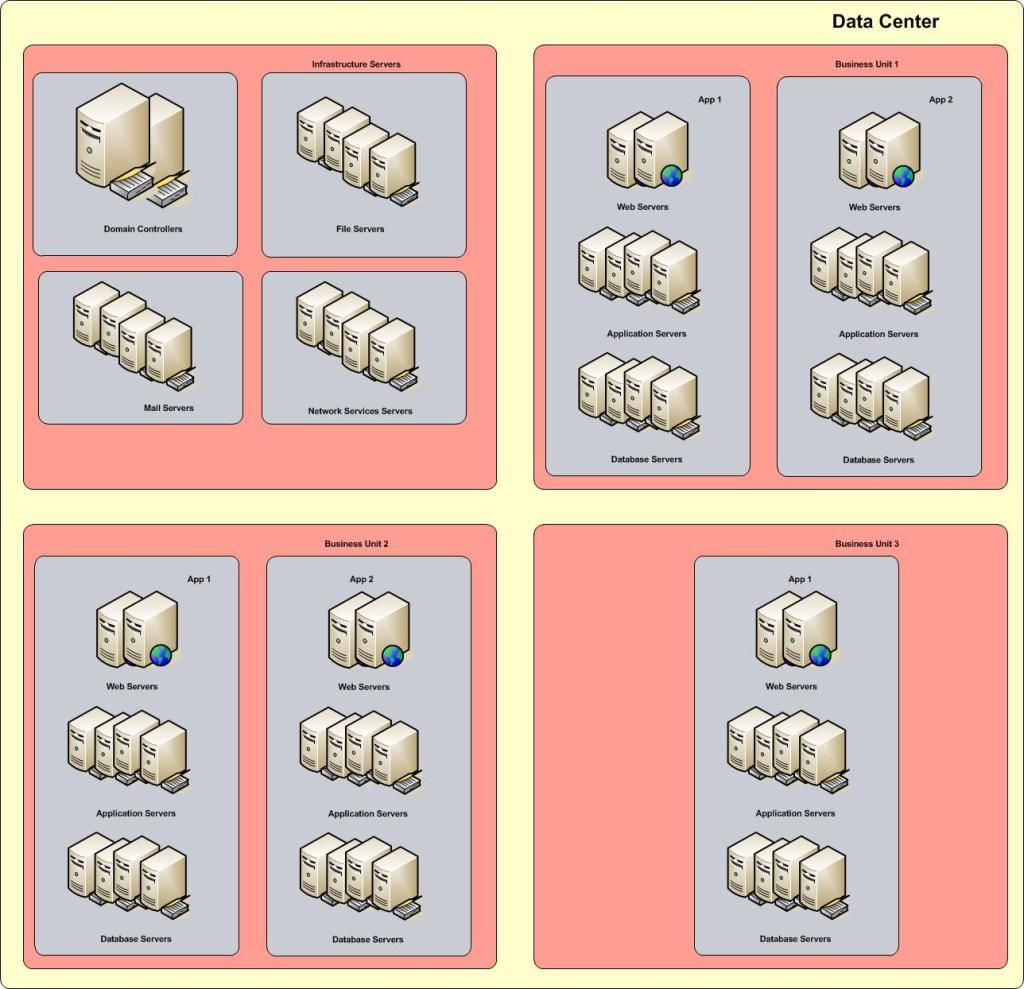
To start, create specific server "roles".  A server role, defines it's function or purpose within your network. A role does not have to be OS specific - Windows/UNIX/Linux all provide for every role in the stack.

 Any particular server could be an Authentication Server such as an Active Directory Domain Controller.  It could be an Infrastructure Server, such as mail, ftp, or DNS.  It could be a Database or File Server.  It could be An Application or Web Server.  

Typically, you will find that any one server may host several roles.  In any case,  you will want to create and apply a consistent Policy Template that will define the protection model for each role. In the template, you would identify resources to protect, such as directories, files, registry keys that are used to configure, maintain, and operate that application. (All commercial products in this space provide hundreds of such templates "out-of-the-box")

Once you have identified the roles, you will want to group your server assets into units, possibly by Line of Business (My line of business depends on these servers), or by Application (this application uses these web servers, these app servers, and this database server), or both.  This way, you can create policies establishing the allowed channels of communication.
 (App1 webservers can only talk to App1 application servers on tcp ports 80 and 443, and App1 application servers can only talk to App1 database servers on tcp port 1433)


Any attempt at communication outside of these rules would be prevented/denied, and result in alerts sent to the appropriate security focal through any of a number of channels (email, snmp, SMS...). 
By putting the security policies locally on the servers, close to the data, you significatly reduce the potential for data exfiltration.  That said, this is not a Data Loss Prevention solution unto it's own, as it is not aware of the context of the data it is protecting, but can provide valuable feeds into your DLP infrastructure.


Of course this would not be complete without talking about the basics of creating a hardened server in the first place.  
  • Patch, patch, and patch....
  • Disable/remove/rename default administrator accounts - at the OS, Application, and Database layer
  • Turn off / Disable / Uninstall all services not required for the role of the server
  • Place your Application Server / Database Server files on a separate volume from your OS
  • Where possible, enable logging for everything
  • Consult your vendor for additional recommendations per server role.

Examples of like Server Roles:  (Apologies if I left out your personal favorite!)
Authentication and Directory Services Servers:  
Infrastructure Services:
File and Database Servers:
Application Servers:
Web Servers:
 So?  Who are the players in this field? 
Symantec Critical System Protection   - To date, Symantec CSP provides the widest coverage for server roles across the most Operating Systems - Both Physical and Virtual.  Their System Protection Console cleanly integrates their Security and Malware product suites into a single pane of glass.
TripWire Enterprise File Integrity Monitor - TripWire has been the industry leader in this space for over a decade, and is perfect for small to medium enterprises.
McAfee File Integrity Monitor - McAfee provides a suite of tools that are well integrated for protecting Windows Based Servers and Databases..
IBM Tivoli Virtual Server Protection - VMware ESX protection suite.

SafeNet Data Protection Suite
NewNetTechnologies NNT
Splunk Change Monitor

Further Reading:
http://www.infosecurity-magazine.com/view/30067/51-of-uk-networks-compromised-by-byod
http://www.novell.com/docrep/2010/03/Log_Event_Mgmt_WP_DrAntonChuvakin_March2010_Single_en.pdf
http://www.acunetix.com/websitesecurity/webserver-security/
http://www.symantec.com/page.jsp?id=protection-center
http://msmvps.com/blogs/ulfbsimonweidner/archive/2007/09/25/protect-objects-from-accidential-deletion-in-windows-server-2008.aspx
http://eval.veritas.com/mktginfo/enterprise/white_papers/ent-whitepaper_protecting_active_directory.pdf
 http://www.sans.org/reading_room/analysts_program/mcafee-server-protection-june-2010.pdf
http://www.newnettechnologies.com/tripwire-alternative.html?gclid=CO3A8cn1uLUCFShgMgodLloAtw

3rd party List of System Integrity Tools:
https://mosaicsecurity.com/categories/83-system-integrity-tools?direction=desc&sort=products.name

Tuesday, 15 January 2013

Data Loss Prevention: A Layered Aproach is Best.

DLP, or Data Loss Prevention is the practise (some say art) of identifying and remediating the loss or leakage of "sensitive data" from the Corporate network.  Sensitive data can be anything that is not classified as "Public Information", from Corporate Financials, to customer Personally Identifiable Information.

Data loss can be through theft, accident, negligence, or ignorance.  There are a ton of articles available on Data Theft. Whether it be disgruntled employees, external hackers, or botnet installation, data is stolen becasue it has value. Period.
According to a 2012 Verison Business report on Data Theft, we see the following:

          WHO IS BEHIND DATA BREACHES?
  • 98%      stemmed from external agents (+6%)
  • 4%        implicated internal employees (-13%)
  • <1%     committed by business partners (<>)
  • 58%     of all data theft tied to activist groups

HOW DO BREACHES OCCUR?
  • 81%     utilized some form of hacking (+31%)
  • 69%     incorporated malware (+20%)
  • 10%     involved physical attacks (-19%)
  • 7%      employed social tactics (-4%)
  • 5%      resulted from privilege misuse (-12%)

 
A good starting point for any Data Loss discussion, is to Assume that you have already been breached, and plan your management and containment strategy.


Lets dispel a bit of fantasy here...
No Data Loss Prevention system on the planet can or will stop all data leakage.  

If that's what they're selling you, turn and run.  The only way to stop all data leakage is to NEVER STORE ANYTHING, and Certainly DO NOT TRANSMIT ANYTHING.   You know...
The only secure computer is one that's unplugged, locked in a safe, and buried 20 feet under the ground in a secret location... and I'm not even too sure about that one.—Dennis Hughes, FBI


All existing DLP solutions use one of two methods to identify sensitive data.  The "Precise" method relies on some type of tagging of the data in question.  Now this can be as easy as "Anything coming from this database",  or "This column in this table", "this field in this record type", "this folder on this share", or "this LUN on the SAN".  

The "Precise" method of DLP will stop data from inappropriately leaving it's known source.  And more sophisticated systems *may* actually have signatures (hash files) of all the data on those known stores to match against data in flight, to ensure a copy of the data doesn't leave.  Neither would stop a legitimate request for the data being screen captured and sent off separately or the data being repackaged in a different format and sent out.

The "Imprecise" method relies on signatures, meta-data, regular expressions, statistical analysis, or heuristics to watch the network egress points and make educated decisions on whether to allow traffic to pass, challenge the sender, or just block the traffic.


Data exists in three states "At Rest", "In Use", and "In Motion":

To implement an appropriate level of Data Loss Protection, you must tackle all aspects of data at rest, in use, and in motion. 

Data At Rest:
Typically data at rest (static data stored or archived on a file share, in a database table, or in an email system, for example) is protected from innapropriate access by Operating System level access controls. This type of control relies on group or role memberships.  You may be given the ability to read a file, read and update, or no access at all.  Most files within a folder share the same permissions, so the permissions folders themselves dictate the level of access per role. 
Additional to this, depending on the type of sensitive data in question, you may want to actually encrypt the data or the container it's stored in. In the case of Corporate Removeable Media, Laptops, or Mobile devices these MUST be encrypted as part of the standard build process.  Laptop theft or loss of a USB Memory stick without such encryption could cause your company considerable reputational, financial or legal damage.

Data in Use:
Data in use, shares much of the same features of data at rest, except that it most commonly refers to dynamic data that is changing frequently, and potentially residing on end point systems as well as in the data center systems.

Data in use can be protected through the use of End Point DLP solutions as well as those controls in place for Data At Rest.

Data in Motion:
Once data has been accessed by a user, and is "sent" somewhere via email, file transfer, uploaded to a website (Cloud Storage) it is considered to be "in motion".

At this point we need to heavility lean on "Perimeter  Data Loss Prevention".  Your perimeter is typically considered the edge of your network, protected by a firewall which connects your network to the Internet. Here, you will typically see data leaving via email, Instant Messaging, ftp, and web transfer.  A perimeter solution must account for these plus any other method that data may leak outside of your network.   There are many strong point solutions out there that tackle one or more of these Perimeter Data Loss vectors by such reputable security providers as Symantec, WebSense, Cisco, Fortinet, McAfee, Sophos, etc...          

So, to sum up quickly:  To reduce your risk of data loss, you must tackle the problem in a layered approach, through Policy and Awareness, at the endpoint devices,  the data center, and on the perimeter. 
  Endpoint Protection: 
Data Center Protection:
 Perimeter Protection:

Finally... Create a Breach Incident Plan.  
Have the necessary tools, policies, training, contacts, and escalation in place, and test it regularly. Make sure that you have engaged Legal, Compliance, Brand, and your Corporate Communications teams and that they all know and can follow the plan. 


Obligatory links:

http://csrc.nist.gov/groups/SNS/rbac/documents/data-loss.pdf
http://www.symantec.com/data-leak-prevention
http://www.rsa.com/products/DLP/ds/11668_RSA_DLP_Cisco_Integration.pdf
http://www.fortinet.com/solutions/data_loss_prevention.html
http://www.mydlp.com/
http://www.ey.com/Publication/vwLUAssets/Keeping_your_sensitive_data_out_of_the_public_domain/$FILE/Data_loss_prevention_Keeping_your_sensitive_data_out_of_the_public_domain.pdf

Friday, 11 January 2013

Standing at the Crossroads: Employee Use of Cloud Storage.

Is Employee Use of Cloud Storage Your Number One Data Loss Vector Today?


Lets all agree that we have entered into a time where our employees are finding it easier to use free Internet based personal Cloud Storage like Box.com or Dropbox.com so that they can use these files in a more mobile world. 

This is not a good Business Risk Scenario at all, but unless you take drastic steps to block the ability to access these sites from within the Company Network, your employees will take the path of least resistance.  It is pretty much a gaurantee that you are currently hemorrhaging potentially sensitive business data and have little or no visibility into this activity.

First things first, lets clarify the difference between "Enterprise Cloud Storage"  and "Personal Cloud Storage" .

Enterprise Cloud Storage is simply an extension of the Corporate Shared Storage Infrastructure outsourced to a Cloud Provider.  It is managed and maintained in a fashion similar to an onsite storage pool.  It can be protected through standard encryption practices.  Provisioning user access and allocating capacity are left in the hands of your IT staff.  Logging and reporting for capacity and compliance management are part of the service.

Personal Cloud Storage however, is "fairly" new market that has evolved over the past couple of years. These Storage providers have made it extremely easy for any end user to sign up and receive an allocation of personal storage anywhere from 5GB to 100GB for free!  To sweeten the pot, they provide both mobile and desktop applications to easily synchronize files/folders/pictures/music/videos between your various dissimilar devices.   Most providers of this type of storage also facilitate sending links via email directly to anyone you wish to share your data with.   Any logging or reporting is on a personal level to the requestor of the account.   Access to this storage is available anywhere in the world and the end user controls the password. 

So?  What can we do?

The first thing is make sure that you have added this scenario to your Information Security Policy. And educate your employees.  "You must not use Personal Cloud Storage for transfering or storing Corporate Information"

Next, implement measures at your perimeter to block access to this type of site.  Typically this would be accomplished in a Content filtering solution such as WebSense or BlueCoat which classify the millions of Internet sites on a regular basis and apply Corporate access rules based on these categories. This works while the end point device is connected through the coprorate network.

Better yet, would be to manage a policy on the endpoint device that restricts access to these sites. At the moment, this is a bit more onerous as you would need to identify and manage a list of known sites and apply these restrictions either through Windows Group Policy  on your browser or local Firewall Policy.  Managing in this way, depending on the size of your company, would increase your company headcount by several bodies.

Or....  Fight fire with fire! 
Use Cloud Services in the form of Cloud based Content filtering to restrict and control your employees access to these sites REGARDLESS of where they are coming from.  A policy enforced on the company managed endpoint devices will restict Internet access of that device except through the Cloud based Gateway.


There are several players in this space:
Finally, if we look at my last Blog, by restricting all end user access through an Authentication Portal, we can provision true Enterprise Cloud storage to the end user, and manage the encryption levels and potential deprovisioning of that storage if and when the time is required.

Next up.... Data Loss Prevention....