(as published in Itworldcanada.ca)
http://www.itworldcanada.com/blog/the-demise-of-excess-access-a-eulogy-for-traditional-vpn/96655
Once upon a time, in a world where mobile meant "laptop" or "remote home PC", Corporate network connectivity came in two flavours: 1) Dial-up modem, with it's clunky protocols and achingly slow speeds, and 2) Corporate VPN client over Internet.
Internet VPN seemed like a godsend in comparison to Dial-up. Basically it's purpose was to provide a secure network connection between your remote PC/Laptop (the entire device) and your Corporate network. Whether old-school IPSec or the more recent SSL encapulation, the transport was secured. Username/password, and optionally a One Time password or Security Token would be used to provide Two Factor Authentication (2fa).
Seems secure? Right? I mean, authentication and transport security are covered.. what else is there?
Dynamic Access Policies were then created to define a set of rules, similar to firewall rules, that describe what applications (port/protocol) on the remote users PC could talk to what servers/services in the data center.
In general, this worked fine if there were less than a hundred employees in the company, you had no third party users, no application was ever upgraded, and nobody changed roles.
In practice, policies are defined loosely to allow for Convenience rather than Security. Realistically, large numbers of PC's have unfettered access to the corporate network, as if they were sitting at their desk. (We'll get into THAT issue in a future blog.)
Well then we started worrying about Viruses, worms, trojans... basically Malware residing on the remote PC. What stops them from propagating into the corporate network? How do we know the end user has applied all the appropriate patches, and is running the most current AntiMalware (And that it's signatures are up to date!)?
Network Access Control was added to the VPN client to assess the endpoint (laptop or PC) and determine it's "security posture" based on patch status and running AntiMalware applications.
But this wasn't enough to satisfy the Audit or Risk departments, so you had to install Intrusion prevention appliances and network anti-malware inside the network to remediate anything that was missed on the endpoint...
AND... we still have all those remote endpoints, with pretty much open access to our entire corporate network...
In the meantime...
As a result of the explosion of Tablets and smart phones, alternate solutions arose for many of the very services we require daily as part of our VPN dependency. An entire industry arose to service BYOD or Bring Your Own Device. Tablets and Smart phones are managed through various means, but typically now applications running on those devices are segregated or "sandboxed" from one another to reduce the risk of eavesdropping and data capture.
The Future of Enterprise Remote Connectivity:
Today, there is absolutely NO REASON to use VPN for your Corporate Email service. All enterprise grade email clients utilize strong local authentication, integrate with industry standard Single Sign On, and use strong transport encryption. Whether you are an Exchange/Outlook or Domino/Notes user, for this use case, VPN is merely a hindrance to productivity, and a complexity that costs your company both in Capex and Opex.
Similarly, there is absolutely NO REASON to use VPN for your Corporate VOIP or Instant messaging. These services also integrate cleanly into Enterprise Single Sign On, and provide for secured, encrypted transport.
If you NEED, and I stress NEED, a corporate desktop, then there are many highly secure NON VPN solutions available, such as Microsoft's Remote Desktop Gateway, Citrix Access Gateway, or VDI via VMWare's Horizon View. Some Legacy Applications may still require this model for a few years to come.
Are you using Cloud Services through VPN? If you are using VPN to get to your corporate Cloud applications like SalesForce, SAP, Concur,ServiceNow, Microsoft Office 365, or Taleo, you are simply adding an extra network loop to an already secured connection. These services already use Enterprise Single Sign On, and provide for secured, encrypted transport.
Containerization technologies like Bromium will transform application development for the laptop environment, and allow Laptops to join the realm of Managed Devices in a Mobile Device Strategy. Soon your Enterprise Mobile Application Management suite will package and manage apps for Windows and OSX as well as iOS, Blackberry and Android.
Write Once, Run Anywhere has been a mantra used by vendors such as Oracle for well over a decade. It is finally approaching a maturity level that will see it in action everywhere. Most large applications today are being developed using frameworks that abstract the presentation layer, and allow the designers to write various "front ends" specific to the device, while the rest of the application is identical across platforms.
So aren't you just replacing one remote access solution with several niche appliances?
In a quick answer, sort of... Service specific appliances, such as SIP gateways provide a much more robust and secure means on managing this specific traffic, and many companies already have them in place for internal branch to branch connectivity.
I'm not suggesting that the future of remote connectivity is free and unfettered access to your Corporate Network. Quite the opposite in fact. I'm suggesting that 2/3 of what employees access today via traditional VPN, already has BETTER and MORE SECURE means of connectivity through their native infrastructure, and that the remaining 1/3 is on track to be replaced with technologies that will allow the remote applications to be secured on any device from phone to tablet to laptop.
In today's world of high profile Data Breaches, Zero Day Attacks, and Significant Operating System vulnerabilities, we cannot allow the Excess Access that traditional VPN affords.
References:
WindowsSecurity.com: Death of VPN
VPN Clients are Dead in the Cloud
The Evolution …. and Death of the VPN
The Death of the VPN
Microsoft Technet: Overview of Remote Desktop Gateway
App Wrapping is A Form of Containerization
Forrester: Containerization Vs. App Wrapping - The Tale Of The Tape
Showing posts with label firewall. Show all posts
Showing posts with label firewall. Show all posts
Saturday, 4 October 2014

Friday, 12 July 2013
Security Appliances: In-band or out-of-band?
Do we need to place our Security Appliances inline?
In a typical Corporate DMZ, such as a Public Internet Landing Zone, where private internal network traffic and public Internet traffic meet, you would find several security products or appliances to monitor, log , and manage that transition of data.
Almost all companies employ corporate Firewalls at the very perimeter where your network connects to the Internet. These would have rules designed to block inbound traffic, except that which is destined to your Web, FTP, or Mail servers, and to only allow outbound traffic that meets your corporate security policy, ie: HTTP/HTTPS, mail, ftp.
Between the firewall and the internal corporate network (intranet) you may (should!) find any of several Security Appliances to filter, inspect, log, and ultimately pass or block traffic based on it's content, source, destination or type.
Network Intrusion Detection / Prevention systems look for malicious, malformed or erroneous traffic that could impact the security of the network and ultimately corporate data. Rules are evaluated against the traffic flowing in and outbound to ensure compliance. Non-compliant traffic can be actively blocked.The question is, how best to inject these appliances into the corporate network to provide the best security coverage without compromising availability.
Web URL filtering or Content filtering applies a set of rules to validate whether an individual can gain access to a particular site or service on the Internet. These are typically used on "Code of Conduct" compliance.
Botnet / Malware Control Appliances like Damballa or FireEye inspect traffic source/destination, comparing against known Command and Control networks and can download and inspect the content of attachments for malicious payload and remove where appropriate.
Data Loss Prevention Infrastructure may inspect the content of traffic passing in and out of the network, and block or quarantine any messages or attachments that are deemed to contain Corporate Sensitive Data.
There are five primary ways in which Network Traffic can be provided to Analysis or Security tools:
- SPAN ports on your Switching Gear,
- Breakout or Passive TAPS,
- Direct inline Daisy-chained Appliances
- Bypass Switches.
- Additional Firewall DMZs (Firewall Sandwich)
Comparing these is the purpose of this particular discussion.
SPAN or Mirror:
- SPAN (Switched Port ANalyzer) ports are a feature of virtually every managed switch on the market, ie: they are free. Most switches have at least two SPAN ports available.
- A SPAN port is remotely configurable, allowing you to change which physical ports or VLANs on a switch are mirrored to the port being monitored. However, when traffic levels on the network exceed the output capability of the SPAN, because of duplex aggregation, the switch is forced to drop packets. (*see note below)
- Layer 1 and 2 errors are also not mirrored, and therefore never reach the port being monitored. Bad or malformed packets are dropped, ie: not monitored.
- If all you are doing is monitoring network traffic for compliance, this may do, but for forensics, legal, data loss, Anti-Malware, or Intrusion Prevention, this is not your solution.
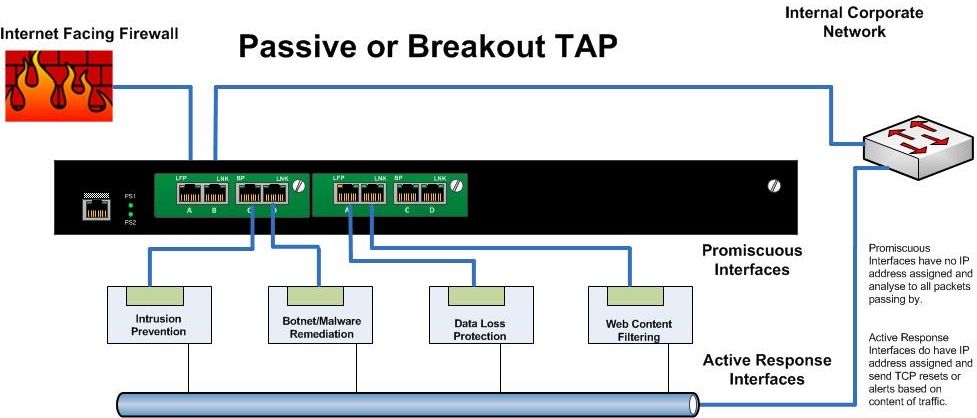
Breakout or Passive TAPs
- These are the simplest type of TAP (Test Access Point). Typically these would have have four to eight ports. Two for Ethernet in and out and the remainder as "monitoring ports". The network traffic is sent between the input and output ports unimpeded. The network segment does not “see” the TAP. At the same time the TAP sends a copy of all the traffic to monitoring ports of the TAP.
- The problem is that a Breakout TAP does not allow the Security Appliance to directly affect the passing traffic.
- For monitoring purposes, it is fantastic, but if you need to actively manage or block traffic.... this is not your solution.
Daisy Chaining Inline Appliances
- An efficient and inexpensive way to allow your security appliances to inspect and make immediate decisions on all traffic.
- However it comes at the great cost of adding several points of failure in your egress zone.
- If any one appliance fails, or stops passing traffic, the entire segment is down. This is typically unacceptable.

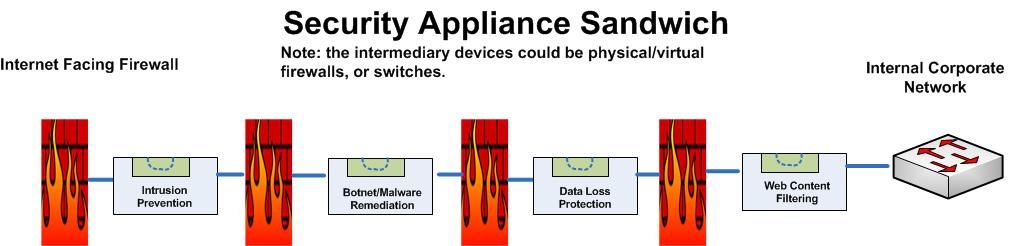
The Appliance Sandwich
- Otherwise known as a Firewall Sandwich uses other network equipment like firewalls or switches to provide for failover mechanisms between appliances.
- This is a very costly method of providing redundancy, and actually adds several points of failure to the design.
- The firewalls in this approach will want to manage traffic according to their rules rather than providing ALL passing data to the security appliances. This has the high probability of failing to identify malicious traffic. It's not like malicious code follows rules....
And finally...
Bypass TAPs
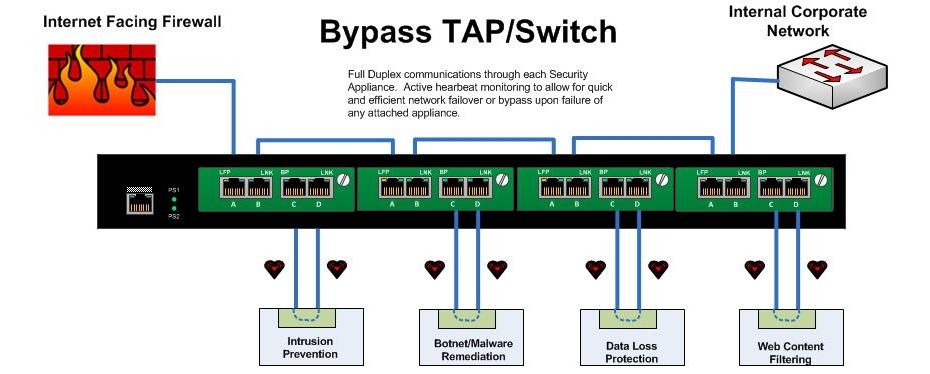
- A Bypass Tap or Switch will allow you to place Security Appliances into the network while removing the risk of introducing a point of failure.
- With a bypass TAP, failure of the inline device, reboots, upgrades, or even removal and replacement of the device can be accomplished without taking down the network.
- In applications requiring inline tools, bypass TAPs save time, money and network downtime.
- In a high availability design, ie: your infrastructure from the switch to the firewall and router, is completely redundant, the bypass unit can be configured to actively manage link states up and downstream to force natural failover and failback upon appliance failure.
- The bypass unit can also be configured - as it's name states - to pass traffic beyond the failed appliance un-inspected if that is required.
- Failure modes are decided as part of the architecture, and are automatic. The Bypass Switch sends heartbeat packets through each connected appliance, and upon failure to receive the heartbeat through the appliance can opt to bypass that particular appliance or force a failover to the secondary stream.
In short:
Terminate your Internet connection in an HA pair of firewalls. Each these firewalls would connect to the upstream corporate switch via a multiport Bypass Switch. Security/Monitoring/Logging/Forensics/Compliance tools can be inserted into this Bypass switch without loss of network. Any failure of an attached appliance would automatically trigger a natural network failover both up and downstream.
The advantages of TAPs compared to SPAN/mirror ports are:
- TAPs do not alter the time relationships of frames – spacing and response times are especially important with RTPs like VoIP and Triple Play analysis including FDX analysis.
- TAPs do not introduce any additional jitter or distortion nor do they groom the flow, which is very important in all real-time flows like VoIP/video analysis.
- VLAN tags are not normally passed through the SPAN port so this can lead to false issues detected and difficulty in finding VLAN issues.
- TAPs do not groom data nor filter out physical layer errored packets.
- Short or large frames are not filtered/dropped.
- Bad CRC frames are not filtered.
- TAPs do not drop packets regardless of the bandwidth.
- TAPs are not addressable network devices and therefore cannot be hacked.
- TAPs have no setups or command line issues so getting all the data is assured and saves users time.
- TAPs are completely passive and do not cause any distortion even on FDX and full bandwidth networks.
- TAPs do not care if the traffic is IPv4 or IPv6; it passes all traffic through.
From Cisco’s own White Paper – On SPAN port usability and using the SPAN port for LAN analysis
Cisco warns that “the switch treats SPAN data with a lower priority than regular port-to-port data.” In other words, if any resource under load must choose between passing normal traffic and SPAN data, the SPAN loses and the mirrored frames are arbitrarily discarded. This rule applies to preserving network traffic in any situation. For instance, when transporting remote SPAN (RSPAN) traffic through an Inter Switch Link (ISL), which shares the ISL bandwidth with regular network traffic, the network traffic takes priority. If there is not enough capacity for the remote SPAN traffic, the switch drops it. Knowing that the SPAN port arbitrarily drops traffic under specific load conditions, what strategy should users adopt so as not to miss frames? According to Cisco, “the best strategy is to make decisions based on the traffic levels of the configuration and when in doubt to use the SPAN port only for relatively low-throughput situations.”
Resources:
NetworkWorld: Security appliances should be in-line rather than out of band
NetworkInstruments: Tap vs SPAN port
http://www.lovemytool.com/blog/2007/08/span-ports-or-t.html
Juniper Networks: Optimize Network Access and Visibility Without Introducing a Point of Failure
http://blog.anuesystems.com/tag/lovemytool/
CISCO: Using the Cisco Span Port for San Analysis
CISCO: Catalyst Switched Port Analyzer (SPAN) Configuration Example
Benefits and Limitations of SPAN Ports
IXIA: To SPAN or to TAP - That is the question
NetworkInstruments: Analyzing Full-Duplex Networks
WikiPedia: Network Tap
SANS: Egress Filtering For a Better Internet
Net Optics, Inc. Introduces iBypass for Fail-Safe IPS Security Deployments
Overcoming Challenges with SPAN and TAP limitations
Active Internet Traffic Filtering: Real-Time Response to Denial-of-Service Attacks
Hardware tap vs port mirroring - Any limitations?
Has Your Network Outgrown SPAN Ports?
Load Balancing 101: Firewall Sandwiches
Your Firewall Sandwich Gives Me Indigestion
Sandwich Mode Insanity Reaches New Levels of Breakage
Security Best Practices
Public DMZ network architecture
proceranetworks.com: Carrier-grade, hardware-based bypass solution
IBM: 10 Gb Network_Active_Bypass
IBM pfd: 10GB Network Active Bypass Unit overview
Detailed Modes of Proventia Network Active Bypass
Intelligent Bypass switches
The Players in this Space:
GarlandTechnology ( http://www.garlandtechnology.com )
Network Critical ( http://www.networkcritical.com )
Gigamon ( http://www.gigamon.com )
Net Optics ( http://www.netoptics.com )
DATACOM ( http://www.datacomsystems.com )
Network Instruments ( http://networkinstruments.com )
Silicom-USA (http://www.silicom-usa.com)
Procera Networks ( http://www.proceranetworks.com )
Net Equalizer (http://www.netequalizer.com )
IBM Proventia ( http://www-03.ibm.com/software/products/us/en/network-active-bypass/)
Subscribe to:
Posts (Atom)