Search This Blog

Showing posts with label FireEye. Show all posts

Friday, 4 July 2014

Advanced Persistent Threats, the Killchain, and FireEye...


Over the past several years, our Defence In Depth strategy has been working overtime to keep up with Advanced Persistent Threats and Zero Day Exploits. Firewalls, Intrusion Prevention, URL filtering, and AntiVirus are no longer sufficient to stave off a data breach.

Ask any Military Tactician, and they will tell you that the Defence in Depth strategy is intended to merely slow down an attacker, to buy time, and potentially exhaust the attackers resources.  In and of itself, this strategy, given time, will fall.


According to a report by analyst firm Gartner, adding more layers of defense will not necessarily improve protection from targeted threats. What is needed, the analysts say, is the evolution of better security controls.

A new way of thinking needs to be employed... A counter methodology needs to be embedded in the corporate security culture, and tooling needs to be put in place to proactively remediate against today's type of attacks.

RSA: The Malware Factory and Massive Morphing Malware


We've been hearing more and more about Advanced Persistent Threats or Advanced Volatile Threats or just Advanced Threats.. where a Threat Actor  (person/agency/government) is intent on getting access to your confidential or sensitive data, and has the time and resources to invest in a calculated exercise to achieve this goal. Malicious tools have evolved to the point where you can automate the build of thousands of variants to piece of malware, and deliver each one to a specific person or machine.  No Signature based AntiVirus on the planet would catch a one-off piece of malicious code.  

Enter FireEye® with it's  Advanced Malware Protection appliances.  Established in 2004 as a security research company, they came up with the novel concept of using Virtualization to launch and assess the activity of "payloads" such as email attachments or downloaded files.  Any attachment, executable, zip file etc.. is run within a series of sanitized virtual environments, and any unexpected activity would be flagged for analysis. One of the malicious activities identified early on was the "callback" to botnet Command and Control servers.  

As a valuable byproduct of the development of this system, FireEye amassed a large database of "known" Threat Actors.  This intelligence is then used to block any subsequent activities to those Threat Actors across FireEye's entire customer base.


When installed inline at the Internet landing zone, FireEye (Both Mail and Web) adds a proactive member to your existing reactive firewall, IPS, and URL filters.

“Advanced threats against enterprises today thrive on exploiting the unknown and evading blocking techniques thanks to a growing, global marketplace for selling software vulnerabilities,” said Zheng Bu, vice president of security research, FireEye. “The old security model of tracking known threats and relying on signature-based solutions are simply powerless to stop zero-day threats. The number of zero-day attacks profiled in the paper highlight why organizations need to take a new approach to security by combining next-generation technology with human expertise.”


So we have a proactive tool to identify anomalous behaviour, and identify/prevent Zero-day attacks... Now what?


A methodology first described by Lockheed Martin, the Cyber "Kill Chain" can be used to identify, and proactively mitigate and remediate against these advanced security threats.


From the Lockheed Martin paper:
(I added the Red Text to show the result of implementing FireEye)
  1. Reconnaissance - Research, identification and selection of targets, often represented as crawling Internet websites such as conference proceedings and mailing lists for email addresses, social relationships, or information on specific technologies. 
  • If the reconnaissance is done as a form of phishing exercise, there will likely be links in the email back to a C&C server on the Internet.  Any attempt to connect to that network (ie: clicking the link) would be blocked by FireEye and generate an alert to the SIEM.
  1. Weaponization - Coupling a remote access trojan with an exploit into a deliverable payload, typically by means of an automated tool (weaponizer). Increasingly, client application data files such as Adobe Portable Document Format (PDF) or Microsoft Office documents serve as the weaponized deliverable. 
  • Email attachments as well as files downloaded from the Internet will be assessed by FireEye (Executed in several virtual sandboxes), and if deemed malicious, will alert the SIEM, block callbacks, and prevent further downloads.
  1. Delivery - Transmission of the weapon to the targeted environment. The three most prevalent delivery vectors for weaponized payloads by APT actors, as observed by the Lockheed Martin Computer Incident Response Team (LM-CIRT) for the years 2004-2010, are email attachments, websites, and USB removable media. 
  •  As in Weaponization, Email attachments as well as files downloaded from the Internet will be assessed by FireEye (Executed in several virtual sandboxes), and if deemed malicious, will alert the SIEM, block callbacks, and prevent further downloads.
  1. Exploitation - After the weapon is delivered to victim host, exploitation triggers intruders’ code. Most often, exploitation targets an application or operating system vulnerability, but it could also more simply exploit the users themselves or leverage an operating system feature that auto-executes code.Installation - Installation of a remote access trojan or backdoor on the victim system allows the adversary to maintain persistence inside the environment. 
  • *IF* a malicious application DOES get installed out of band, ie: from CD or USB drive, any callbacks would be blocked by FireEye, raising an alert in SIEM, and preventing subsequent communication with the C&C and subsequent downloads.
  • Host Protection tools on your servers are HIGHLY recommended to prevent installation and  execution of any such malicious applications in the first place.
  1. Installation - Installation of a remote access trojan or backdoor on the victim system allows the adversary to maintain persistence inside the environment.
  • Host Protection tools on your servers are HIGHLY recommended to prevent installation and execution of any such malicious applications in the first place.
  1. Command and Control (C2) - Typically, compromised hosts must beacon outbound to an Internet controller server to establish a C2 channel. APT malware especially requires manual interaction rather than conduct activity automatically. Once the C2 channel establishes, intruders have “hands on the keyboard” access inside the target environment.
  • FireEye will block callbacks to the Command and Control, and prevent further downloads. 
  1. Actions on Objectives - Only now, after progressing through the first six phases, can intruders take actions to achieve their original objectives. Typically, this objective is data exfiltration which involves collecting, encrypting and extracting information from the victim environment; violations of data integrity or availability are potential objectives as well. Alternatively, the intruders may only desire access to the initial victim box for use as a hop point to compromise additional systems and move laterally inside the network.
  •  Malicious code will not be able to exfiltrate data, if callbacks are blocked, and the Command and Control IP addresses are blocked.  Again, any attempt to do so, would send alerts to the SIEM while still being blocked.


I am not suggesting that FireEye in and of itself is a full Malware mitigation strategy.  I HIGHLY recommend that you also install Host Protection tools on your servers, and run  network firewall, Intrusion Prevention, layer two segregation, and Email/URL filtering as well. 

With FireEye installed in your internet egress, inspecting both Mail and Web content, you significantly reduce the risk of malware infection and subsequent Data Breach by phishing emails or drive by downloads.


References:


Dell Secureworks: Managed FireEye - Advanced Malware Protection Service
Gartner: Best-Practices-for-Mitigating-Advanced-Persistent-Threats CISCO: Advanced Malware Protection
DarkReading: FireEye Releases Comprehensive Analysis of 2013 Zero-day Attacks; Impact on Security Models 
RSA: The Malware Factory and Massive Morphing Malware 
http://www.symantec.com/theme.jsp?themeid=apt-infographic-1
Email Security (FireEye EX Series)
FireEye: Cybersecurity's Maginot Line A real World Assessment
FireEye: Advanced Threat Report 2013
FireEye: Multi-Vector Virtual Execution (MVX) engine 
http://newsroNSS Labs Ranks Cisco Advanced Malware Protection Among Top Breach Detection Systemsom.cisco.com/press-release-content?articleId=1403242
Paloalto: Advanced Persistent Threats
OWASP: Defense_in_depth
NSA: Defence in Depth
Government of Canada: Mitigation Guidelines for Advanced Persistent Threats
Lockheed Martin: Kill Chain Analysis
RSA: Adversary ROI: Evaluating Security from the Threat Actor’s Perspective
 http://www.fireeye.com/blog/technical/malware-research/2014/06/turing-test-in-reverse-new-sandbox-evasion-techniques-seek-human-interaction.html
http://www.csoonline.com/article/2134037/strategic-planning-erm/the-practicality-of-the-cyber-kill-chain-approach-to-security.html
Digital Bread Crumbs: Seven Clues To Identifying Who’s Behind Advanced Cyber Attacks
Microsoft: The evolution of malware and the threat landscape. – a 10-year review 
Kaspersky: MALWARE EVOLUTION. THE TOP SECURITY STORIES OF 2013 
McAfee Identified an Astounding 200 New Malware Samples Per Minute in 2013 
Paloalto: The Modern Malware Review 


Friday, 12 July 2013

Security Appliances: In-band or out-of-band?


Do we need to place our Security Appliances inline? 


In a typical Corporate DMZ, such as a Public Internet Landing Zone, where private internal network traffic and public Internet traffic meet, you would find several security products or appliances to monitor, log , and manage that transition of data.

Almost all companies employ corporate Firewalls at the very perimeter where your network connects to the Internet.  These would have rules designed to block inbound traffic, except that which is destined to your Web, FTP, or Mail servers, and to only allow outbound traffic that meets your corporate security policy, ie: HTTP/HTTPS, mail, ftp.

Between the firewall  and the internal corporate network (intranet) you may (should!) find any of several Security Appliances to filter, inspect, log, and ultimately pass or block traffic based on it's content, source, destination or type.


Network Intrusion Detection / Prevention systems look for malicious, malformed or erroneous traffic that could impact the security of the network and ultimately corporate data.  Rules are evaluated against the traffic flowing in and outbound to ensure compliance.  Non-compliant traffic can be actively blocked.

Web URL filtering or Content filtering applies a set of rules to validate whether an individual can gain access to a particular site or service on the Internet.  These are typically used on "Code of Conduct" compliance.
  
Botnet / Malware Control Appliances like Damballa or FireEye  inspect traffic source/destination, comparing against known Command and Control networks  and can download and inspect the content of attachments for malicious payload and remove where appropriate.

Data Loss Prevention Infrastructure may inspect the content of traffic passing in and out of the network, and block or quarantine any messages or attachments that are deemed to contain Corporate Sensitive Data.

The question is, how best to inject these appliances into the corporate network to provide the best security coverage without compromising availability. 

There are five primary ways in which Network Traffic can be provided to Analysis or Security tools:


Comparing these is the purpose of this particular discussion.


SPAN or Mirror:
  • SPAN (Switched Port ANalyzer) ports are a feature of virtually every managed switch on the market, ie: they are free.  Most switches have at least two SPAN ports available.
  • A SPAN port is remotely configurable, allowing you to change which physical ports or VLANs on a switch are mirrored to the port being monitored. However, when traffic levels on the network exceed the output capability of the SPAN, because of duplex aggregation, the switch is forced to drop packets. (*see note below)
  • Layer 1 and 2 errors are also not mirrored, and therefore never reach the port being monitored.  Bad or malformed packets are dropped, ie: not monitored.  
  • If all you are doing is monitoring network traffic for compliance, this may do, but for forensics, legal, data loss, Anti-Malware, or Intrusion Prevention, this is not your solution.


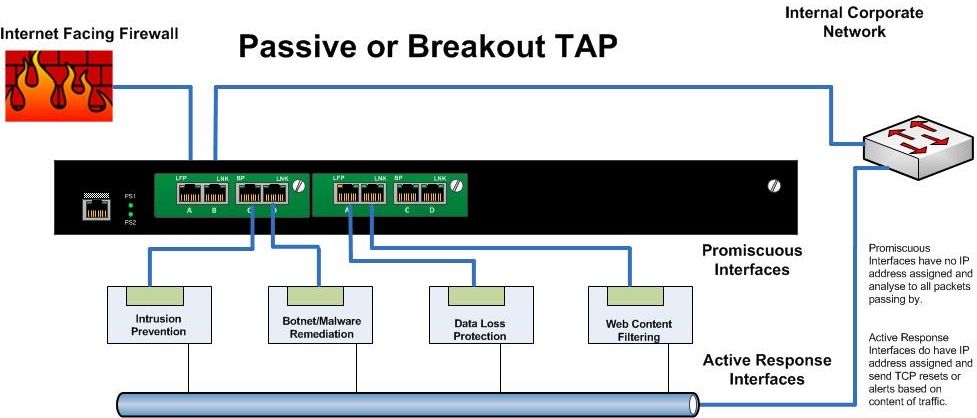
Breakout or Passive TAPs
  • These are the simplest type of TAP (Test Access Point). Typically these would have have four to eight ports. Two for Ethernet in and out and the remainder as "monitoring ports". The network traffic is sent between the input and output ports unimpeded.  The network segment does not “see” the TAP.  At the same time the TAP sends a copy of all the traffic to monitoring ports of the TAP.
  • The problem is that a Breakout TAP does not allow the Security Appliance to directly affect the passing traffic. 
  •  For monitoring purposes, it is fantastic, but if you need to actively manage or block traffic.... this is not your solution.


Daisy Chaining Inline Appliances
  •  An efficient and inexpensive way to allow your security appliances to inspect and make immediate decisions on all traffic.
  • However it comes at the great cost of adding several points of failure in your egress zone.  
  • If any one appliance fails, or stops passing traffic, the entire segment is down. This is typically unacceptable.


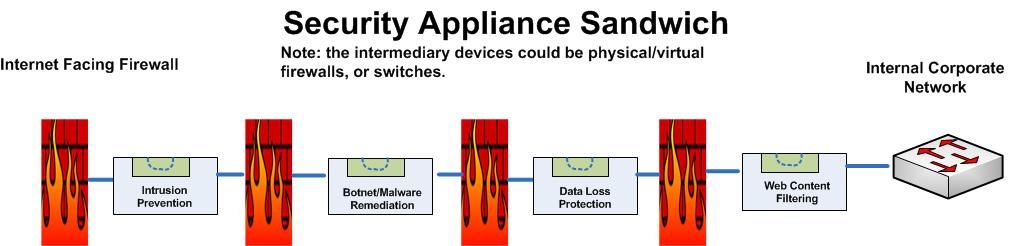
The Appliance Sandwich
  • Otherwise known as a Firewall Sandwich uses other network equipment like firewalls or switches to provide for failover mechanisms between appliances. 
  • This is a very costly method of providing redundancy, and actually adds several points of failure to the design.
  • The firewalls in this approach will want to manage traffic according to their rules rather than providing ALL passing data to the security appliances. This has the high probability of failing to identify malicious traffic.  It's not like malicious code follows rules....


And finally...


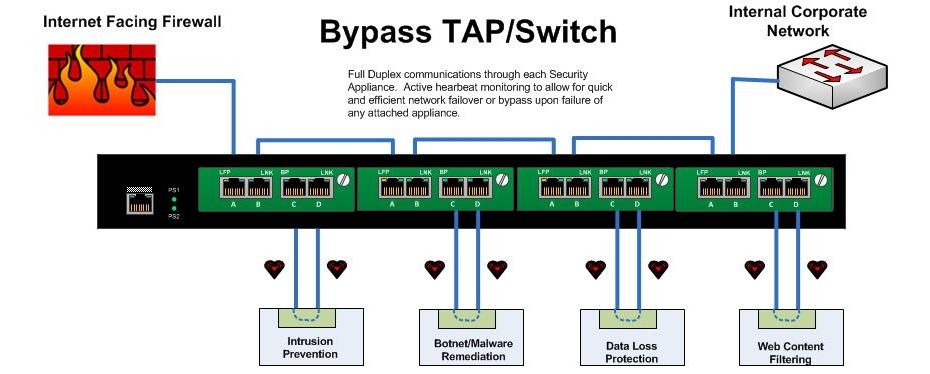
Bypass TAPs
  • A Bypass Tap or Switch will allow you to place Security Appliances into the network while removing the risk of introducing a point of failure. 
  • With a bypass TAP, failure of the inline device, reboots, upgrades, or even removal and replacement of the device can be accomplished without taking down the network. 
  • In applications requiring inline tools, bypass TAPs save time, money and network downtime.
  • In a high availability design, ie: your infrastructure from the switch to the firewall and router, is completely redundant, the bypass unit can be configured to actively manage link states up and downstream to force natural failover and failback upon  appliance failure.
  • The bypass unit can also be configured - as it's name states - to pass traffic beyond the failed appliance un-inspected if that is required. 
  • Failure modes are decided as part of the architecture, and are automatic. The Bypass Switch sends heartbeat packets through each connected appliance, and upon failure to receive the heartbeat through the appliance can opt to bypass that particular appliance or force a failover to the secondary stream.


In short:  
 Terminate your Internet connection in an HA pair of firewalls. Each these firewalls would connect to the upstream corporate switch via a multiport Bypass Switch.   Security/Monitoring/Logging/Forensics/Compliance tools can be inserted into this Bypass switch without loss of network. Any failure of an attached appliance would automatically trigger a natural network failover both up and downstream.


The advantages of TAPs compared to SPAN/mirror ports are:

  • TAPs do not alter the time relationships of frames – spacing and response times are especially important with RTPs like VoIP and Triple Play analysis including FDX analysis.
  • TAPs do not introduce any additional jitter or distortion nor do they groom the flow, which is very important in all real-time flows like VoIP/video analysis.
  • VLAN tags are not normally passed through the SPAN port so this can lead to false issues detected and difficulty in finding VLAN issues.
  • TAPs do not groom data nor filter out physical layer errored packets.
  • Short or large frames are not filtered/dropped.
  • Bad CRC frames are not filtered.
  • TAPs do not drop packets regardless of the bandwidth.
  • TAPs are not addressable network devices and therefore cannot be hacked.
  • TAPs have no setups or command line issues so getting all the data is assured and saves users time.
  • TAPs are completely passive and do not cause any distortion even on FDX and full bandwidth networks.
  • TAPs do not care if the traffic is IPv4 or IPv6; it passes all traffic through.


From Cisco’s own White Paper – On SPAN port usability and using the SPAN port for LAN analysis
Cisco warns that “the switch treats SPAN data with a lower priority than regular port-to-port data.” In other words, if any resource under load must choose between passing normal traffic and SPAN data, the SPAN loses and the mirrored frames are arbitrarily discarded. This rule applies to preserving network traffic in any situation. For instance, when transporting remote SPAN (RSPAN) traffic through an Inter Switch Link (ISL), which shares the ISL bandwidth with regular network traffic, the network traffic takes priority. If there is not enough capacity for the remote SPAN traffic, the switch drops it. Knowing that the SPAN port arbitrarily drops traffic under specific load conditions, what strategy should users adopt so as not to miss frames? According to Cisco, “the best strategy is to make decisions based on the traffic levels of the configuration and when in doubt to use the SPAN port only for relatively low-throughput situations.”

Resources:

NetworkWorld: Security appliances should be in-line rather than out of band
NetworkInstruments: Tap vs SPAN port
http://www.lovemytool.com/blog/2007/08/span-ports-or-t.html
Juniper Networks: Optimize Network Access and Visibility Without Introducing a Point of Failure

http://blog.anuesystems.com/tag/lovemytool/
CISCO: Using the Cisco Span Port for San Analysis
CISCO: Catalyst Switched Port Analyzer (SPAN) Configuration Example
Benefits and Limitations of SPAN Ports
IXIA: To SPAN or to TAP - That is the question
NetworkInstruments: Analyzing Full-Duplex Networks
WikiPedia: Network Tap
SANS: Egress Filtering For a Better Internet
Net Optics, Inc. Introduces iBypass for Fail-Safe IPS Security Deployments
Overcoming Challenges with SPAN and TAP limitations
Active Internet Traffic Filtering: Real-Time Response to Denial-of-Service Attacks
Hardware tap vs port mirroring - Any limitations?
Has Your Network Outgrown SPAN Ports?
Load Balancing 101: Firewall Sandwiches
Your Firewall Sandwich Gives Me Indigestion
Sandwich Mode Insanity Reaches New Levels of Breakage
Security Best Practices
Public DMZ network architecture
proceranetworks.com: Carrier-grade, hardware-based bypass solution
IBM: 10 Gb Network_Active_Bypass
IBM pfd: 10GB Network Active Bypass Unit overview
Detailed Modes of Proventia Network Active Bypass
Intelligent Bypass switches


The Players in this Space:

GarlandTechnology ( http://www.garlandtechnology.com )
Network Critical  ( http://www.networkcritical.com ) 
Gigamon ( http://www.gigamon.com )  
Net Optics ( http://www.netoptics.com )
DATACOM ( http://www.datacomsystems.com )
Network Instruments ( http://networkinstruments.com )
Silicom-USA  (http://www.silicom-usa.com)
Procera Networks ( http://www.proceranetworks.com )
Net Equalizer (http://www.netequalizer.com )
IBM Proventia ( http://www-03.ibm.com/software/products/us/en/network-active-bypass/)