Search This Blog

Showing posts with label network. Show all posts

Friday, 13 February 2015

Giving your network a shot in the arm! Darktrace: The Enterprise Immune System.

I understand that most of you reading this have never worked in a Security Operations Center or SOC for short, but you've all seen them in movies.. 

Sterile, brightly lit rooms of computer screens.  All showing spreadsheets or charts or static maps of the world.  I yawn even thinking of it.
 
And yet the men and women working this environment 24/7 are responsible for detecting that one little anomaly or sorting out the REAL bad traffic patterns from among the thousands of False Positive bad traffic patterns that show up on their screens hourly.

Little wonder the poor Security Analysts over at Target missed the evidence in front of them.  The sheer enormity and chaos of data that assaults them in the course of their workday is stressful and overwhelming.  All the screens look the same, tables and columns, and rows of information about network and security events collected and forwarded by every device on the network.  Then hundred or thousands of rules process them to try to find deviations from "normal traffic".   Like any network has "normal traffic".  Right...

I know.  I've worked in or around these systems for the past two decades.  I've seen the tools appear, mature, merge, morph, and become "fairly" useable.  But the false positives are still rampant, and low and slow "Advanced Persistent Threats" are under the radar and typically don't show up here.

So when an upstart Security Analytics company called me late in 2013 to show me what they've been working on, well... I could care less.  Really... They tried hard to influence me with their Pedigree:  Harking from the minds ex-MI5 Security Intelligence employees, and funded by Autonomy founder Mike Lynch.   But all big software stands on the shoulders of giants, right?

Then a few months ago, a friend of mine convinced me to come out to a public demo of their system. 


Five minutes in, I was awestruck. 

So let me take a second to say that the basis of their tools revolves around some very propeller head complex math that us mere mortals could never comprehend.  They do not rely on rules or signatures or feeds from your network devices.  Yes... they DO require network span or tap at critical aggregation points in your network, but they are able to watch, analyze, identify, and correlate your traffic over a period of time, and through machine learning techniques, develop and understanding of "normal traffic" within several contexts.  

Darktrace touts themselves to be your "Enterprise Immune System", in that like the human body's immune system, which has an understanding of "self" or what belongs or is normal versus contaminants like bacteria or viruses. After a period of mapping your environment's traffic patterns: Source/Destination/Port/Protocol/Time of day/Day of year/etc... Darktrace will use it's learning algorithms to alert on traffic patterns that are NOT normal, and therefore should be looked at. It learns what "normal" or "self" is for each device on your network.  The difference here is the heuristic learning.  Not rules, made be people who think they know the system.  

All very impressive... BUT...  that's not really what caught my eye.  Sorry Darktrace guys, but the person or people you can never let leave your company are the ones who wrote that AWESOMELY FUTURISTIC HUMAN INTERFACE!!!  Oh My God! 
 (pause here to collect my breath)


Remember up top where I said how sterile and drab and monotonous staring at a gazillion screens full of spreadsheets was?   Well... now picture having the tools from Minority Report!  Yeah, you know the ones!   


The screen in front of me started off with a wireframe globe.  Little pins of light would show up, intensify, dim... whatever.. I've seen this before.  But... Our presenter took the mouse, spun the globe a few degrees, and zoomed in "just like in the movies". 

 I got the feeling at first that this was canned video footage. But then the presenter selected one of those intensifying lights. Zoomed in, and as he zoomed, images of network devices started showing up.  Lines between them glowing as well, in various intensities and colors.  They then portrayed a communication session initiated from a desktop to a webserver.  a faint white line... Then immediately more light from that webserver back to another device that turned out to be an associated database server... AND more illuminated lines back to the network storage array...  That one transaction, a web page request I would imagine, allowed me to visualize *VISUALIZE* connectivity to the various sub components of the web applications infrastructure.  

Before anyone had a chance to ask about those red glowing devices and lines, the presenter clicked one and detailed how THIS was not typical traffic from that particular device at this time of day, nor from the area of the network being connected.   Anomalous behaviorVISIBLE in real time.  

On a 3D rotatable glowing thingamabobber of a Awesome Graphical User Interface.  

If you want your Security Operations Center personnel to be engaged, alert, 
and notice the anomalies... 
let them play with Darktrace just for a few days.  I guarantee you'll  leave it in. 


Darktrace Corporate Overview.

References:
www.darktrace.com 
Darktrace: Enterprise Immune System 
Darktrace: Recursive Bayesian Estimation 
Darktrace CEO Joins Prime Minister David Cameron on Official Cyber Security Visit to Washington D.C.  
Former MI5 chief advises Darktrace 
GCHQ Defence chief to head cyber security start-up Darktrace  

ZDNet: Darktrace: What happens when Bayesian analysis is turned on intruders 

Deloitte: The ‘Immune System’ of Enterprise IT?
How Threats Disguise Their Network Traffic 
TrendMicro: Network Detection Evasion Methods
What is “Normal Traffic” Anyway? (by Chris Greer) 
MI5: UK Security Intelligence

Cyber Security Exchange Conference with Darktrace 

Thursday, 7 March 2013

Securing your Database: 101

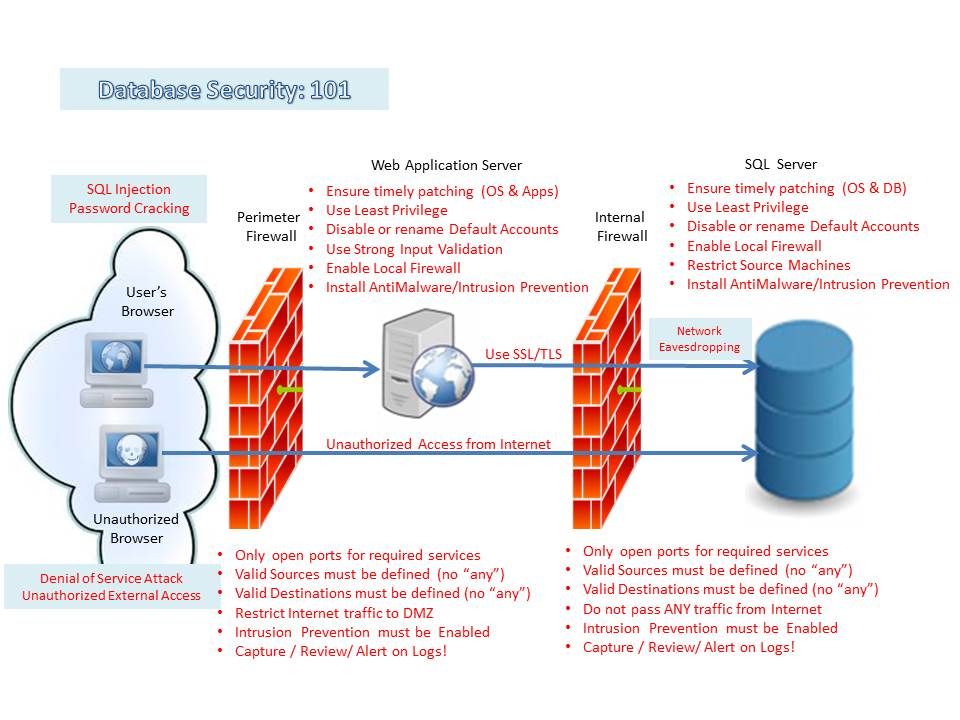
Regardless of whether you are running your SQL database (Yes, I know... I should be calling them Relational Databases) on Windows, UNIX, or Linux, the threats and vulnerabilities are very similar.


There are many SQL database vendors on the market. The fact that they need to function in a similar manner based on the SQL standards, makes them vulnerable to similar types of attacks.  These attacks can be initiated locally on the SQL server, or as far away as a client's Web Browser.


Below, I will outline some of the typical threats and misconfigurations that could endanger your SQL database. After each threat/misconfiguration, you will find some of the remediation strategies that can be used to reduce each risk.


Typical Threats
  • SQL injection - A SQL Injection is a hacking technique which attempts to pass unauthorized SQL commands through a web application with the intent of having them executed by the SQL server.
    • require SQL be constructed using parameterized queries, preventing SQL injection attacks by differentiating code from data.
    • require Web Inputs be sanitized and validated - cast type and length.
    • install Intrusion Detection/Prevention software and configure it to log and alert!
    • do not provide SQL error or warning messages to the public
    • limit database privileges
  • Network eavesdropping - Network Eavesdropping consists of capturing data packets on the network inline with the intenet of capturing passwords, session information, or confidential data.
    • require all communications between Webserver and Database Server be SSL/TLS encrypted.
    • also require all communications between developers/administrators workstations and database server be SSL/TLS encrypted 
  • Unauthorized server access - Unauthorized server access can be related to poorly configured or patched systems, or improper management of account privileges.
    • ensure that database server and all connecting web and app servers upstream are patched in a timely fashion.
    • ensure that all unused accounts, services, and features are disabled
    • employ "Least Privilege Principle"
    • use local firewall to restrict source systems
    • install and configure Intrusion Detection/Prevention on database/web/app servers.
    • LOG!!!  Review and Alert!  (I can't tell you how important custom logging/alerting is!)
  • Password cracking - Password Cracking is the exercise of attempting to recover passwords from a file or network stream using various methods such as a dictionary attack.
    • use complex passwords
    • install and configure Intrusion Detection/Prevention on database/web/app servers.
    • LOG!!! Review and Alert! (Did I mention how important this is?)
    •  
  • Denial of Service attack - An extension of the SQL Injection, a SQL Denial of Service attack will use any search forms available on your website to get your SQL database to execute a number of long running and CPU intensive queries so that the site becomes unusable to other users.
    • install and configure Intrusion Detection/Prevention on database/web/app servers.
    • LOG!!! Review and Alert! (Ok... this is important! Really!)


Typical mis-configurations 
  • Default, Blank & Weak Username/Password  - As in any computer system, Database password controls are critical in setting and maintaining security of the database.  Default passwords must be changed upon installation. Corporate Password Standards should be maintained for all accounts.
  • Excessive User & Group Privilege - Employ both Principle of Least Privilege and Segregation of Duties between Administrative, Application, and User accounts.   
  • Unpatched Databases/Operating Systems - Database software, like the Operating System, is an integral part of your overall system security. Failing to patch in a timely fashion based on the vendor's recommendations places you in a state of higher risk.
  • Unnecessary Enabled Database/Operating System Features - Any user/service account, feature, or service, installed on a system, that is enabled but not used, is a potential vector for attack.  If you do not need an account,  feature, or service in your production database, turn it off or better yet, remove it.
  • Unencrypted sensitive dataat rest and in motion Todays servers have aqequate resources to negate any arguement around encryption/decryption performance. Any sensitive data that resides within the database should be encrypted.  I'm not saying encrypt entire tables or databases, unless required by compliance, but sensitive fields (Social Insurance Numbers, financial information, etc..) should be encrypted. Many SQL Vendors now also provide Transparent Data Encryption for full tables or Databases. Also ensure that any communications to and from the SQL server uses SSL/TLS encryption to prevent eavesdropping.
  • Failure to configure audit and transaction logging - Properly configured, audit and transaction logs will allow you to identify abnormal or malicious traffic to your server. If coupled with Intrusion Detection/Prevention software, will be able to alert and/or remediate the intrustion immediately.
  • Location of SQL Database server/data - During installation, ensure that the DB software and Databases are on a separate drive/volume from the operationg system. This allows you to provide greater protection to the storage volume without adversely impacting the underlying OS. 


And finally:  On UNIX Systems..... USE A CHROOT JAIL!

A chroot provides a sandboxed environment to install a critical service that "looks like" the host operating system.  It has a file structure similar to the host, and has copies of all the files and libraries required to run the application, but is logically segregated from the operating system it is hosted on. 

A properly configured chroot environment will prevent privilege escalation from the hosted application to the hosting operating system. What happens in chroot, stays in chroot!


Reference Material:


Default  SA accounts: (these need to be disabled or renamed once installation is complete)

DatabaseAdmin Account NameAdmin Database
MSSQLsamaster
Oraclesys, systemdba_users
DB2dasusr1
MySQLrootmysql
PostGreSQLpostgrespg_shadow
Sybasesa, sccadminmaster


Default TCP ports: (firewalls should restrict access on this port to only servers/workstations authorized to communicate with the DB server)
DatabasePorts Used
MSSQLTCP 1433
OracleTCP 1521
DB2TCP 3700
MySQLTCP 3306
PostGreSQLTCP 1433
SybaseTCP 4200


Vulnerapedia! - Extremely nice matrix tool for Vulnerability Attacks/Controls/Threat Agents
How to Build a Chroot Environment in CentOS
Best Practices for UNIX chroot() Operations
Increasing Security With Chroot Jails
Microsoft MSDN: Improving Web Application Security: Threats and Countermeasures
Secure Your MSSQL Server Database
Tips For Securing Your Database Server: MSSQL 2008 Transparent Data Encryption
MySQL: Reference Manual - Security Guidelines
MySQL SQL Injection Cheat Sheet
Symantec: Securing MySQL: step-by-step
IBM Developerworks: Total security in a PostgreSQL database
Security-Enhanced PostgreSQL (SE-PostgreSQL)
Securing PostgreSQL From External Attack
Oracle® Database 2 day Security Guide
Oracle Security Checklist
Oracle 11g Security - Those Pesky Predefined Accounts
Application Security Inc. - Hack-proofing DB2
Securing Your Data Assets Using Sybase® IQ Advanced Security Option

Top Ten Database Security Threats
The 10 Most Common Database Vulnerabilities
Threat and Vulnerability Matrix (Database Engine)
Tackling the network eavesdropping risk
Dark Reading: Five Ways To Stop Mass SQL Injection Attacks
Default Credentials: Low-hanging Fruit in the Enterprise
The Simplest Security: A Guide To Better Password Practices
Database Risk in 2011