Search This Blog

Sunday, 16 November 2014

CyberArk Privileged Identity Vault - Enterprise Case Study


Cyber-Ark Enterprise Password Vault (EPV) 

 
Cyber-Ark EPV is a suite of applications to securely manage passwords and other related sensitive objects.  While it typically is used to store and manage privileged account passwords, it has the capability to manage any type of sensitive information including such as database connection strings.

Features include:

  • Granular password object access controls
  • Ability to manage passwords automatically as per a predefined policy (i.e. change password every 90 days, verify password every 30 days, etc.) for many platforms
  • One-time passwords possible
  • Dual control authentication possible
  • API spanning all common languages/development environments to integrate with custom applications facilitating secure storage and retrieval of sensitive application specific credentials and other information (i.e. private keys, database connection strings, etc.)
  • Seven layers of security/access control for vault objects

Privileged Password Management


What is a privileged account?

Privileged accounts are a required part of any software whether it is an operating system, database or application. Most hardware appliances also require privileged accounts for administration.

Similar to the UNIX's root and Windows' administrator accounts, privileged system accounts are required for systems to function and are frequently used by system administrators to do their jobs, granting special system privileges that average users don't need, and that even administrators need only from time to time when making major changes.

However, these privileged accounts have no accountability, as they typically do not belong to any individual user and are commonly shared by many administrative staff.
Alternatively, many organizations bestow excessive privileges onto the accounts of those conducting administrative tasks


So why care about privileged accounts?

These accounts have elevated access rights, meaning that those with access can circumvent the internal controls of the target system.

Once these controls are bypassed, users can breach confidential information, change transactions and delete or alter audit data.
  
Privileged Account security is at the top of compliance and auditor’s concerns.

The Problem with Privileged Passwords
  • The most common type of hacker breaks into target systems using default lists of Privileged User accounts and can easily crack weak passwords.
  • Compliance audit regulations (such as Sarbanes Oxley and PCI ) require organizations to periodically monitor and prove who has accessed shared accounts, what was done, and whether passwords are managed according to policy

  • With hundreds or more servers and network devices, manually updating and reporting on Privileged Passwords can be extremely time-consuming, in particular, defining individual user access to a shared account, and when the access occurred
  • Most enterprises consist of a multitude of disparate IS platforms (Windows, UNIX, Mainframe, AS/400, Databases, etc…). Each of these platforms pose unique challenges in managing privileged access
  • Too many people have access to passwords for “generic” privileged access accounts (Administrator, DBA, ROOT).
  • Too many people have more access to privileged resources on their own account than is required by their role.  Access tends to accumulate over the course of a user's employment.
  • Most companies have not done a great job in the past in cleaning up user accounts that had privileged access.
  • System or service accounts have been created with significant privileged access, but for technical reasons have not followed password compliance standards.


Case Study:  Large Global Enterprise with multiple outsourced data centers.

 Outsourcing your data center administration has particular challenges when it comes to privileged access management.  In this case, a third part organization has access to the very keys of your critical information assets.  Typically outsource arrangements allow for pools of administrators in off-shore locations, with a high rate of turn over.  Yet we bestow privileges onto their accounts, or give them unfettered access to group accounts that have excessive privileges and little or no monitoring and auditing capabilities. 

In this case study, an organization has implemented Cyber-Ark Enterprise Password Vault redundantly between two data centers.

This implementation will allow the various Business Units to Securely control access to their Privileged System Accounts.  This would include "infrastructure service accounts" like ROOT, Administrator, SYS, and DBA, as well as Business Unit and Application specific account that required privilege for the purposes of administration.


 "Security Policies and Implementation Issues" By Robert Johnson
The new privileged access follows a Best Practice “Firecall Process

Any employee (local or off-shore) with an "Administrator" role in a particular environment would not have these privileges added to their own user account. Nor would they have access to the password of a shared privileged account.  


By virtue of their role, the employee would be granted access to the Enterprise Password Vault, to check out a privileged account for the purpose of administration. 

The easiest way to implement this, is to show them a password for the target system upon checkout, and allow them to cut and paste it into a remote access session, resetting the password immediately upon use. Better yet, hide the password, but log them directly into the target system via remote access proxy.  Again, a one time use password would reset to restrict un-approved use.

Various workflow options can be applied to this process, including but not limited to two-factor authentication (requiring a token as well as your user credentials) or dual authentication (requiring your manager or delegate to approve your access). The Password vault can also integrate into most change/incident management systems, and can require that an appropriate change ticket be in place in order to grant access, and to outline the time frame and target system of access. 

All passwords in the vault are secured with industry standard strong encryption, and replicated to the opposite data center.

There is no single point of failure, and should “both” vaults become unavailable, there is provision for an “out of band” password recovery. 


Within each vault, there is the concept of "safes".  A safe is basically a collection of privileged ids with a common association. Maybe a Business Unit would have all of their privileged ids from various applications within one safe, or a particular third party provider might have all of it's privileged ids within one safe. 


This infrastructure can potentially remove privileged access from thousands of end user and service accounts.


In fact, the company was able to remove a couple hundred individual third party user accounts that had direct Windows Domain Admin access, and replaced them with a small pool of Domain Admin accounts in the vault.  Another pool was created for UNIX root accounts.  By virtue of their role, the Administrators could check out access to perform their duties, but the request was logged and sent to SEIM.  The treat landscape was greatly diminished by this one action.     

They went on to enroll Business unit applications into safes, and saw a significant reduction in the number of unmanaged privileged accounts being reviewed annually.


Future Extensions:

By adding Privileged Session Manager, the company will be able to enforce policies around the actual content of a privileged access session.  Individual commands or processes can be whitelisted/blacklisted by role, and any activity deemed anomalous can be flagged and sent to a manager/audit for review and/or attestation.  

Entire administrative sessions to a target system can be recorded - both for secure remote desktop in the case of windows, or SSH in the case of UNIX or network appliances. These sessions can later be played back, annotated, and approved by managers or audit.


for more detail on this Privileged Session Manager please see my blog 


Supported Managed Devices:

    Operating Systems
      Windows, Linux/UNIX, OS390, AS400

    Windows Applications
      Service accounts, Scheduled Tasks, IIS Application Pools

    Databases
      Oracle, MSSQL, DB2,Informix, Sybase, sny ODBC compliant

    Security Appliances
      CheckPoint, Nokia, Juniper, Cisco, Blue Coat,Fortinet

    Network Devices
      Cisco, Juniper, F5, Alactel, Quintum,

    Applications –
      SAP, WebSphere, WebLogic, JBOSS, Oracle ERP

    Directories
      Microsoft, Sun, Novell

    Remote Control and/Monitoring
      IBM, HP iLO, Sun, Digi

    Generic Interfaces – any SSH/Telnet device, Windows registry


References:

Privileged Identity Management - Make those with the most access, accountable for their activities!
Security Musings: Risk reduction through Jump Servers  
http://www.cyberark.com/resource/isolation-control-monitoring-next-generation-jump-servers/ http://en.wikipedia.org/wiki/Privileged_Identity_Management 
ESG: Validating Privileged Account Security While Validating CyberArk
http://lp.cyberark.com/rs/cyberarksoftware/images/br-privileged-account-security-solution-9-26-13-en.pdf


Saturday, 8 November 2014

Risk reduction through Jump Servers


A common practice in today's data centers is to allow Systems Administrators Remote Desktop  (RDP) or Secure Shell (SSH) access to the servers they are administrating, directly from their desktops.  Regardless of where they are located!

Although restricting Lateral access between servers is quite easily achieved through group policy on Windows, or source whitelisting local firewall rules for both Windows and UNIX/Linux, these are not enabled by default. Typically, even with network segmentation and access control lists, is is possible to jump from server to server unhindered, by simply having access to the appropriate credentials. 


Both the Target Breach, and the Home Depot Breach were initiated by a compromised business partner with access to internal resources.  Those accounts were used to assess the network topology and browse the corporate directories to find more privileged accounts. Once inside, these credentials could be used to log onto servers within the environment in search of information or more credentials to abuse. The attacker could, over time, hop from server to server essentially unnoticed.


Restricting Lateral Access within your Network
The concept of a "jump" server has been around for decades, but is rarely in use or enforced.  One popular use of jump servers is to restrict access into a DMZ. This allows administrative control of servers in the DMZ to be regulated and audited as per compliance rules.


In Microsoft Technet's  "Implementing Secure Administrative Hosts", they state: 
Secure administrative hosts are workstations or servers that have been configured specifically for the purposes of creating secure platforms from which privileged accounts can perform administrative tasks in Active Directory or on domain controllers, domain-joined systems, and applications running on domain-joined systems. In this case, “privileged accounts” refers not only to accounts that are members of the most privileged groups in Active Directory, but to any accounts that have been delegated rights and permissions that allow administrative tasks to be performed.
.......

Although the “most privileged” accounts and groups should accordingly be the most stringently protected, this does not eliminate the need to protect any accounts and groups to which privileges above those of standard user accounts have been granted.

A secure administrative host can be a dedicated workstation that is used only for administrative tasks, a member server that runs the Remote Desktop Gateway server role and to which IT users connect to perform administration of destination hosts, or a server that runs the Hyper-V® role and provides a unique virtual machine for each IT user to use for their administrative tasks. In many environments, combinations of all three approaches may be implemented.

So... restrict access to servers, specifically for anyone with privileges above a basic user. 
I can't argue with that at all... 


Enter CyberArk's Next Generation Jump Server

More than just a jump server from which to initiate RDP or SSH sessions, CyberArk has added Privileged Session Management to monitor and record all access through the jump server. The tightly integrated SSH proxy is context aware, and can be configured to look for anomalous behavior.  Not only can you control "who" has access to "what" through the jump server, but you can alert on suspicious or anomalous activity within those sessions.  Both secure RDP to Windows servers, as well as SSH to UNIX/Linux/Network appliances are managed via Privileged Session Manager on the jump server.  

The jump server can now be used to isolate your server environment from  your workstation endpoints, and provide real-time visibility into administrative access.  Without adding agents to the servers being administered, you can use workflows to augment authentication and authorization, and monitor access at a granular level, recording all activities for future playback and potential audit attestation.

Integrate this service with their Enterprise Password Vault, and you have significantly reduced privilege escalation from your threat landscape.


Rogue or Malicious Administrator
Many companies, small and large alike, allow almost unrestricted access to the data center servers for administrator, both from within the local network, and over VPN. The excuse being that this is required in case of a emergency.

This excessive access allows anyone authenticated, malicious or otherwise, to jump laterally from server to server.  The Target Breach, in particular is known to have accommodated it's attackers by allowing a credentialed account in the Business Partner network to access servers in the core data center, and ultimately get on to the Point-of-Sale systems.  Restricting this lateral access by enforcing the use of jump servers would not totally remove the Rogue Administrator threat, however all access through the server would be monitored and recorded.  Any administrative commands/requests/activities that were deemed anomalous by predefined security policies could be blocked and/or alerted on.


Malware Mitigation
By allowing lateral access between servers, an infected server could act to propagate malicious code to its peers. Most Advanced Persistent Threats rely on the ability to see peer servers laterally and scan them for exploitable opportunities.  With jump servers in place, and lateral access removed through policy, malicious actors and malware alike will not be able to propagate without going through the jump server and being seen/alerted/blocked.


Pass the Hash
One of the techniques typical of a APT is the “Pass the Hash” attack, where the invader captures account logon credentials in the form of a cached password "hash" on one machine and then use them to authenticate to another machine.  This little known exposure has been around for a couple decades, but has become an industry favorite among cyber criminals.  By enforcing all server remote administration through the jump servers, this method of subversion is eliminated.

Don't be the next headline.  Choosing either CyberArk's suite of Privileged Access and Session Management tools or another Remote Access Gateway product will significantly reduce your threat landscape and allow you to sleep more easily.


References:

CyberArk: Are You Ready to Take the Next Jump? Secure your IT Environment with Next Gen Jump Servers
Privileged Accounts at Root of Most Data Breaches
http://en.wikipedia.org/wiki/Pass_the_hash
SANS: Pass-the-hash attacks: Tools and Mitigation
Microsoft: Defending Against Pass-the-Hash Attacks
CyberArk Launches Enhanced “CyberArk DNA” to Detect Pass-the-Hash Vulnerabilities
NSA: Reducing the Effectiveness of Pass-the-Hash 
The World's #1 Cyber Security Risk - Active Directory Privilege Escalation
IT World Canada: Early lessons from the Target breach
IT World Canada: Hacking of HVAC supplier led to Target breach: Report
IT World: Home Depot says attackers stole a vendor's credentials to break in
Cisco: Putting a Damper on ‘Lateral Movement’ due to Cyber-Intrusion  
Trend Micro: How Do Threat Actors Move Deeper Into Your Network? 
Prevent Lateral Movement With Local Accounts (Windows) 
Lateral Movement: No Patch for Privilege Escalation 
Intel: Achieving PCI DSS compliance when managing retail devices with Intel® vPro™ technology 
Techrepublic: Jump boxes vs. firewalls 
Microsoft: Implementing Secure Administrative Hosts 
CyberArk: Privileged Session Manager 
ITWorld Canada: The 10 Step Action Plan - Building Your Custom Defense Against Targeted Attacks and Advanced Persistent Threats

Wednesday, 29 October 2014

Eliminate HTTP Man-In-The-Middle attacks with HSTS

The most prolific Internet Protocol (ok, maybe aside from mail) is HTTP, or common Web traffic, between end user browsers and web servers.  However, it is also one of the most insecure. Setting up a man-in-the-middle attack has been proven quite trivial, and leaves both the end user and the web service vulnerable to attack.

From OWASP.ORG

What this means in layman's terms, is that an attacker could set up a computer system in such a way that they pretend to be the website you are hoping to visit. Everything *looks* legitimate, and they pass your traffic back and forth to the real site, keeping copies of everything, including sensitive information.  They could potentially even alter information on your behalf. 


HTTPS, was born out of the need to secure Web transactions.  Basically it wraps standard HTTP traffic in an SSL/TLS tunnel, thus preventing  eavesdropping and tampering.

The problem is, that most web servers will initially establish an HTTP session, and if secure communications is required (ie: Banking, medical, personal information, etc..) then the web server will re-direct your browser to the HTTPS version. 

But even here, a cunning hacker could set up an SSL proxy using a  "self signed SSL certificate" and pretend to be the official site. You would connect to the HTTP version, the attacker would redirect you to THEIR SSL service, and then connect you with the official site. 

Many of you are now screaming at me:
"Modern browsers WARN the user that they do not trust Self Signed Certificates" 


The sad news is that most people ignore these warnings, do not read them fully and click through to accept the certificate.

HSTS: HTTP Strict-Transport-Security was developed to remediate this issue. It basically sends information from a web server to the users browser that FORCES an HTTPS secure connection the next and subsequent times that the user goes to that site.   Even if the user types HTTP:// and the site name, they are forced to the HTTPS variant.  ALSO, if the certificate is self signed, revoked, or expired, HSTS will terminate the session. 

A Web server configured for HSTS would supply a header over an HTTPS connection to the browser.  Current browsers are designed to understand and keep this header for future use. When the site is revisited, it will force a HTTPS redirection from the browser.  Also, if the certificate is untrusted, aconnection WILL NOT be established.

This HSTS Policy helps protect web traffic against eavesdropping and most man-in-the-middle attacks.


I highly recommend that you adopt HSTS for both your External as well as your Internal web servers to further reduce your threat landscape.


References:

EITF: RFC6797 - HTTP Strict Transport Security (HSTS)
https://en.wikipedia.org/wiki/HTTP_Strict_Transport_Security
Configure HSTS (HTTP Strict Transport Security) for Apache/Nginx
https://www.owasp.org/index.php/HTTP_Strict_Transport_Security
https://www.owasp.org/index.php/Man-in-the-middle_attack 
http://en.wikipedia.org/wiki/Man-in-the-middle_attack 
Hack Like a Pro: How to Conduct a Simple Man-in-the-Middle Attack
https://www.owasp.org/index.php/Man-in-the-middle_attack
US CERT: Understanding Web Site Certificates
How is it possible that people observing an HTTPS connection being established wouldn't know how to decrypt it?

Wednesday, 22 October 2014

CyberArk positioned to lead Industry in SSH key management practice

CyberArk, best known for it's Privileged Password Vault, and recent IPO success story has just announced a new product set.  At the 2014 CyberArk Customer Event held in Boston this week, they announced their new SSH key manager. (October 21st 2014)


"The CyberArk SSH Key Manager is designed to securely store, rotate and control access to SSH keys to prevent unauthorized access to privileged accounts."
Extending their already successful Enterprise Vault Infrastructure, CyberArk protects SSH keys with the highest level of security and granular control. Keys in the vault are encrypted, and managed in a fashion not unlike their Password Management Infrastructure.  Integrating SSH keys into this platform creates a one-stop-shop for Privileged Access Management on both Windows and UNIX/Linux platforms.


In January of 2013, CyberArk added Privileged Session Management for UNIX and Linux systems to their growing arsenal of Privileged Management tools. This led me to blog about the requirement to Treat Your Key Pairs Like Passwords!  It looks like they were listening...

Up until this week, there was only SSH.COM, with their Universal SSH Key Manager, and Venafi, with their Trust Authority SSH manager. 

 With the announcement of CyberArk's new SSH key manager, we now have an Enterprise holistic approach to Privileged User Account Management across the network.


References:
CyberArk: SSH Key Manager
Infosec Musings: Treat Your Key Pairs Like Passwords!
http://security-musings.blogspot.ca/2013/01/privileged-identity-management-make.html
http://www.cyberark.com/resource/isolation-control-monitoring-next-generation-jump-servers/
http://en.wikipedia.org/wiki/Privileged_Identity_Management
http://www.cyberark.com/esg-validating-privileged-account-security-while-validating-cyberark
IDC: A Gaping Hole in Your Identity and Access Management Strategy: Secure Shell Access Controls 
Networkworld: SSH key mismanagement and how to solve it 


Saturday, 18 October 2014

Know Your Threat Landscape - Standardized Security Threat Information (STIX & TAXII)

Over the years, many managed security service providers have been publishing variants of an external Threat Analysis in one form or another. Annual, Quarterly, Weekly, Daily, and live feeds are regular deliverables now from anyone who is anyone in the Security Industry.

Great news, right?  Well... sort of...

The fact is, that each of these service providers had their own proprietary naming conventions and threat report formats. This made it difficult for the consumer of these reports and feeds to understand what information was redundant, and what was really important.


Recently, however, many of these providers have banded together at the influence of the U.S. Department of Homeland Security (DHS) and Mitre Corporation. A community has formed, intent on standardizing not only the language used to to represent structured cyber threat information - Structured Threat Information Expression (STIX™) - but the transport mechanism used to distribute this cyber threat information as well, called Trusted Automated Exchange of Indicator Information (TAXII™).

By standardizing on the language and delivery of cyber threat information, clear and expeditious remediation can be put in place without wasting time wading through multiple vendor notifications. 


Links to the various Managed Security Service Providers Threat Intelligence.

IBM has X-Force 
  • IBM X-Force security professionals monitor and analyze security issues from a variety of sources, including its database of more than 76,000 computer security vulnerabilities, its global web crawler and its international spam collectors.

Symantec has DeepSight
  • Symantec has established some of the most comprehensive sources of Internet threat data in the world through the Symantec™ Global Intelligence Network, which is made up of approximately 69 million attack sensors which record thousands of events per second.

CheckPoint has Threatcloud
  • ThreatCloud, the first collaborative security infrastructure to fight cybercrime. ThreatCloud dynamically reinforces Check Point Threat Prevention Software Blades with real-time threat intelligence derived from Check Point research, global sensors data, industry feeds and specialized intelligence feeds from the ThreatCloud IntelliStore.

Paolo Alto has Wildfire
  • WildFire offers a completely new approach to Cybersecurity, through native integration with Palo Alto Networks Enterprise Security Platform, the service brings advanced threat detection and prevention to every security platform deployed throughout the network, automatically sharing protections with all WildFire subscribers in about 15 minutes.

McAffee has GTI (Global Threat Intelligence)
  • McAfee Global Threat Intelligence (GTI) notices the anomalous behavior and predictively adjusts the website’s reputation so McAfee web security products can block access and protect customers. Then McAfee GTI looks out across its broad network of sensors and connects the dots between the website and associated malware, email messages, IP addresses, and other associations, adjusting the reputation of each related entity
Radware has Lancope StealthWatch
  • Lancope Inc. is a leading provider of network visibility and security intelligence to defend enterprises against today’s top threats. By collecting and analyzing NetFlow, IPFIX and other types of flow data, Lancope’s StealthWatch® System helps organizations quickly detect a wide range of attacks from APTs and DDoS to zero-day malware and insider threats. 

F5 has IP Intelligence
  • F5® IP Intelligence incorporates external, intelligent services to enhance automated
    application delivery with better IP intelligence and stronger, context-based security. By identifying IP addresses and security categories associated with malicious activity, the IP Intelligence service can incorporate dynamic lists of threatening IP addresses into the F5 BIG-IP® platform, adding context to policy decisions. IP Intelligence service reduces risk and increases data center efficiency by eliminating the effort to process bad traffic.

Cisco-Sourcefire has Talos
  • The Cisco Talos Security Intelligence and Research Group (Talos) is a group of elite cyber security experts whose threat intelligence detects, analyzes and protects against both known and emerging threats by aggregating and analyzing Cisco’s unrivaled telemetry data of billions of web requests and emails, millions of malware samples, open source data sets and millions of network intrusions. More than just a traditional response organization, Talos is a proactive member of your security ecosystem, working around the clock to proactively discover, assess, and respond to the latest trends in hacking activities, intrusion attempts, malware and vulnerabilities with new rules, signatures, file analysis and security tools to better protect your organization.
Trend Micro - Security Intelligence
  • With Trend Micro at your side, you can safely navigate the changing cyber security landscape. We defend tens of millions of customers around the clock through a worldwide network of 1000+ threat researchers and support engineers committed to 24x7 threat surveillance and analysis, attack prevention and remediation, and educational tools to help you secure your data against cyber crime in this ever-changing digital world.

Kaspersky Labs -Threat Intelligence
  • Kaspersky Lab’s Security Intelligence Services constantly monitor the threat landscape, identifying emerging dangers and taking steps to defend and eradicate. Combining our world-leading knowledge of malware and cybercrime with a detailed understanding of our clients’ operations, we create bespoke reports that provide actionable intelligence for an enterprise’s specific needs.  Our intelligence services range from subscriptions to our global network insights, monthly threat analysis specific to your organisation, through to bespoke training and education programmes.

Arcsight has Reputation Security Monitor
  • Actively enforce and manage reputation-based security policies to help focus on those threats with most risk. By using frequently scheduled updates of reputation data, vetted by a global cadre of experts, HP RepSM detects communication with sites known to have bad reputations-preventing exfiltration of intellectual property and reducing business risk. In addition, you can proactively monitor and protect the reputation of your own enterprise by making sure company and partner web sites and assets are not found on the bad reputation list.

Microsoft is soon announcing  Interflow
  •  The new Interflow platform, based on Microsoft's Azure cloud service, is geared for incident responders and security researchers. "We needed a better and more automated way to exchange information with incident responders. That's how we started on a path developing this platform," says Jerry Bryant, lead senior security strategist with Microsoft Trustworthy Computing. "This allows for automated knowledge exchange."

Note:  Apologies if I've missed your favorite Internet Threat Analysis feed or report.  
Add a quick comment below, and I'll update this list if appropriate.


References:

https://stix.mitre.org
https://taxii.mitre.org  
NetworkWorld: The International Security Community Should Embrace the STIX and TAXII Standards 
Networkworld: Symantec rolls out threat-intelligence sharing with Cisco, Check Point, Palo Alto Networks 
US-CERT: Information Sharing Specifications for Cybersecurity 
IBM X-Force Threat Intelligence
Infosec Institute: Reinventing Threat Intelligence
Large Organizations Need Open Security Intelligence Standards and Technologies 
SANS.org: Developing Cyber Threat Intelligence... 
BrightCloud: 2014 CYBERTHREAT DEFENSE REPORT 
Threat intelligence lifecycle maturation in the enterprise market 


Friday, 10 October 2014

Toronto based PCI Compliance upstart brings single solution to Voice-Web-POS

As published in ITWorldCanada.com
(http://www.itworldcanada.com/blog/toronto-upstart-brings-tokenization-protection-to-uc-web-pos/98109)


The standard Information Security mantra is to Protect Sensitive Data Where It Resides, but I posit that with the number of Security Breaches being publicized these days, we should quickly move to Remove Sensitive Data Where Not Required.

I know that I'm not new to this train-of-thought, but the cost of non-compliance is growing exponentially.  Financial Damage can be insured against... Reputational damage cannot.

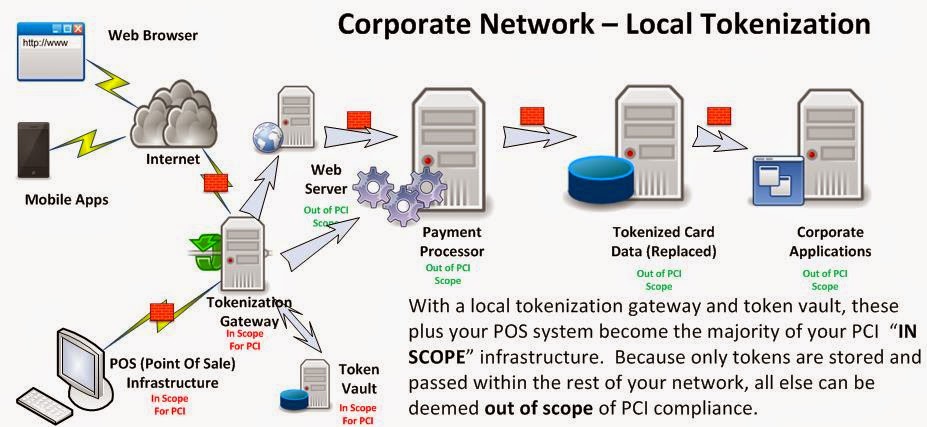
In a previous article, I spoke about the need for complementing industry standard Encryption with a process called Tokenization. While encryption is intended to hide the actual data in a manner that is reversible, tokenization replaces the sensitive data with a tag or token, preserving only the format or schema of the data.

The Payment Card Industry has clearly stated that any piece of infrastructure that is accessible by network to those systems that either process or store PCI (Credit Card) Data are "in scope" for PCI compliance. This means that the scope an an annual compliance audit could essentially include every device on your network....


Many software companies have taken on portions of the tokenization challenge.  Originally, they provided API's and libraries for developers to embed tokenization into applications, or bootstrap tokenization onto existing applications.  These did little though to reduce the scope of your PCI compliance, and in many cases raised the complexity of the environment.

Next came the tokenization broker appliances, which were housed in your data center to communicate with your Point Of Sale and payment processing systems. Although this reduces scope and complexity of your PCI environment, it still leaves a large amount of your environment "in scope" for PCI, and the "crown jewels" were still onsite, albeit in a very robust data vault.


With a tokenization solution outsourced via a SaaS model, sensitive data such as credit card numbers are not stored in your system. There is nothing to obtain during a breach.  Full stop. Let someone else take on the burden of PCI compliance.


Toronto's own Blueline Data has taken on the challenge, by creating a novel tokenization gateway solution that not only covers your Web and Point Of Sale transaction systems, but your Telephony and Unified Communications Infrastructure as well. In fact, you can define any type of digital data sequence to be protected for SOX / HIPAA / OSFI  or any other regulatory requirement and tokenize it as well.  They call their strategy "Assurance through Deterrence". By removing the sensitive data from your environment, they deter would-be attackers from investing in Advanced Persistent Attacks to breach your environment.


The PCI-DSS covers 6 areas of protection with 12 Specific Requirements.  Blueline's unique offering covers 7 of these requirements, across 5 areas!


The Blueline environment itself, subject to PCI audit, complies with the DSS 3.0 requirements. It offers a unique and low-risk approach to protect your IT assets, such as financial records, intellectual property, employee details and data entrusted to you by customers or third parties. The combined benefit is the highest security and the lowest cost.


Their approach to format preserving and diskless tokenization at the perimeter, essentially creates a Zero Vector of Attack™ computing environment, which is easy to operate but not feasible to exploit.

I believe that their forward thinking initiative of providing tokenization services to non-traditional channels of data flow sets them aside from the competitors in this market.  I'm anxious to watch this company flourish amid the weekly disclosures of Sensitive Data Breaches.


From the Blueline Data Website:
Blueline Data Products and Services
  • Strategic Assessment – a review with your team to determine what Blueline Solutions would be most impactful with your business requirements and technology investments
  • Solution Services compliance delivery guidance and market insight (call center, financial services, healthcare, retail, etc.) 
  • Voice Gateway - encompasses security encryption around voice channels that send and receive sensitive data, to eliminate fraud by capturing, masking and encrypting confidential signaling information on the  path. The encrypted sensitive datagrams are securely rendered to allow fully protected  processing, eliminating the possibility of a call to get compromised.
  • Retail Gateway - offers integration with any point-of-sale (POS) device in a secure and compliant manner, and allows point-to-point encryption of client's personal information from any payment media. This applies to any transaction or function where a client is required to use a payment terminal for credit or debit card processing expected to integrate with the backend data repository. There is no need for manual card data entry for proof of identity, payment guarantee or other purposes.
  • Data Gateway - provides organizations with a single access point-of-presence to transaction services, such as secure banking and financial networks, mobile application payment delivery, or secure web bill presentment. It allows you centrally and uniformly govern all traffic of financial interest, whether it is exchanged between your partner organizations or with your clientele involved in the transaction flow.  Sensitive data transfer is fully protected to meet the highest security and privacy standards.
  • Data Vault - presents a conversion engine that takes any sensitive data element – whether it is SSN or SIN number, driver's license, credit or debit card, or patient record – and encrypts such information in a format-preserving manner.  The data is tokenized and optionally stored in a secure "digital vault" that you can access as you need, provided that sufficient privileges are presented.  It fully removes sensitive payment and personal information from your computing systems and digital media.


References:
PCI Security Standards: Information Supplement: PCI DSS Tokenization Guidelines 
SANS: Six Ways to Reduce PCI DSS Audit Scope by Tokenizing Cardholder data 
http://bluelinex.com/resources/blp204_pci_compliance_sheet.pdf
Blueline Services: Data Tokenization 
Securosis: Understanding and Selecting a Tokenization Solution
Shift4: A detailed look at tokenization and it's Advantages over Encryption
TokenEX: Outsourcing Tokenization vs. On-Premise Data Security 
http://www.mashery.com/api-gateway/tokenization
http://www.bankinfosecurity.com/whitepapers/using-pci-dss-criteria-for-pii-protection-w-947
Payment Card Industry (PCI) Data Security Standard
Protegrity Tokenization Securing Sensitive Data for PCI, HIPAA and Other Data Security Initiatives
Protegrity: Vaultless Tokenization
Protegrity: Vaultless Tokenization Fact Sheet.
Cybersource: Reducing PCI Compliance Scope: Take the Data Out
Intel: PCI DSS Tokenization Buyer’s Guide 


Saturday, 4 October 2014

The Demise of Excess Access - A eulogy for traditional VPN

(as published in Itworldcanada.ca)
http://www.itworldcanada.com/blog/the-demise-of-excess-access-a-eulogy-for-traditional-vpn/96655
 
Once upon a time, in a world where mobile meant "laptop" or "remote home PC", Corporate network connectivity came in two flavours:  1) Dial-up modem, with it's clunky protocols and achingly slow speeds, and  2) Corporate VPN client over Internet. 


Internet VPN seemed like a godsend in comparison to Dial-up. Basically it's purpose was to provide a secure network connection between your remote PC/Laptop (the entire device) and your Corporate network. Whether old-school IPSec or the more recent SSL encapulation, the transport was secured. Username/password, and optionally a One Time password or Security Token would be used to provide Two Factor Authentication (2fa). 

Seems secure? Right?  I mean, authentication and transport security are covered.. what else is there?

Dynamic Access Policies were then created to define a set of rules, similar to firewall rules, that describe what applications (port/protocol) on the remote  users PC could talk to what servers/services in the data center.  

In general, this worked fine if there were less than a hundred employees in the company, you had no third party users, no application was ever upgraded, and nobody changed roles.

In practice, policies are defined loosely to allow for Convenience rather than Security. Realistically, large numbers of PC's have unfettered access to the corporate network, as if they were sitting at their desk.  (We'll get into THAT issue in a future blog.)
 
Well then we started worrying about Viruses, worms, trojans... basically Malware residing on the remote PC. What stops them from propagating into the corporate network? How do we know the end user has applied all the appropriate patches, and is running the most current AntiMalware (And that it's signatures are up to date!)?

Network Access Control was added to the VPN client to assess the endpoint (laptop or PC) and determine it's "security posture" based on patch status and running AntiMalware applications.

But this wasn't enough to satisfy the Audit or Risk departments, so you had to install Intrusion prevention appliances and network anti-malware inside the network to remediate anything that was missed on the endpoint... 

AND... we still have all those remote endpoints, with pretty much open access to our entire corporate network...


In the meantime...

As a result of the explosion of Tablets and smart phones, alternate solutions arose for many of the very services we require daily as part of our VPN dependency.  An entire industry arose to service BYOD or Bring Your Own Device. Tablets and Smart phones are managed through various means, but typically now applications running on those devices are segregated or "sandboxed" from one another to reduce the risk of eavesdropping and data capture.


The Future of Enterprise Remote Connectivity:

Today, there is absolutely NO REASON to use VPN for your Corporate Email service. All enterprise grade email clients utilize strong local authentication, integrate with industry standard Single Sign On, and use strong transport encryption.  Whether you are an Exchange/Outlook or Domino/Notes user, for this use case, VPN is merely a hindrance to productivity, and a complexity that costs your company both in Capex and Opex.

Similarly, there is absolutely NO REASON to use VPN for your Corporate VOIP or Instant messaging.  These services also integrate cleanly into Enterprise Single Sign On, and provide for secured, encrypted transport.

If you NEED, and I stress NEED, a corporate desktop, then there are many highly secure NON VPN solutions available, such as Microsoft's Remote Desktop GatewayCitrix Access Gateway, or VDI via VMWare's Horizon View.   Some Legacy Applications may still require this model for a few years to come. 


Are you using Cloud Services through VPN?   If you are using VPN to get to your corporate Cloud applications like SalesForce, SAP, Concur,ServiceNow, Microsoft Office 365, or Taleo, you are simply adding an extra network loop to an already secured connection. These services already use Enterprise Single Sign On, and provide for secured, encrypted transport.

Containerization technologies like Bromium will transform application development for the laptop environment, and allow Laptops to join the realm of Managed Devices in a Mobile Device Strategy.  Soon your Enterprise Mobile Application Management suite will package and manage apps for Windows and OSX as well as iOS, Blackberry and Android.  

Write Once, Run Anywhere has been a mantra used by vendors such as Oracle for well over a decade.  It is finally approaching a maturity level that will see it in action everywhere.  Most large applications today are being developed using frameworks that abstract the presentation layer, and allow the designers to write various "front ends" specific to the device, while the rest of the application is identical across platforms.


So aren't you just replacing one remote access solution with several niche appliances?
In a quick answer, sort of... Service specific appliances, such as SIP gateways provide a much more robust and secure means on managing this specific traffic, and many companies already have them in place for internal branch to branch connectivity.

I'm not suggesting that the future of remote connectivity is free and unfettered access to your Corporate Network.  Quite the opposite in fact.  I'm suggesting that 2/3 of what employees access today via traditional VPN, already has  BETTER and MORE SECURE means of connectivity through their native infrastructure, and that the remaining 1/3 is on track to be replaced with  technologies that will allow the remote applications to be secured on any device from phone to tablet to laptop.

In today's world of high profile Data Breaches, Zero Day Attacks, and  Significant Operating System vulnerabilities, we cannot allow the Excess Access that traditional VPN affords.


References:

WindowsSecurity.com: Death of VPN
VPN Clients are Dead in the Cloud 
The Evolution …. and Death of the VPN 
The Death of the VPN 

Microsoft Technet: Overview of Remote Desktop Gateway 
App Wrapping is A Form of Containerization 
Forrester: Containerization Vs. App Wrapping - The Tale Of The Tape