If you rely on an internet facing website or service to either bring in, or communicate with customers, there's a good chance that service will be disrupted or greatly impacted in the near future.
A Distributed Denial of Service attack is a method used by an individual or group that wishes to do harm against your company by essentially making your website inaccessible. New attack tools are readily available on the black market, and reports indicate that attack traffic is up 133% over this time last year.
By sending large quantities of traffic requests to your company website (tens of thousands of hits per second), the attackers basically overload the website's ability to respond and service legitimate customer requests. If your website is down, you are not reaching customers, and not generating revenue. Even a mild attack has the effect of slowing down your website to the point where customers may not want to use it. Corporate reputation may be at risk as a cause of such attack. The primary way that businesses can and are protecting themselves against these DDoS attacks is through the use of Content Deliver Networks.
(for a more technical overview, please see my blog on CDN: Content Delivery Networks in the Context of Security). A Content Delivery Network, such as Akamai/Prolexic augments your corporate website service by mirroring your website through many webservers distributed globally on their own network. Should a Distributed Denial of Service attack be launched against your website, the effect of that attack is spread across many, many servers. The result is a greatly reduced impact on the service provided to you customers. In most cases, the net slowdown is almost immeasurable. Introducing a CDN service to front your Critical Corporate websites not only makes sense, but will greatly enhance your Disaster Recovery and Business Continuity programme.
Should you find your website under attack right now, please look into the following service from Akamai.
File Transfer (FTP) may be the single most insecure piece of infrastructure that any corporation has. It's roots date back to the early 70's before encryption and transport security were of great concern. Many common malware attacks rely on unsecured FTP services within a company to stage and exfiltrate sensitive corporate data to unknown third parties.
There is little excuse for a company to be running vanilla FTP either inside their data center or especially over the Internet. Secure file transfer protocols and standards have been around and fully supported SINCE THE TURN OF THE CENTURY!!!
"...what about the threat information contained on an unsecured
FTP server could pose to a business like yours? Consider a few other recent FTP
exposures:
CardSystems, who processed credit card transactions for nearly 120,000 merchants totaling more than $18 billion annually, were essentially forced out of business after 40 million identities were exposed. Amex and Visa told CardSystems that they would no longer do business with the company.
54,000 records were stolen from Newcastle City Council
An unsecured document was exposed on the New Mexico Administrative Office of the Courts FTP server; it contained names, birth dates, SSNs, home addresses and other personal information of judicial branch employees.
The Hacker Webzine reports that Fox News had an exposed FTP connection linking out to Ziff Davis.
The personal information of uniformed service members and their family members were exposed on an FTP server while being processed by major Department of Defense (DoD) contractor SAIC. As many as 867,000 individuals may have been affected."
Lets take a minute to discuss the legacy FTP system, it's derivative FTPS, and the completely different SFTP.
The FTP (File Transfer Protocol) protocol was documented in 1971 as RFC 114 and eventually evolved into RFC 959 , the FTP standard that all systems use today. It has been the workhorse of most corporate file transfer systems in production. All current Server Operating Systems, whether Windows, Unix, Linux, MAC, or Mainframe come with a variant of an FTP service following RFC 959. There are VERY many FTP client applications available for each and every Desktop, Laptop, Tablet and smartphone in existence, also complaint with RFC 959.
(Did I mention that there is no reason in this day and age to use vanilla FTP, EVER?)
Once companies and security consultants realized the great risk that FTP exhibits by sending corporate data "in the clear" over the network, they proposed RFC 2228 (in 1997) to protect FTP data in transit using SSL encryption. Aside from transport encryption the service is identical to FTP. FTPS transport encryption comes in two flavors Implicit, and Explicit. Implicit FTPS (Now pretty much obsolete) establishes an SSL or TLS session prior to exchanging data, over TCP ports 989(data)/990(control). Explicit FTPS, the more common of the two, can use a single port for both encrypted and unencrypted data transfer. The client initially establishes an unencrypted session, and if SSL/TLS is required, an AUTH TLS or AUTH SSL
command is issued by the client to secure the control channel before sending credentials.
Although regularly confused with FTPS, SFTP is actually an application in the SSH protocol suite. RFC4253 "The Secure Shell (SSH) Transport Layer Protocol" defines the security model of this Secure File Transfer Protocol. Whereas FTPS relies on SSL (X.509) Certificates with their associated PKI requirements to secure the session, SFTP uses Diffie-Hellman Key Exchange to manage an asymmetric pair of keys to secure the session. All UNIX based systems (Including MAC, Linux, and Mainframe) come with SSH preinstalled. There are many variants available for Windows as well.
Both SFTP and FTPS are fully scriptable (ie: support automation). Either one is acceptable, depending on the application, and Operating System at hand.
Up to this point, we've discussed securing the Data Transport, or "Data in Motion", but what about securing the "Data at Rest"? How do we secure the file transfer directory structure?
In simplest terms, strong user/group access controls are required on FTP service directory structure. I'm going to link to some vendor recommendation sites here:
In the UNIX world (Including MAC, Linux, Mainframe), a chroot is a virtual filesystem that can be associated with a specific service, in this case SFTP. A new protected replica of the OS folders and files relevant to running that service are created, and all files uploaded/downloaded via this service reside inside the protection of the "jail"
"In a physical environment, every application depends on its OS for a
range of services, including memory allocation, device drivers, and much
more. Incompatibilities between an application and its operating system
can be addressed by either server virtualization or presentation
virtualization; but for incompatibilities between two applications
installed on the same instance of an OS, you need Application
Virtualization. "
According to a report by analyst firm Gartner, adding more layers of
defense will not necessarily improve protection from targeted threats.
What is needed, the analysts say, is the evolution of better security controls.
Enter FireEye® with it's Advanced Malware Protection appliances. Established in 2004 as a security research company, they came up with the novel concept of using Virtualization to launch and assess the activity of "payloads" such as email attachments or downloaded files. Any attachment, executable, zip file etc.. is run within a series of sanitized virtual environments, and any unexpected activity would be flagged for analysis. One of the malicious activities identified early on was the "callback" to botnetCommand and Control servers.
As a valuable byproduct of the development of this system, FireEye amassed a large database of "known" Threat Actors. This intelligence is then used to block any subsequent activities to those Threat Actors across FireEye's entire customer base.
When installed inline at the Internet landing zone, FireEye (Both Mail and Web) adds a proactive member to your existing reactive firewall, IPS, and URL filters.
“Advanced threats against enterprises today thrive on exploiting the
unknown and evading blocking techniques thanks to a growing, global
marketplace for selling software vulnerabilities,” said Zheng Bu, vice
president of security research, FireEye. “The old security model of
tracking known threats and relying on signature-based solutions are
simply powerless to stop zero-day threats. The number of zero-day
attacks profiled in the paper highlight why organizations need to take a
new approach to security by combining next-generation technology with
human expertise.”
So we have a proactive tool to identify anomalous behaviour, and identify/prevent Zero-day attacks... Now what?
A methodology first described by Lockheed Martin, the Cyber "Kill Chain" can be used to identify, and proactively mitigate and remediate against these advanced security threats.
From the Lockheed Martin paper:
(I added the Red Text to show the result of implementing FireEye)
Reconnaissance-
Research, identification and selection of targets, often represented as
crawling Internet websites such as conference proceedings and mailing
lists for email addresses, social relationships, or information on
specific technologies.
If the reconnaissance is done as a form of phishing exercise, there will likely be links in the email back to a C&C server on the Internet. Any attempt to connect to that network (ie: clicking the link) would be blocked by FireEye and generate an alert to the SIEM.
Weaponization -
Coupling a remote access trojan with an exploit into a deliverable
payload, typically by means of an automated tool (weaponizer).
Increasingly, client application data files such as Adobe Portable
Document Format (PDF) or Microsoft Office documents serve as the
weaponized deliverable.
Email attachments as well as files downloaded from the Internet will be assessed by FireEye (Executed in several virtual sandboxes), and if deemed malicious, will alert the SIEM, block callbacks, and prevent further downloads.
Delivery-
Transmission of the weapon to the targeted environment. The three most
prevalent delivery vectors for weaponized payloads by APT actors, as
observed by the Lockheed Martin Computer Incident Response Team
(LM-CIRT) for the years 2004-2010, are email attachments, websites, and
USB removable media.
As in Weaponization, Email attachments as well as files
downloaded from the Internet will be assessed by FireEye (Executed in
several virtual sandboxes), and if deemed malicious, will alert the
SIEM, block callbacks, and prevent further downloads.
Exploitation-
After the weapon is delivered to victim host, exploitation triggers
intruders’ code. Most often, exploitation targets an application or
operating system vulnerability, but it could also more simply exploit
the users themselves or leverage an operating system feature that
auto-executes code.Installation -
Installation of a remote access trojan or backdoor on the victim system
allows the adversary to maintain persistence inside the environment.
*IF* a malicious application DOES get installed out of band, ie: from CD or USB drive, any callbacks would be blocked by FireEye, raising an alert in SIEM, and preventing subsequent communication with the C&C and subsequent downloads.
Host Protection tools on your servers are HIGHLY recommended to prevent installation and execution of any such malicious applications in the first place.
Installation-
Installation of a remote access trojan or backdoor on the victim system
allows the adversary to maintain persistence inside the environment.
Host Protection tools on your servers are HIGHLY recommended to prevent installation and execution of any such malicious applications in the first place.
Command and Control (C2)-
Typically, compromised hosts must beacon outbound to an Internet
controller server to establish a C2 channel. APT malware especially
requires manual interaction rather than conduct activity automatically.
Once the C2 channel establishes, intruders have “hands on the keyboard”
access inside the target environment.
FireEye will block callbacks to the Command and Control, and prevent further downloads.
Actions on Objectives-
Only now, after progressing through the first six phases, can intruders
take actions to achieve their original objectives. Typically, this
objective is data exfiltration which involves collecting, encrypting and
extracting information from the victim environment; violations of data
integrity or availability are potential objectives as well.
Alternatively, the intruders may only desire access to the initial
victim box for use as a hop point to compromise additional systems and
move laterally inside the network.
Malicious code will not be able to exfiltrate data, if callbacks are blocked, and the Command and Control IP addresses are blocked. Again, any attempt to do so, would send alerts to the SIEM while still being blocked.
I am not suggesting that FireEye in and of itself is a full Malware mitigation strategy. I HIGHLY recommend that you also install Host Protection tools on your servers, and run network firewall, Intrusion Prevention, layer two segregation, and Email/URL filtering as well.
Of specific note:As of this date (June 13rd, 2014) We still do not *know* for certain how the attackers got into Target's internal network, nor how they escalated privileges to install their malware.
Krebs, Dell SecureWorks, and Malcovery have collected strong evidence to support a hypothesis. We do not need to fully understand the mechanics of the breach to conjecture a remediation strategy for those who have not identified their breaches as of yet.
In a nutshell, the attackers launched a phishing attack some time in October 2013, and managed to compromise one of Targets vendors. The credentials for this vendor most likely gave the attackers access to Target's Online Billing system. Coupled with a large amount of publicly available documentation intended to assist vendors in accessing the system, the attackers were able to capture enough detail of the Target network and Active Directory Infrastructure to launch a SQL injection attack. It is believed that they used this SQL injection attack to install tools used in the remainder of their exercise.
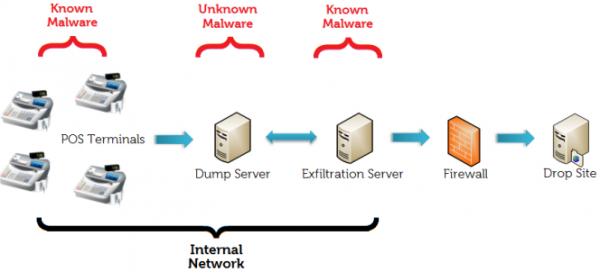
They were able to install three different sets of malware to enact their scheme: First, they added a variant of a previously known Point Of Sale memory Scraper. This application would monitor the active processes memory on the Embedded Windows POS endpoints, and capture anything resembling Credit Card information. The application would then periodically ftp that information to another server that was compromised through a privilege escalation in Active Directory. Yet another compromised system would pick the data from that ftp service, and deliver it to several external ftp sites.
How did an Admin Account on a single server get privilege escalated to the Active Directory?
Once in the Production Environment, how did they get to the POS network? I mean they are PCI compliant, aren't they? There should be no direct path between the two...
Where was Intrusion Prevention between the corporate network and the POS network?
How was an FTP service allowed to communicate from the Data Center out to the Internet?
Where was Intrusion Prevention between the Corporate Network and the Internet?
If IPS was in fact in place (I have to believe it was...) was it detuned or ignored?
Target isn't talking, so....
Lets assume for the sake of the remainder of this posting, that they had put a Zero Trust security model in place. How would this scenario have played out? What are the points of contact that would have raised alerts/sounded alarms?
Seems like an impossible task? Too late to retrofit into an existing production infrastructure! It will never work!!! Or... Can it?
The cost, both financially and in time, would be extremely prohibitive to retrofit an existing corporate network. VLAN segmentation, layer 2 and layer 3 firewalls, as well as a myriad of network security appliances are needed to inspect and enforce traffic moving between hosts...
By having a properly configured and managed host based security suite in place, applications residing on those hosts would only allow traffic communications from known sources, on known ports, using known protocols. Attempts to brute force passwords, scan ports, or escalate privileges would not only be immediately blocked at the server being attacked, but all other systems within the management policy. Alerts would be sent to the Corporate SIEM, and multiple layers of alarms would be generated. If a server were actually compromised, the incident could be contained to that one host.
You could gradually integrate the Zero Trust model into your environment, one host at a time, by creating Virtual Zones of Trust. Start with low hanging fruit, by grouping systems belonging to a common application, and applying a policy that rejects traffic from other applications, essentially "sandboxing" the application.
•Operate on the significant majority
of our Host Operating Systems, and support all of our existing Database and
Middleware
•Protect against Zero-Day malware
and malicious actor attacks.
•Prevent unauthorized
changes or actions, even if the perpetrator has administrative rights.
•Enable demonstrable change
control on mission-critical systems.
•Centralize configuration
protection across the enterprise, reducing administrative burden.
•Support a
library of pre-defined rules that recognize common security events.
•Support policies across
logical groups of hosts, helping to ensure the appropriate level of security and ease
administrative burden.
•Run pre-defined and customized
reports on policies and security events enterprise-wide across heterogeneous
systems.
•Automatically trigger alerts and
actions, based on pre-defined thresholds, when an event matches a rule.
•Record the event in a centralized corporate
SEIM.
How could Host Based Protection have helped Target?
With Host Protection installed on the Point of Sale Embedded Windows OS terminals, a policy would restrict the system from accepting patches/updates, or installing software/executables from anywhere other than the official SECURED software distribution infrastructure. This would have eliminated the potential of an attacker installing anything, unless they had already compromised your software distribution infrastructure. The POS application would run in a "sandbox", basically a separate secured process that does not expose it's memory or connectivity to other processes on the host. This would have eliminated the potential for memory scrapers. Essentially, phase1 of the attack would not have been achieved. With Host protection running in the core data center servers (both physical and virtual), there would be no way to install the data transfer software... even if you had the credentials to an administrative service account on the server. The Host Protection would only allow software updates, patches, or executables to be pushed from the official SECURED software distribution infrastructure. If the data transfer software were already installed, then any change to the configuration of this software, even with a compromised administrative service account, would raise an alert, and log all activity to the console. If the alert was not responded to within a period of time, the configuration could be rolled back automatically. Essentially, phase2 of the attack would not have been achieved.
With no Phase1, and no Phase2... Exfiltration of the customer data through this methodology would not have happened, and CEO Gregg Steinhafel and CIO Beth Jacob would still have their jobs...
Additional controls to consider, beyond those provided by Host Based Server Protection:
Segment POS network from the corporately accessed network
Segment Database network from the corporately accessed network
Encrypt all transactions between POS network and servers outside POS network
Employ a Privilege Access Management Strategy
Enforce scheduled maintenance windows for software updates/installations
Enforce specific hosts/accounts allowed to deploy software updates/installations
Patch Applications as well as Operating System as patches become available
Use Heuristic Analysis as well as Signature based AntiMalware.
Subscribe to and USE live Threat Analysis Feeds
Do not log locally, but rather stream log events to a SIEM
Remove - not just disable - all not pertinent applications/executables
Run AntiMalware at your Internet Egress point, as well as on your hosts
Run Data Loss Protection on your hosts as well as at ALL egress points