Search This Blog

Wednesday, 27 February 2013

SAMBA 4: Active Directory Domain Controller? Absolutely!

1991 was an extremely productive year....

On one hand Linus Torvalds introduced the Linux Kernel that would turn the Computing world on it's head and challenge commercial Operating Systems for the next two decades.

On the other hand, and in a completely unrelated event, Andrew Tridgell would develop "netbios for unix" soon to be known as Samba. It wasn't until a couple years later that you would commonly find Samba on a typical Linux Distribution.


From the official Samba site: What is Samba?
Samba is software that can be run on a platform other than Microsoft Windows, for example, UNIX, Linux, IBM System 390, OpenVMS, and other operating systems. Samba uses the TCP/IP protocol that is installed on the host server. When correctly configured, it allows that host to interact with a Microsoft Windows client or server as if it is a Windows file and print server.


Samba is used commercially in some small NAS filer appliances, and as stand alone file and print servers.  It has been packaged and supported for every Commercial UNIX version on the market. It is included in every Linux Distribution.  It allows Mainframes to share files "natively" with a Windows environment.

Samba has been able to provide Windows Domain Controller functionality for some time now, albeit under limited scope. Samba 3.x was able to provide for a very decent Windows NT4 Primary Domain Controller (PDC), but was not able to fill all of the roles of a true Active Directory PDC.  It could however, substitute as a Backup Domain Controller (BDC).


Enter Samba V4!

As of Version 4, introduced in December 2012, you are able to create a fully functional Active Directory Primary Domain Controller and then use Microsoft's Administration tools to manage it from your Windows 7 workstation!

Note: In the first release of v4, there were issues with directory and file replication that prohibited standing up a redundant pair of  Linux or Unix based Samba Domain Controllers.  These issues have been corrected as of v4.0.3 in January 2013.

It is now possible to build an entirely redundant Active Directory Domain on  Linux / Samba 4 Domain Controllers.

Although there are still a few issues with "Cross Forest Trusts", most small and medium size businesses in the free world are able to function within a single Active Directory domain anyway.
Samba 4 now supports all typical Active Directory features, including Group Policy and Roaming Profiles. They can also integrate with Microsoft Exchange servers (or better yet OpenChange ).


According to the official Samba site, Samba 4 was build with documentation and some assistance from Microsoft themselves:

The Samba 4.0 Active Directory Compatible Server was created with help from the official protocol documentation published by Microsoft Corporation and the Samba Team would like acknowledge the documentation help and interoperability testing by Microsoft engineers that made our implementation interoperable.
"Active Directory is a mainstay of enterprise IT environments, and Microsoft is committed to support for interoperability across platforms," said Thomas Pfenning, director of development, Windows Server. "We are pleased that the documentation and interoperability labs that Microsoft has provided have been key in the development of the Samba 4.0 Active Directory functionality."

There are several good articles already on just how to build a functional Active Directory Domain Controller using SAMBA 4 on Linux. I'm not going to go into the details here, but you can read:


I was able to create two Virtual AD Domain controllers (One PCD, One BDC), set up the domain, join a couple workstations, a print queue, and file server in the space of an afternoon.

I'll definitely admit it's not an "out-of-the-box" exercise, but when I got to use Microsoft's tools for managing Users,  Groups, OUs, Group Policy.... the reality set in that this is now ready for prime time...

Now.... Somebody please script this build!!! 

Further Reading:

Samba Team Releases Samba 4.0
HOWTO to set up Samba as an Active Directory compatible Domain Controller
Samba4 joining a domain as a DC
Samba4 as AD domain controller on Centos 6
Samba 4 AD Domain with Ubuntu 12.04
http://www.alexwyn.com/computer-tips/centos-samba4-active-directory-domain-controller


Producing a documented and tested automated procedure for configuring Ubuntu Linux 12.04
http://serverfault.com/questions/tagged/samba4
Ask Slashdot: Is Samba4 a Viable Altrnative To Active Directory?

A Tale of Two Standards
Samba 4 review: No substitute for Active Directory -- yet


Thursday, 21 February 2013

PCI DSS Cloud Computing Guidelines - Overview

The PCI Security Standards Council  has just published (02'07'2013) an Information Supplement: 

According to their press release:
"One of cloud computing’s biggest strengths is its shared-responsibility model. However, this shared model can magnify the difficulties of architecting a secure computing environment," said Chris Brenton, a PCI Cloud SIG contributor and director of security for CloudPassage. "One of this supplement’s greatest achievements is that it clearly defines the security responsibilities of the cloud provider and the cloud customer. With PCI DSS as the foundation, this guidance provides an excellent roadmap to crafting a secure posture in both private and public cloud."
So, first things first: 
This is an information supplement, not intended to replace the PCI Data Security Standard (DSS), but rather to enhance the work done during the development of the Virtualization Guidelines in June of 2011. They have acknowledged the move toward Cloud Services, and have created a set of guidelines to allow businesses to remain PCI Compliant while moving their workloads to the Cloud.
To diferentiate roles and responsibilities between Cloud Customer and Cloud Service Provider, the PCI Security Standards Council leverages the definitions of Cloud Computing provided by NIST to outline the common deployment models:
  • Private cloud. The cloud infrastructure is provisioned for exclusive use by a single organization comprising multiple consumers (e.g., business units). It may be owned, managed, and operated by the organization, a third party, or some combination of them, and it may exist on or off premises.
  • Community cloud. The cloud infrastructure is provisioned for exclusive use by a specific community of consumers from organizations that have shared concerns (e.g., mission, security requirements, policy, and compliance considerations). It may be owned, managed, and operated by one or more of the organizations in the community, a third party, or some combination of them, and it may exist on or off premises.
  • Public cloud. The cloud infrastructure is provisioned for open use by the general public. It may be owned, managed, and operated by a business, academic, or government organization, or some combination of them. It exists on the premises of the cloud provider.
  • Hybrid cloud. The cloud infrastructure is a composition of two or more distinct cloud infrastructures (private, community, or public) that remain unique entities, but are bound together by standardized or proprietary technology that enables data and application portability (e.g., cloud bursting for load balancing between clouds).

Within each of these you would have service models  (Software As A Service SaaS, Platform As A Service PaaS, and Infrastructure As A Service IaaS).
They then clearly define the relationships between Customer and Service ProviderOf particular note:

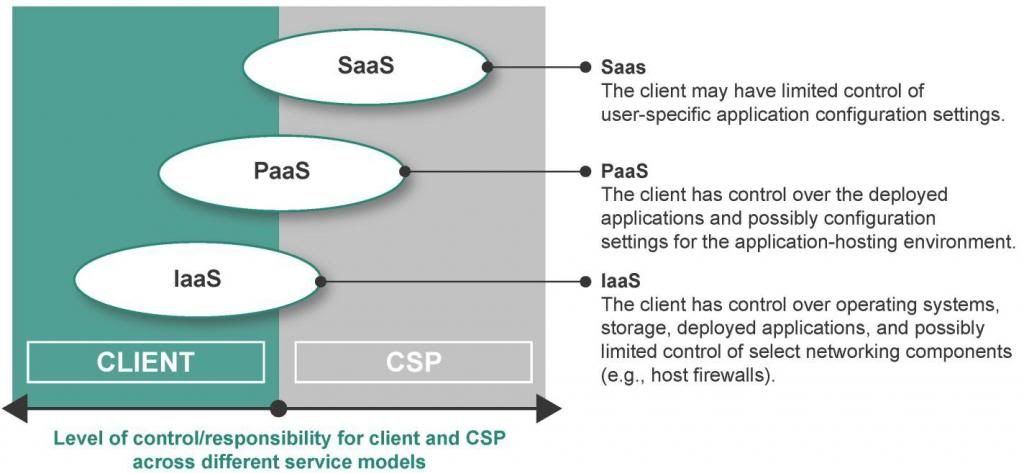
The level of security responsibility across the cloud service models generally migrates towards the client as the client moves from a SaaS model (least client responsibility) to an IaaS model (most client responsibility). The greatest level of responsibility for the CSP to maintain security and operational controls is present in the SaaS service model.
  

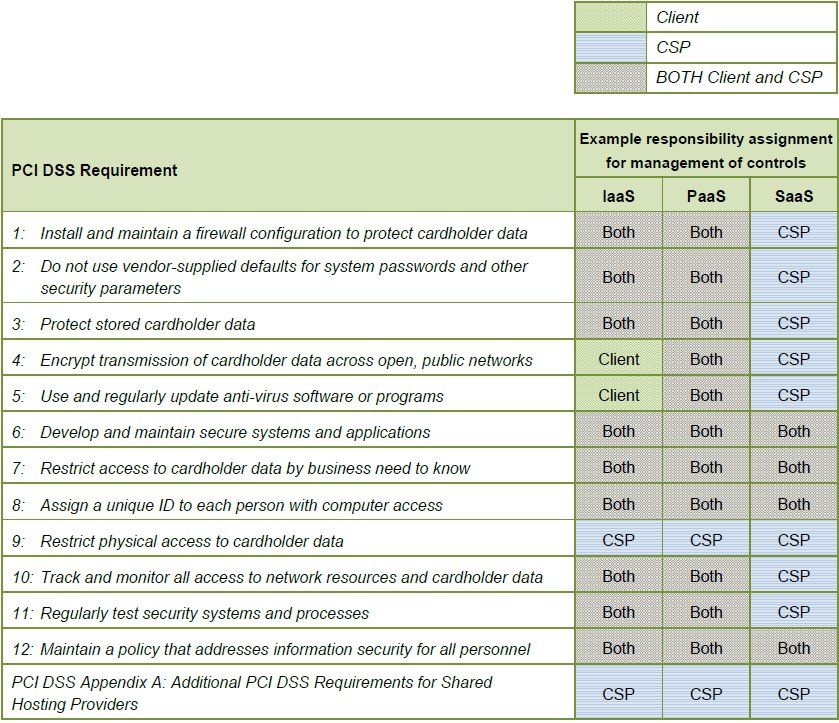
They then thoroughly discuss the PCI related responsibility each side may have from the physical data center of the provider, through the network, storage, virtualization layers, Operating System, Application Stack, presentation layer, and finally data. The following table is one of the examples they provide:
As expected, considerable care is placed around the discussion of segmentation.
It is the Customer's responsibility to ensure that the Cloud Service Provider has adequately provided "an equivalent level of isolation as that achievable through physical network separation."  Critical to this discussion is the isolation of each layer (network, virtualization, Operating System, and Data)  from other Customers of the Provider. 

Once any layer of the cloud architecture is shared by CDE (Cardholder Data Environment) and non-CDE environments, segmentation becomes increasingly complex. This complexity is not limited to shared hypervisors; all layers of the infrastructure that could provide an entry point to a CDE must be included when verifying segmentation.
Recommendations for minimizing and simplifying PCI DSS scope in a cloud environment include:
Don’t store, process or transmit payment card data in the cloud.


Failing that:
  • Implement a dedicated physical infrastructure that is used only for the in-scope cloud environment.
  • Ensure Segregation of CDE and non-CDE environments
  • Ensure Segregation of Service Provier Customers
  • Minimize reliance on third-party CSPs for protecting payment card data.
  • Do not transmit data in clear text
  • Do not store data in clear text
  • Maintain control of your encryption keys (isolate encryption/decryption/key management from your cloud)
  • Validate PCI DSS controls regularly

  There are several case studies described in the document to assist in understanding the accountabilities/responsibilities in various Cloud Provider models.
All in all, this is a clear and concise read which go to great lengths to help assess the requirements to meet when selecting a Cloud Service Provider to support your PCI environment.

Friday, 15 February 2013

Manage Security Where the Data Resides

NERD ALERT:  This particular blog is a technical discussion rather than executive roadmapping.  That said, I still look forward to any comments from the Pointy Haired Bosses.
As I've ranted... er... discussed in my previous blogs;  we, as an industry, have spent the past two decades building logical security controls at the perimeter where our corporate network interfaces with either the Internet or Business Parner networks.
This model, although supported and backed by our friends in Risk/Compliance/Audit, assumes that everything inside those pearly gates is protected. 

This is a risk statement that you cannot accept. 
  With today's move to virtualization, convergence of Data Center and Cloud Services, and a greater ability for Business Units to outsource/offshore development and hosting of critical applications, the line between Inside and Outside of your perimeter is vanishing.
Additional threats facing us daily include un-patched and legacy systems, zero-day malware attacks, advanced persistent threats, malicious insider breaches, as well as administrator human error.
According to the 2012 Verizon Data Breach Investigations Report , and contrary to popular belief, 94% of all data compromised involved servers.

Moving forward, we must assunme that our internal network has already been compromised, or at minimum is quite vulnerable, and that to protect the corporate data assets, we must move our security controls as close as we can to that data.
  
This not as onerous a task as it sounds.  There are many good vendors in this space already, and the field has matured significatly over the past five years.  All commercial solutions are centrally managed, come with a library of out-of-the-box templates, integrate seamlessly with your logging/reporting systems and provide for flexible workflow.
 Before we discuss the players and what they bring to the table, lets talk about what we need to do, and how it can be achieved.
  1. Prevent Unauthorized Access to critical assets.
  2. Prevent Unauthorized  Changes to critical assets even for those with legitimate access.
  3. Protect against Zero-Day Malware attacks.
To achieve this you need to have something that manages local security policies across all servers that can provide:
Note: This discussion is completely agnostic to whether a server is physical or virtual. The requirements are identical.

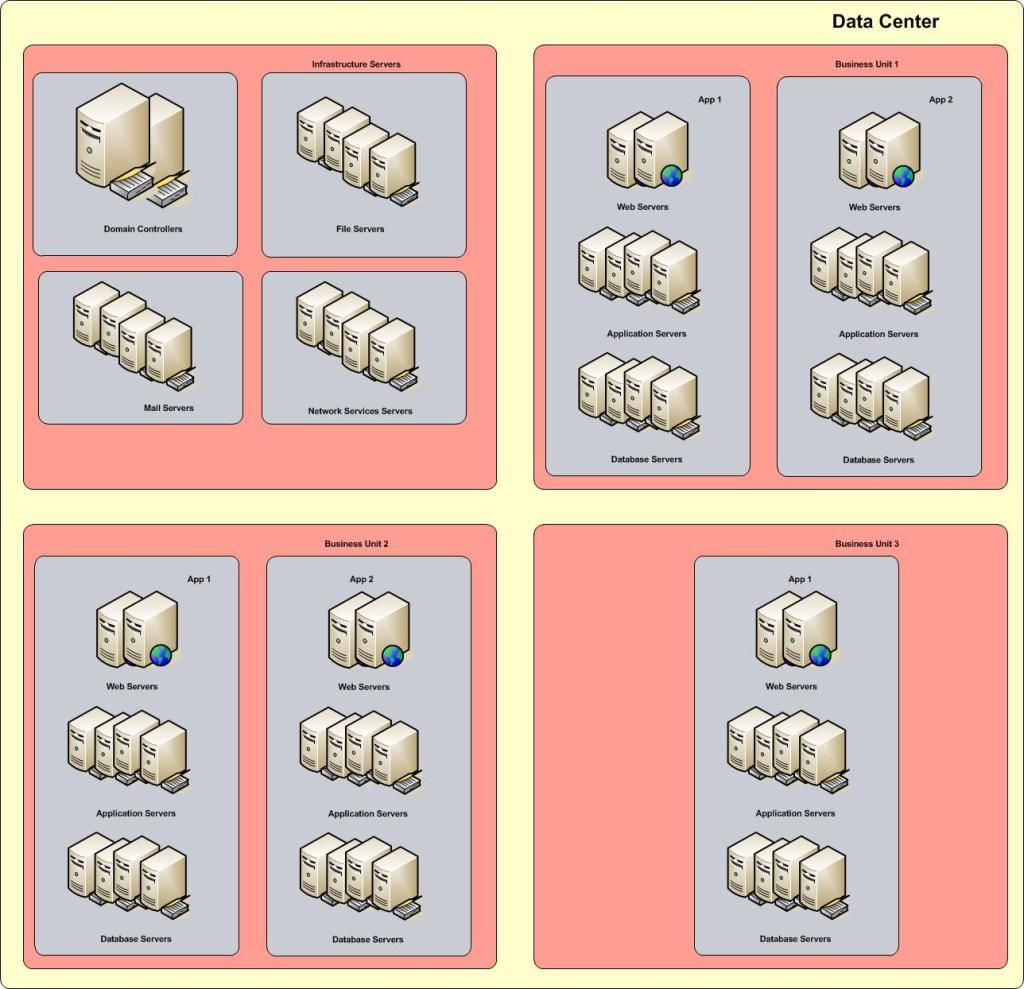
To start, create specific server "roles".  A server role, defines it's function or purpose within your network. A role does not have to be OS specific - Windows/UNIX/Linux all provide for every role in the stack.

 Any particular server could be an Authentication Server such as an Active Directory Domain Controller.  It could be an Infrastructure Server, such as mail, ftp, or DNS.  It could be a Database or File Server.  It could be An Application or Web Server.  

Typically, you will find that any one server may host several roles.  In any case,  you will want to create and apply a consistent Policy Template that will define the protection model for each role. In the template, you would identify resources to protect, such as directories, files, registry keys that are used to configure, maintain, and operate that application. (All commercial products in this space provide hundreds of such templates "out-of-the-box")

Once you have identified the roles, you will want to group your server assets into units, possibly by Line of Business (My line of business depends on these servers), or by Application (this application uses these web servers, these app servers, and this database server), or both.  This way, you can create policies establishing the allowed channels of communication.
 (App1 webservers can only talk to App1 application servers on tcp ports 80 and 443, and App1 application servers can only talk to App1 database servers on tcp port 1433)


Any attempt at communication outside of these rules would be prevented/denied, and result in alerts sent to the appropriate security focal through any of a number of channels (email, snmp, SMS...). 
By putting the security policies locally on the servers, close to the data, you significatly reduce the potential for data exfiltration.  That said, this is not a Data Loss Prevention solution unto it's own, as it is not aware of the context of the data it is protecting, but can provide valuable feeds into your DLP infrastructure.


Of course this would not be complete without talking about the basics of creating a hardened server in the first place.  
  • Patch, patch, and patch....
  • Disable/remove/rename default administrator accounts - at the OS, Application, and Database layer
  • Turn off / Disable / Uninstall all services not required for the role of the server
  • Place your Application Server / Database Server files on a separate volume from your OS
  • Where possible, enable logging for everything
  • Consult your vendor for additional recommendations per server role.

Examples of like Server Roles:  (Apologies if I left out your personal favorite!)
Authentication and Directory Services Servers:  
Infrastructure Services:
File and Database Servers:
Application Servers:
Web Servers:
 So?  Who are the players in this field? 
Symantec Critical System Protection   - To date, Symantec CSP provides the widest coverage for server roles across the most Operating Systems - Both Physical and Virtual.  Their System Protection Console cleanly integrates their Security and Malware product suites into a single pane of glass.
TripWire Enterprise File Integrity Monitor - TripWire has been the industry leader in this space for over a decade, and is perfect for small to medium enterprises.
McAfee File Integrity Monitor - McAfee provides a suite of tools that are well integrated for protecting Windows Based Servers and Databases..
IBM Tivoli Virtual Server Protection - VMware ESX protection suite.

SafeNet Data Protection Suite
NewNetTechnologies NNT
Splunk Change Monitor

Further Reading:
http://www.infosecurity-magazine.com/view/30067/51-of-uk-networks-compromised-by-byod
http://www.novell.com/docrep/2010/03/Log_Event_Mgmt_WP_DrAntonChuvakin_March2010_Single_en.pdf
http://www.acunetix.com/websitesecurity/webserver-security/
http://www.symantec.com/page.jsp?id=protection-center
http://msmvps.com/blogs/ulfbsimonweidner/archive/2007/09/25/protect-objects-from-accidential-deletion-in-windows-server-2008.aspx
http://eval.veritas.com/mktginfo/enterprise/white_papers/ent-whitepaper_protecting_active_directory.pdf
 http://www.sans.org/reading_room/analysts_program/mcafee-server-protection-june-2010.pdf
http://www.newnettechnologies.com/tripwire-alternative.html?gclid=CO3A8cn1uLUCFShgMgodLloAtw

3rd party List of System Integrity Tools:
https://mosaicsecurity.com/categories/83-system-integrity-tools?direction=desc&sort=products.name

Friday, 8 February 2013

Treat Your Key Pairs Like Passwords!

I just had this conversation with a friend, and decided to pull this old blog over to here to stir some discussion...


We have all been taught the Best Practices for Password Management.  There is no shortage of publications providing guidance on password management.

  1. Don't use Personally Identifiable Information (PII) in your password
  2. Don't use any word that can be found in the dictionary 
  3. Create passwords at with at least eight characters
  4. Change your critical passwords on a regular basis (although this theory is being challenged)
So why do we not have these same discussions around Certificate or Key Pair Management?
(This is not a trainer on cryptography, but rather a discussion on proper management) 

These provide similar functionality as a username/password.  They provide authority as to who you are, to the system you are communicating with. They also provide the user with a sense of security/confidentiality.

However, keypairs and certificates, like passwords, can be compromised!   Even the mighty RSA SecureID is not impervious to attack.

 Typically, ssh keys are used to automate authentication to a host. That said, according to ssh.com
 "About 10 percent of all SSH user keys provide root access, creating a major security and compliance issue"

Many administrators use the same keys across multiple hosts. Similar to using the same password, this could be an issue when that key is compromised.  These very people are also the ones who have sudo access to privileged resources. A compromised machine could be silently used for a man in the middle attack.


I suggest that we need to start managing keypairs and certificates in a similar fashion to passwords.


Keypair  best practices:
  1. Create a corporate policy for Keypairs and Certificates!
  2. Treat your passphrase as you would a regular password (rules above)
  3. Use different keypairs for critical systems, privileged access, and regular access
  4. Do not share your private key with anyone.... ANYONE
  5. Change your keypairs on a regular basis (maybe not as frequent as passwords, but...)
Beyond simply managing your current keypairs and certificates, you should do a discovery to see how many stagnant or unused keypairs are in your environment.   Both Venafi and SSH.Com have discovery tools that will assist in identifying how prevalent keys and certificates are within your environment.  They will scan your network, and catalog existing SSL certificates and assymetric keys, providing pertinent information regarding expiry, ownership, strength, etc...
There are many companies in the marketplace that provide x.509 / SSL Certificate discovery and management, but few have stepped up yet for managing those critical ssh/and pgp keypairs.  

Ok, I've started the discussion...  let's talk... 
   This document presents current recommended practice for managing SSH
   user keys for automated access.  It provides guidelines for
   discovering, remediating, and continuously managing SSH user keys and
   other authentication credentials.

 Resources:

Friday, 18 January 2013

2013: The year to forget everything you know about Perimeter Security!

We've all been educated in a world where the security and admin teams could potentialy manage every device from the server in the back end, through the core and branch networks to the end users laptop or desktop. 

Even in complex environments, we have had the comfort of knowing where our network perimeter connected to the public Internet, and could apply stringent controls to secure that traffic. 

Mail filtersURL filters, Intrusion Prevention...  All of your communications with the Internet, channel through your firewall like good little cattle...

I miss those days.... 


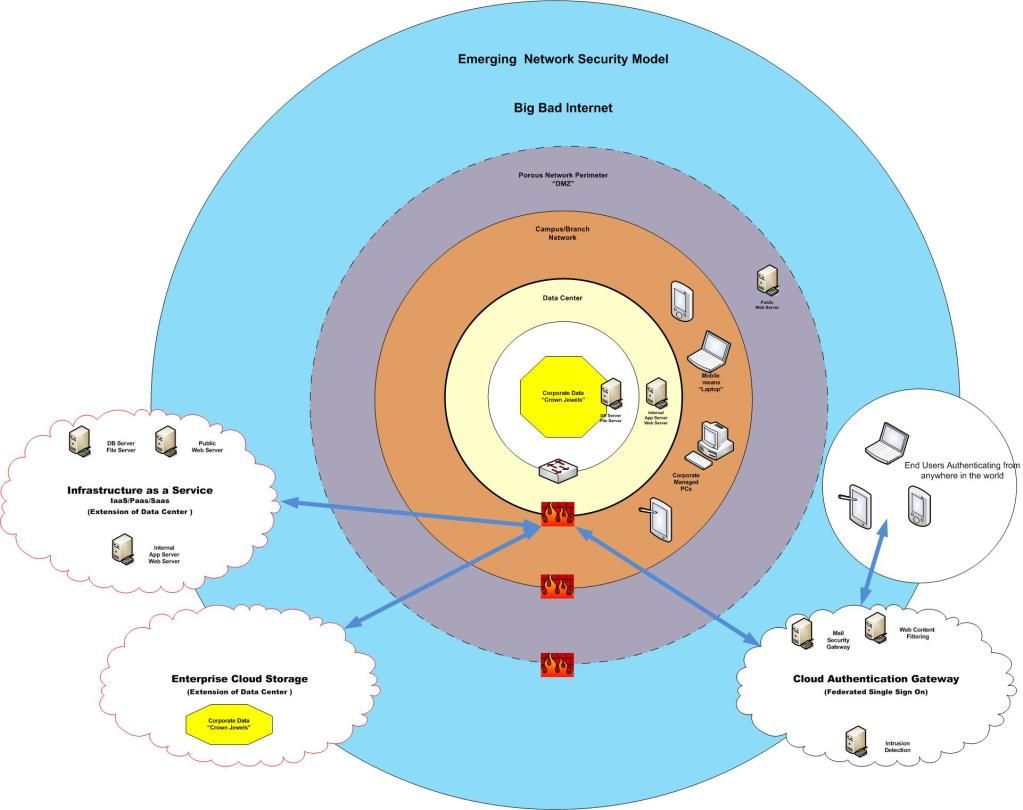
Today, and ever more relevant in the near future, those "perimeters" are becoming more and more porous.  Virtualization has taken the data center by storm, and Lines of Business are realizing the value in placing their new application or service with a "Cloud Provider".   All manner of valid reasons are mentioned, from "Business Continuity" and "Reducing Capital Expenditures", to "Time to Market".  

Traditional data center services are now comoditized on the public Internet.  Getting a Virtual Web or Database Server up and running these days, in either Windows or Linux variants is a mere matter of minutes.  Email and File Transfer Services are but a click away.  Storage... Gigs of storage... are FREE for the taking!

Regardless of the reason, your data center is expanding beyond your bricks and mortar controls.  Many call this the Shrinking Perimeter. (Here, and Here, and Here,)   Firewalls at the edge of your network are no longer adequate, and provide for a false sense of comfort.


To add Insult to Injury, Your end users are getting restless.  They no longer want to wait for your technology refresh cycles to bring them the newest, last year's PC.  They want access to their applications and information from the latest technology on the Planet, and will fund that purchase themseleves just for the privilege.

BYOD is here already, in one form or another. Gauranteed that your Executives are already using the latest iPad, iPhones, Samsung Galaxy, or Blackberry Playbook.  Go ahead!  Tell me I'm wrong!  Even if you have not made provisions for them to connect, they are in your offices, in your campuses, in your Data centers.

Please forgive me, but I will get into the complexities of Mobile Management (Mobile Device Management , vs Mobile Application Management , vs Mobile Data Management) in another article... 

Where's there's a Mobile Hotspot there's a way.... 
I'm just saying...


In the very near future, if it hasn't happed to you already, you will have to manage end users connecting from a multitude of diverse devices, from anywhere they are in the world, to your corporate applications..... Which of course also reside anywhere in the world.


Your role in all of this, even in the face of security, is to be an enabler.  Stand in their way, and they will surely find the path around you. 


Don't take my word for it.  Go talk to your lines of business.  I'm sure they have already engaged the likes of Salesforce, Amazon, Workday, Box, IBM Cloud Storage.  Validate this in your URL filter logs...  They are going there already.


So.... Give them what they want, in a way that allows you to maintain your controls. 

Lock down access to your servers and data on the system itself!  Keep your Data Security as close to the data as possible.

Then, entertain the ability to stretch outside of the concrete that houses your data center. Make external Cloud providers a part of your roadmap, a part of your delivery model where the appropriate controls can be maintained, regardless of geography.

Negotiate a Master Services Agreement with a reputable Cloud Storage Provider, such that YOU maintain the encryption keys, and can facilitate user provisioning  / deprovisioning yourself.  Make sure that the provider can comply with your Corporate regulatory requirements, such as scheduled security assessments/audits. 

Make sure that your Cloud providers can feed appropriate logging and alerting to your Security Operations Center!

Likewise, find a suitable Provider for Infrastructure, Platform, and Software services, and negotiate an Enterprise Relationship with them.   Then provide these options, withing your controls framework, to your users.

Simply provide for the path of least resistance, while embedding all of the controls required to manage these providers.


Tuesday, 15 January 2013

Data Loss Prevention: A Layered Aproach is Best.

DLP, or Data Loss Prevention is the practise (some say art) of identifying and remediating the loss or leakage of "sensitive data" from the Corporate network.  Sensitive data can be anything that is not classified as "Public Information", from Corporate Financials, to customer Personally Identifiable Information.

Data loss can be through theft, accident, negligence, or ignorance.  There are a ton of articles available on Data Theft. Whether it be disgruntled employees, external hackers, or botnet installation, data is stolen becasue it has value. Period.
According to a 2012 Verison Business report on Data Theft, we see the following:

          WHO IS BEHIND DATA BREACHES?
  • 98%      stemmed from external agents (+6%)
  • 4%        implicated internal employees (-13%)
  • <1%     committed by business partners (<>)
  • 58%     of all data theft tied to activist groups

HOW DO BREACHES OCCUR?
  • 81%     utilized some form of hacking (+31%)
  • 69%     incorporated malware (+20%)
  • 10%     involved physical attacks (-19%)
  • 7%      employed social tactics (-4%)
  • 5%      resulted from privilege misuse (-12%)

 
A good starting point for any Data Loss discussion, is to Assume that you have already been breached, and plan your management and containment strategy.


Lets dispel a bit of fantasy here...
No Data Loss Prevention system on the planet can or will stop all data leakage.  

If that's what they're selling you, turn and run.  The only way to stop all data leakage is to NEVER STORE ANYTHING, and Certainly DO NOT TRANSMIT ANYTHING.   You know...
The only secure computer is one that's unplugged, locked in a safe, and buried 20 feet under the ground in a secret location... and I'm not even too sure about that one.—Dennis Hughes, FBI


All existing DLP solutions use one of two methods to identify sensitive data.  The "Precise" method relies on some type of tagging of the data in question.  Now this can be as easy as "Anything coming from this database",  or "This column in this table", "this field in this record type", "this folder on this share", or "this LUN on the SAN".  

The "Precise" method of DLP will stop data from inappropriately leaving it's known source.  And more sophisticated systems *may* actually have signatures (hash files) of all the data on those known stores to match against data in flight, to ensure a copy of the data doesn't leave.  Neither would stop a legitimate request for the data being screen captured and sent off separately or the data being repackaged in a different format and sent out.

The "Imprecise" method relies on signatures, meta-data, regular expressions, statistical analysis, or heuristics to watch the network egress points and make educated decisions on whether to allow traffic to pass, challenge the sender, or just block the traffic.


Data exists in three states "At Rest", "In Use", and "In Motion":

To implement an appropriate level of Data Loss Protection, you must tackle all aspects of data at rest, in use, and in motion. 

Data At Rest:
Typically data at rest (static data stored or archived on a file share, in a database table, or in an email system, for example) is protected from innapropriate access by Operating System level access controls. This type of control relies on group or role memberships.  You may be given the ability to read a file, read and update, or no access at all.  Most files within a folder share the same permissions, so the permissions folders themselves dictate the level of access per role. 
Additional to this, depending on the type of sensitive data in question, you may want to actually encrypt the data or the container it's stored in. In the case of Corporate Removeable Media, Laptops, or Mobile devices these MUST be encrypted as part of the standard build process.  Laptop theft or loss of a USB Memory stick without such encryption could cause your company considerable reputational, financial or legal damage.

Data in Use:
Data in use, shares much of the same features of data at rest, except that it most commonly refers to dynamic data that is changing frequently, and potentially residing on end point systems as well as in the data center systems.

Data in use can be protected through the use of End Point DLP solutions as well as those controls in place for Data At Rest.

Data in Motion:
Once data has been accessed by a user, and is "sent" somewhere via email, file transfer, uploaded to a website (Cloud Storage) it is considered to be "in motion".

At this point we need to heavility lean on "Perimeter  Data Loss Prevention".  Your perimeter is typically considered the edge of your network, protected by a firewall which connects your network to the Internet. Here, you will typically see data leaving via email, Instant Messaging, ftp, and web transfer.  A perimeter solution must account for these plus any other method that data may leak outside of your network.   There are many strong point solutions out there that tackle one or more of these Perimeter Data Loss vectors by such reputable security providers as Symantec, WebSense, Cisco, Fortinet, McAfee, Sophos, etc...          

So, to sum up quickly:  To reduce your risk of data loss, you must tackle the problem in a layered approach, through Policy and Awareness, at the endpoint devices,  the data center, and on the perimeter. 
  Endpoint Protection: 
Data Center Protection:
 Perimeter Protection:

Finally... Create a Breach Incident Plan.  
Have the necessary tools, policies, training, contacts, and escalation in place, and test it regularly. Make sure that you have engaged Legal, Compliance, Brand, and your Corporate Communications teams and that they all know and can follow the plan. 


Obligatory links:

http://csrc.nist.gov/groups/SNS/rbac/documents/data-loss.pdf
http://www.symantec.com/data-leak-prevention
http://www.rsa.com/products/DLP/ds/11668_RSA_DLP_Cisco_Integration.pdf
http://www.fortinet.com/solutions/data_loss_prevention.html
http://www.mydlp.com/
http://www.ey.com/Publication/vwLUAssets/Keeping_your_sensitive_data_out_of_the_public_domain/$FILE/Data_loss_prevention_Keeping_your_sensitive_data_out_of_the_public_domain.pdf

Monday, 14 January 2013

Active Directory: UNIX integration just makes sense!

Ok guys, put your OS bigotry aside for a moment, and think this through. 

All large enterprises inherently have an extensive Active Directory infrastructure to services from simply consolidated management of Windows Servers, to managing the user accounts of your employees on their workstations and shared storage, to providing authentication to VPN and applications. We have all invested heavily on redundancy and security, following Microsoft's guidelines and practises for managing this Enterprise Directory Service.

All large enterprises also have extensive UNIX or Linux implementations in the data centre. Some enterprises are now finding out about the features and functionality that a Apple MAC workstation can bring to the front office.  Yes, UNIX Directory Services are also decades old, but to date most UNIX systems are typically managed with their own  /etc/passwd: /etc/group user stores.  Separate profiles are maintained per server, making provisioning or worse *deprovisioning* a bit of a nightmare.

Imagine the ability to enforce user id synchronization across ALL of your systems, not just Windows!  Imagine being able to update a password policy or "Business Use" message across all systems and users... Not just Windows.   Imaging having all of your security logging and reporting in one place!   Imagine being able to offload "user management" from your UNIX sysadmins!


Active Directory is arguably the most prevalent Network Directory Service on the planet. It has matured significantly over the past 20 some odd years, and provides a more robust and secure Enterprise Directory Service than NIS or raw LDAP.

AD facilitates management of host devices as well as user and service accounts on them.  An Active Directory Domain controller can provide DNS/DHCP and NTP time services with simple intuitive GUI interfaces. Business Continuity or Disaster Recovery are inherent in it's redundant replication design. It is extensible,  and more importantly had strong provisions for auditing and logging.  Active Directory Group Policy management is fully supported for both  UNIX hosts and users in most commercial integration suites.

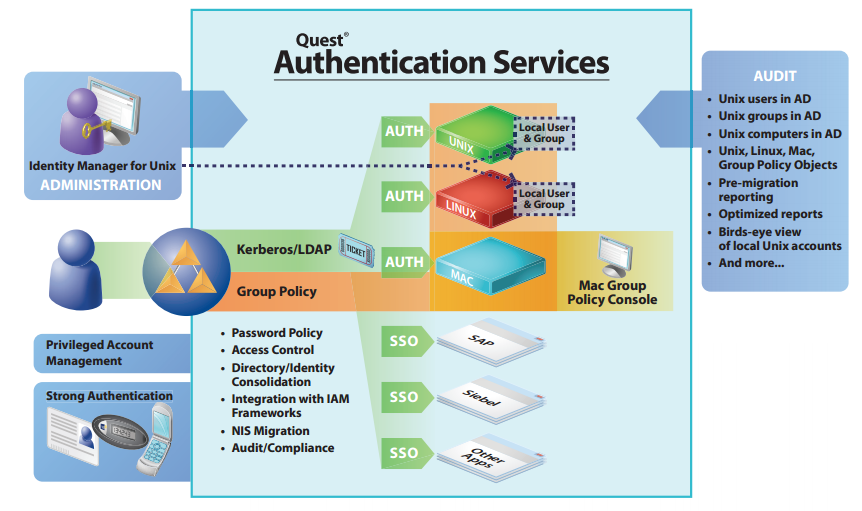
For the past dozen years or so, I have been watching the various vendors in the UNIX space that provide Active Directory integration, and they have all come a long way.  They have all taken the burden out of what used to be a very painful, full day exercise, to enroll a UNIX server into AD. They have also made it relatively easy to synchronize users in the UNIX system with their associated Active Directory accounts.


Today, the process of enrolling a UNIX server into Active Directory  is as easy as finding the UNIX host in the Management console of your favorite tool (I'll get into the players in this space shortly), validating that the ssh is installed on the HOST, and that you have enough privilege to install the kerberos authentication module, and that the HOST can reach the directory service through the standard MS AD ports.  


You then confirm that you want the machine to "join" the domain, and it will automatically be placed into the appropriate OU for UNIX servers in your AD structure.   You can then select how you want user accounts to me merged/migrated with Active Directory.

The easiest way is to associate your users' Windows credentials with their user account in UNIX.  This simple, guided process is launched the first time a user authenticates to the UNIX platform after enrollment.   They will be asked for their UNIX credentials first, then asked to valide that the Active Directory account provided is accurate.  They will then be asked to validate their Active Directory credentials.  From this point forward, when that user logs into the UNIX machine, they will be authenticating back to the AD store, and all logon/logoff, and password reset functionality will be provided for by the Enterprise Active Directory.

The next step is migrating your UNIX groups into Active Directory.  In a similar process, you can migrate entire UNIX groups over to your Active Directory, or alternately find an existing Security Group within Active Directory and merge the two.

Take advantage of the Infrastructure you already own and manage, while reducing your UNIX Identity and Access Management workload.


Here, in no particular order, are the products that will open this rich world of administration bliss:


Coming soon to your favorite blog (This one of course!)  Replace your Windows Domain Controllers with CENTOS/SAMBA4 and never look back!


http://www.interopsystems.com/learningcenter/Native_LDAP_native_Kerberos_and_AD_services.htm