Search This Blog

Friday, 10 October 2014

Toronto based PCI Compliance upstart brings single solution to Voice-Web-POS

As published in ITWorldCanada.com
(http://www.itworldcanada.com/blog/toronto-upstart-brings-tokenization-protection-to-uc-web-pos/98109)


The standard Information Security mantra is to Protect Sensitive Data Where It Resides, but I posit that with the number of Security Breaches being publicized these days, we should quickly move to Remove Sensitive Data Where Not Required.

I know that I'm not new to this train-of-thought, but the cost of non-compliance is growing exponentially.  Financial Damage can be insured against... Reputational damage cannot.

In a previous article, I spoke about the need for complementing industry standard Encryption with a process called Tokenization. While encryption is intended to hide the actual data in a manner that is reversible, tokenization replaces the sensitive data with a tag or token, preserving only the format or schema of the data.

The Payment Card Industry has clearly stated that any piece of infrastructure that is accessible by network to those systems that either process or store PCI (Credit Card) Data are "in scope" for PCI compliance. This means that the scope an an annual compliance audit could essentially include every device on your network....


Many software companies have taken on portions of the tokenization challenge.  Originally, they provided API's and libraries for developers to embed tokenization into applications, or bootstrap tokenization onto existing applications.  These did little though to reduce the scope of your PCI compliance, and in many cases raised the complexity of the environment.

Next came the tokenization broker appliances, which were housed in your data center to communicate with your Point Of Sale and payment processing systems. Although this reduces scope and complexity of your PCI environment, it still leaves a large amount of your environment "in scope" for PCI, and the "crown jewels" were still onsite, albeit in a very robust data vault.
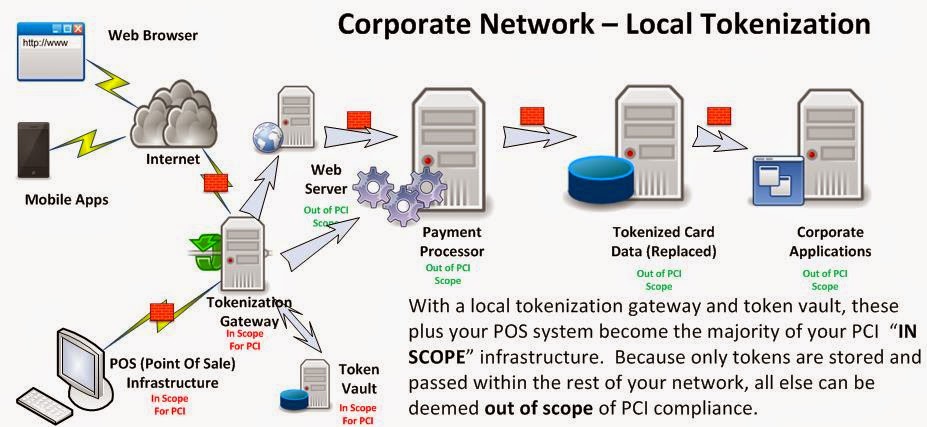


With a tokenization solution outsourced via a SaaS model, sensitive data such as credit card numbers are not stored in your system. There is nothing to obtain during a breach.  Full stop. Let someone else take on the burden of PCI compliance.


Toronto's own Blueline Data has taken on the challenge, by creating a novel tokenization gateway solution that not only covers your Web and Point Of Sale transaction systems, but your Telephony and Unified Communications Infrastructure as well. In fact, you can define any type of digital data sequence to be protected for SOX / HIPAA / OSFI  or any other regulatory requirement and tokenize it as well.  They call their strategy "Assurance through Deterrence". By removing the sensitive data from your environment, they deter would-be attackers from investing in Advanced Persistent Attacks to breach your environment.


The PCI-DSS covers 6 areas of protection with 12 Specific Requirements.  Blueline's unique offering covers 7 of these requirements, across 5 areas!


The Blueline environment itself, subject to PCI audit, complies with the DSS 3.0 requirements. It offers a unique and low-risk approach to protect your IT assets, such as financial records, intellectual property, employee details and data entrusted to you by customers or third parties. The combined benefit is the highest security and the lowest cost.


Their approach to format preserving and diskless tokenization at the perimeter, essentially creates a Zero Vector of Attack™ computing environment, which is easy to operate but not feasible to exploit.

I believe that their forward thinking initiative of providing tokenization services to non-traditional channels of data flow sets them aside from the competitors in this market.  I'm anxious to watch this company flourish amid the weekly disclosures of Sensitive Data Breaches.


From the Blueline Data Website:
Blueline Data Products and Services
  • Strategic Assessment – a review with your team to determine what Blueline Solutions would be most impactful with your business requirements and technology investments
  • Solution Services compliance delivery guidance and market insight (call center, financial services, healthcare, retail, etc.) 
  • Voice Gateway - encompasses security encryption around voice channels that send and receive sensitive data, to eliminate fraud by capturing, masking and encrypting confidential signaling information on the  path. The encrypted sensitive datagrams are securely rendered to allow fully protected  processing, eliminating the possibility of a call to get compromised.
  • Retail Gateway - offers integration with any point-of-sale (POS) device in a secure and compliant manner, and allows point-to-point encryption of client's personal information from any payment media. This applies to any transaction or function where a client is required to use a payment terminal for credit or debit card processing expected to integrate with the backend data repository. There is no need for manual card data entry for proof of identity, payment guarantee or other purposes.
  • Data Gateway - provides organizations with a single access point-of-presence to transaction services, such as secure banking and financial networks, mobile application payment delivery, or secure web bill presentment. It allows you centrally and uniformly govern all traffic of financial interest, whether it is exchanged between your partner organizations or with your clientele involved in the transaction flow.  Sensitive data transfer is fully protected to meet the highest security and privacy standards.
  • Data Vault - presents a conversion engine that takes any sensitive data element – whether it is SSN or SIN number, driver's license, credit or debit card, or patient record – and encrypts such information in a format-preserving manner.  The data is tokenized and optionally stored in a secure "digital vault" that you can access as you need, provided that sufficient privileges are presented.  It fully removes sensitive payment and personal information from your computing systems and digital media.


References:
PCI Security Standards: Information Supplement: PCI DSS Tokenization Guidelines 
SANS: Six Ways to Reduce PCI DSS Audit Scope by Tokenizing Cardholder data 
http://bluelinex.com/resources/blp204_pci_compliance_sheet.pdf
Blueline Services: Data Tokenization 
Securosis: Understanding and Selecting a Tokenization Solution
Shift4: A detailed look at tokenization and it's Advantages over Encryption
TokenEX: Outsourcing Tokenization vs. On-Premise Data Security 
http://www.mashery.com/api-gateway/tokenization
http://www.bankinfosecurity.com/whitepapers/using-pci-dss-criteria-for-pii-protection-w-947
Payment Card Industry (PCI) Data Security Standard
Protegrity Tokenization Securing Sensitive Data for PCI, HIPAA and Other Data Security Initiatives
Protegrity: Vaultless Tokenization
Protegrity: Vaultless Tokenization Fact Sheet.
Cybersource: Reducing PCI Compliance Scope: Take the Data Out
Intel: PCI DSS Tokenization Buyer’s Guide 


Saturday, 4 October 2014

The Demise of Excess Access - A eulogy for traditional VPN

(as published in Itworldcanada.ca)
http://www.itworldcanada.com/blog/the-demise-of-excess-access-a-eulogy-for-traditional-vpn/96655
 
Once upon a time, in a world where mobile meant "laptop" or "remote home PC", Corporate network connectivity came in two flavours:  1) Dial-up modem, with it's clunky protocols and achingly slow speeds, and  2) Corporate VPN client over Internet. 


Internet VPN seemed like a godsend in comparison to Dial-up. Basically it's purpose was to provide a secure network connection between your remote PC/Laptop (the entire device) and your Corporate network. Whether old-school IPSec or the more recent SSL encapulation, the transport was secured. Username/password, and optionally a One Time password or Security Token would be used to provide Two Factor Authentication (2fa). 

Seems secure? Right?  I mean, authentication and transport security are covered.. what else is there?

Dynamic Access Policies were then created to define a set of rules, similar to firewall rules, that describe what applications (port/protocol) on the remote  users PC could talk to what servers/services in the data center.  

In general, this worked fine if there were less than a hundred employees in the company, you had no third party users, no application was ever upgraded, and nobody changed roles.

In practice, policies are defined loosely to allow for Convenience rather than Security. Realistically, large numbers of PC's have unfettered access to the corporate network, as if they were sitting at their desk.  (We'll get into THAT issue in a future blog.)
 
Well then we started worrying about Viruses, worms, trojans... basically Malware residing on the remote PC. What stops them from propagating into the corporate network? How do we know the end user has applied all the appropriate patches, and is running the most current AntiMalware (And that it's signatures are up to date!)?

Network Access Control was added to the VPN client to assess the endpoint (laptop or PC) and determine it's "security posture" based on patch status and running AntiMalware applications.

But this wasn't enough to satisfy the Audit or Risk departments, so you had to install Intrusion prevention appliances and network anti-malware inside the network to remediate anything that was missed on the endpoint... 

AND... we still have all those remote endpoints, with pretty much open access to our entire corporate network...


In the meantime...

As a result of the explosion of Tablets and smart phones, alternate solutions arose for many of the very services we require daily as part of our VPN dependency.  An entire industry arose to service BYOD or Bring Your Own Device. Tablets and Smart phones are managed through various means, but typically now applications running on those devices are segregated or "sandboxed" from one another to reduce the risk of eavesdropping and data capture.


The Future of Enterprise Remote Connectivity:

Today, there is absolutely NO REASON to use VPN for your Corporate Email service. All enterprise grade email clients utilize strong local authentication, integrate with industry standard Single Sign On, and use strong transport encryption.  Whether you are an Exchange/Outlook or Domino/Notes user, for this use case, VPN is merely a hindrance to productivity, and a complexity that costs your company both in Capex and Opex.

Similarly, there is absolutely NO REASON to use VPN for your Corporate VOIP or Instant messaging.  These services also integrate cleanly into Enterprise Single Sign On, and provide for secured, encrypted transport.

If you NEED, and I stress NEED, a corporate desktop, then there are many highly secure NON VPN solutions available, such as Microsoft's Remote Desktop GatewayCitrix Access Gateway, or VDI via VMWare's Horizon View.   Some Legacy Applications may still require this model for a few years to come. 


Are you using Cloud Services through VPN?   If you are using VPN to get to your corporate Cloud applications like SalesForce, SAP, Concur,ServiceNow, Microsoft Office 365, or Taleo, you are simply adding an extra network loop to an already secured connection. These services already use Enterprise Single Sign On, and provide for secured, encrypted transport.

Containerization technologies like Bromium will transform application development for the laptop environment, and allow Laptops to join the realm of Managed Devices in a Mobile Device Strategy.  Soon your Enterprise Mobile Application Management suite will package and manage apps for Windows and OSX as well as iOS, Blackberry and Android.  

Write Once, Run Anywhere has been a mantra used by vendors such as Oracle for well over a decade.  It is finally approaching a maturity level that will see it in action everywhere.  Most large applications today are being developed using frameworks that abstract the presentation layer, and allow the designers to write various "front ends" specific to the device, while the rest of the application is identical across platforms.


So aren't you just replacing one remote access solution with several niche appliances?
In a quick answer, sort of... Service specific appliances, such as SIP gateways provide a much more robust and secure means on managing this specific traffic, and many companies already have them in place for internal branch to branch connectivity.

I'm not suggesting that the future of remote connectivity is free and unfettered access to your Corporate Network.  Quite the opposite in fact.  I'm suggesting that 2/3 of what employees access today via traditional VPN, already has  BETTER and MORE SECURE means of connectivity through their native infrastructure, and that the remaining 1/3 is on track to be replaced with  technologies that will allow the remote applications to be secured on any device from phone to tablet to laptop.

In today's world of high profile Data Breaches, Zero Day Attacks, and  Significant Operating System vulnerabilities, we cannot allow the Excess Access that traditional VPN affords.


References:

WindowsSecurity.com: Death of VPN
VPN Clients are Dead in the Cloud 
The Evolution …. and Death of the VPN 
The Death of the VPN 

Microsoft Technet: Overview of Remote Desktop Gateway 
App Wrapping is A Form of Containerization 
Forrester: Containerization Vs. App Wrapping - The Tale Of The Tape 


Thursday, 18 September 2014

Protecting Sensitive Data with Tokenization - Overview of Tokenization vs Encryption


For the protection of sensitive data, Tokenization is every bit as important as data Encryption.

This blog entry is also being hosted over on the ITWorldCanada site. 
Thank you ITWorldCanada.

We are all very familiar with the requirement to encrypt sensitive data at rest as well as in transit.  We have many tools that perform these functions for us. Our database systems allow for encryption as granular as field, or as course as table or entire database.  Network file systems likewise allow for various degrees of encryption.  All of our tools for moving, viewing, editing data have the ability to transport data encrypted via SSL/TLS or SCP.

Encryption, however, is intended to be reversed.  Sensitive data is still resident in the filestore/database, but in an obfuscated  manner, meant to be decrypted for later use.  Backups of your data still contain a version of your original data.  Transaction servers working on this data may have copies of sensitive data in memory while processing. 

Recently we saw in the Target breach, that memory resident data is not secure if the host is compromised.  Memory scraping tools are among the payloads commonly delivered in a malware incursion.

As long as the valuable sensitive data such as Personally Identifiable Information (PII) or Payment Card Industry (PCI) resides in your facility, or is transmitted across your network, there is reason for a malicious threat agent to want to breach your network and obtain that information.
Additionally, the cost and time involved in regulatory compliance to ensure and attest to the security of that sensitive data can be daunting.   For PCI data, there are 12 rigorous Payment Card Industry Card Data Security Standard (PCI DSS) requirements that have to be signed off on annually.

For the rest of this discussion, I’m going to focus on credit card (PCI) data, as it is nearest and dearest to my field of experience, but the process is similar regardless of the type of sensitive data.

Tokenization is not encryption

Tokenization completely removes sensitive data from your network, and replaces it with a format preserving unique placeholder or  “token”.  You no longer store an encrypted copy of the original data.  You no longer transmit an encrypted copy of the original data.  Transaction servers no longer keep a copy of the sensitive data in their memory.

With no data to steal, any breach would prove fruitless.

The token value is randomly generated, but typically designed to retain the original format, ie: Credit card tokens retain the same length as a valid credit card number, and pass the same checksum validation algorithm as an actual credit card number, but cannot be reverse engineered to acquire the original credit card number.

Don’t get me wrong, the actual data does get stored somewhere, but typically in an offsite, purpose-built, highly secure, managed and monitored vault.

In the case of PCI compliance, this vault and it’s associated security mechanisms are the only infrastructure that requires review/attestation.  The rest of your network, including the transaction servers become outside the scope of review.

Neither Tokenization nor Encryption is a silver bullet in and of itself, but the appropriate mix of each will greatly reduce your overall risk exposure, and potentially keep your name off the next Breach Report.

Also Read:  PCI DSS Cloud Computing Guidelines – Overview


References:
https://www.pcisecuritystandards.org/security_standards/index.php
Securosis: Tokenization Guidance: How to reduce PCI compliance costs
PCI Security Standards Coucil: PCI Data Security Standard (PCI DSS)
Securosis: Tokenization vs. Encryption: Options for Compliance, version 2 
Cardvault: Credit Card Tokenization 101 – And Why it’s Better than Encryption
3 Core PCI-DSS Tokenization Models- Choosing the right PCI-DSS Strategy
Encryption and Tokenization
Data Encryption and Tokenization: An Innovative One-Two Punch to Increase Data Security and Reduce the Challenges of PCI DSS Compliance
Paymetric: Tokenization Amplified
Tokenization is About More Than PCI Compliance
Tokenization: The PCI Guidance


Also Read My:  PCI DSS Cloud Computing Guidelines – Overview

Friday, 8 August 2014

What is DTLS or Datagram Transport Layer Security?

Otherwise known as Secure Real-time Transport Protocol, DTLS (Datagram Transport Layer Security) is used where low latency or "delay sensitive" data must be secured, such as Voice over IP, VPN, Video Conferencing, and various real-time and Massively Multiplayer Online Games.

Much as TLS (Transport Layer Security), a derivative of SSL  (Secure Socket Layer), is used to protect Internet traffic such as HTTPS, FTPS, and IMAPS from eavesdropping, DTLS provides the same reassurance that your delay sensitive streaming data is secured.


Most of today's client software for these protocols, such as Cisco's Anyconnect VPN client,  have DTLS already implemented.

DTLS is also used to secure the transmission control channels for various streaming protocols, such as Datagram Congestion Control Protocol (DCCP), Stream Control Transmission Protocol (SCTP), and Secure Real-time Transport Protocol (SRTP)


References:

The Design and Implementation of Datagram TLS
Wikipedia: Datagram Transport Layer Security
Wikipedia: Secure Real-time Transport Protocol
IETF: Suite B Profile for Datagram Transport Layer Security / Secure Real-time Transport Protocol
Wikipedia: Comparison of TLS implementations
IETF: RFC 6347 for  User Datagram Protocol (UDP)
IETF: RFC 5238 for  Datagram Congestion Control Protocol (DCCP),
IETF: RFC 6083 for  Stream Control Transmission Protocol (SCTP) encapsulation,
IETF: RFC 5764 for  Secure Real-time Transport Protocol (SRTP) 


Wednesday, 23 July 2014

Denial of Service? What is it, and how can we defend against it? - Executive Overview

I've been asked to write a higher level version of some of my blogs.  Apparently my writing is too technical... 


According to Prolexic (now part of Akamai), DDoS, or Distributed Denial of Service attacks are on the rise, and getting smarter. 

If you rely on an internet facing website or service to either bring in, or communicate with customers, there's a good chance that service will be disrupted or greatly impacted in the near future.

A Distributed Denial of Service attack is a method used by an individual or group that wishes to do harm against your company by essentially making your website inaccessible. New attack tools are readily available on the black market, and reports indicate that attack traffic is up 133% over this time last year.

By sending large quantities of traffic requests to your company website (tens of thousands of hits per second), the attackers basically overload the website's ability to respond and service legitimate customer requests.  If your website is down, you are not reaching customers, and not generating revenue.    Even a mild attack has the effect of slowing down your website to the point where customers may not want to use it. Corporate reputation may be at risk as a cause of such attack.

The primary way that businesses can and are protecting themselves against these DDoS attacks is through the use of Content Deliver Networks.  

(for a more technical overview, please see my blog on CDN: Content Delivery Networks in the Context of Security).

A Content Delivery Network, such as Akamai/Prolexic augments your corporate website service by mirroring your website through many webservers distributed globally on their own network.  Should a Distributed Denial of Service attack be launched against your website, the effect of that attack is spread across many, many servers. The result is a greatly reduced impact on the service provided to you customers. In most cases, the net slowdown is almost immeasurable.


 Introducing a CDN service to front your Critical Corporate websites not only makes sense, but will greatly enhance your Disaster Recovery and Business Continuity programme.


 Should you find your website under attack right now, please look into the following service from Akamai.

Emergency DDoS Protection Service to Stop a Cyber Attack


References:

Monday, 7 July 2014

FTP, SFTP, FTPS? What's the difference, and how the !@#$ do I secure them?

File Transfer (FTP) may be the single most insecure piece of infrastructure that any corporation has.  It's roots date back to the early 70's before encryption and transport security were of great concern. 

Many common malware attacks rely on unsecured FTP services within a company to stage and exfiltrate sensitive corporate data to unknown third parties.


There is little excuse for a company to be running vanilla FTP either inside their data center or especially over the Internet.  Secure file transfer protocols and standards have been around and fully supported SINCE THE TURN OF THE CENTURY!!!
 From the Tibco report: Understanding the Impact an FTP Data Breach Can Have on Your Business
"...what about the threat information contained on an unsecured
FTP server could pose to a business like yours? Consider a few other recent FTP
exposures:
  • CardSystems, who processed credit card transactions for nearly 120,000 merchants totaling more than $18 billion annually, were essentially forced out of business after 40 million identities were exposed. Amex and Visa told CardSystems that they would no longer do business with the company.
  • 54,000 records were stolen from Newcastle City Council
  • An unsecured document was exposed on the New Mexico Administrative Office of the Courts FTP server; it contained names, birth dates, SSNs, home addresses and other personal information of judicial branch employees.
  • The Hacker Webzine reports that Fox News had an exposed FTP connection linking out to Ziff Davis.
  • The personal information of uniformed service members and their family members were exposed on an FTP server while being processed by major Department of Defense (DoD) contractor SAIC. As many as 867,000 individuals may have been affected."

 
Lets take a minute to discuss the legacy FTP system, it's derivative FTPS, and the completely different SFTP.

FTP  (Do not use this EVER!)
The FTP (File Transfer Protocol) protocol was documented in 1971 as  RFC 114 and eventually evolved into RFC 959 , the FTP standard that all systems use today. It has been the workhorse of most corporate file transfer systems in production.

All current Server Operating Systems, whether Windows, Unix, Linux, MAC, or Mainframe come with a variant of an FTP service following RFC 959.
There are VERY many FTP client applications available for each and every Desktop, Laptop, Tablet and smartphone in existence, also complaint with RFC 959.    
(Did I mention that there is no reason in this day and age to use vanilla FTP, EVER?)

FTPS
Once companies and security consultants  realized the great risk that FTP exhibits by sending corporate data "in the clear" over the network, they proposed RFC 2228 (in 1997) to protect FTP data in transit using SSL encryption.  Aside from transport encryption the service is identical to FTP.  

FTPS transport encryption comes in two flavors Implicit, and ExplicitImplicit FTPS (Now pretty much obsolete) establishes an SSL or TLS session prior to exchanging data, over TCP ports 989(data)/990(control).  Explicit FTPS, the more common of the two, can use a single port for both encrypted and unencrypted data transfer.  The client initially establishes an unencrypted session, and if SSL/TLS is required, an AUTH TLS or AUTH SSL command is issued by the client to secure the control channel before sending credentials.

And then there's....

SFTP
Although regularly  confused with FTPS, SFTP is actually an application in the  SSH  protocol suite.  RFC4253 "The Secure Shell (SSH) Transport Layer Protocol"  defines the security model of this Secure File Transfer Protocol.   Whereas FTPS relies on SSL (X.509) Certificates with their associated PKI requirements to secure the session, SFTP uses Diffie-Hellman Key Exchange to manage an asymmetric pair of keys to secure the session. All UNIX based systems (Including MAC, Linux, and Mainframe) come with SSH preinstalled.   There are many variants available for Windows as well.


Both SFTP and FTPS are fully scriptable (ie: support automation). Either one is acceptable, depending on the application, and Operating System at hand.

Up to this point, we've discussed securing the Data Transport, or "Data in Motion", but what about securing the "Data at Rest"?  How do we secure the file transfer directory structure?

In simplest terms, strong user/group access controls are required on FTP service directory structure.  I'm going to link to some vendor recommendation sites here:

Disable Anonymous FTP!  Sorry, but you should know who is connecting to your file server.


But, for the best level of security
run SFTP (ok, even FTPS) inside a chroot jail or sandbox

In the UNIX world (Including MAC, Linux, Mainframe), a chroot is a virtual filesystem that can be associated with a specific service, in this case SFTP.  A new protected replica of the OS folders and files relevant to running that service are created, and all files uploaded/downloaded via this service reside inside the protection of the "jail"

In Windows, the practice is typically called "Sandboxing" or Application Virtualization:
    (excerpt from Microsoft: Transform applications into managed services )
"In a physical environment, every application depends on its OS for a range of services, including memory allocation, device drivers, and much more. Incompatibilities between an application and its operating system can be addressed by either server virtualization or presentation virtualization; but for incompatibilities between two applications installed on the same instance of an OS, you need Application Virtualization.  "


And last but CERTAINLY not least:   Scan your network for rogue FTP services (Both Data Center as well as Workstation space) regularly (FREQUENTLY), find them physically, and shut them down!


References:
EITF.ORG: RFC913 - Simple File Transfer Protocol
EITF.ORG: RFC914 - A File Transfer Protocol
EITF.ORG: RFC959 - FILE TRANSFER PROTOCOL (FTP)
EITF.ORG: RFC2228 - FTP Security Extensions
IETF.ORG: secsh-filexfer (SFTP)
IETF.ORG: How to Use Anonymous FTP   -- DON'T!

IANA.ORG: Service Name and Transport Protocol Port Number Registry

TIBCO: Understanding the Impact an FTP Data Breach Can Have on Your Business
Understanding Key Differences Between FTP, FTPS and SFTP
SFTP versus FTPS – What is the best protocol for secure FTP? 
What’s the Difference? FTP, SFTP, and FTP/S 
Filezilla: SFTP specifications
http://winscp.net/eng/docs/ftps 
Using FTP? Know the Risks
wikipedia.org: Public key infrastructure 
SANS: Clear Text Password Risk Assessment Documentation
SFTP chroot 
https://wiki.archlinux.org/index.php/Change_Root
http://www.unixwiz.net/techtips/chroot-practices.html 
Oracle: Configuring and Using Chroot Jails
Winquota: Winjail 
Microsoft: Application Virtualization 


Friday, 4 July 2014

Advanced Persistent Threats, the Killchain, and FireEye...


Over the past several years, our Defence In Depth strategy has been working overtime to keep up with Advanced Persistent Threats and Zero Day Exploits. Firewalls, Intrusion Prevention, URL filtering, and AntiVirus are no longer sufficient to stave off a data breach.

Ask any Military Tactician, and they will tell you that the Defence in Depth strategy is intended to merely slow down an attacker, to buy time, and potentially exhaust the attackers resources.  In and of itself, this strategy, given time, will fall.


According to a report by analyst firm Gartner, adding more layers of defense will not necessarily improve protection from targeted threats. What is needed, the analysts say, is the evolution of better security controls.

A new way of thinking needs to be employed... A counter methodology needs to be embedded in the corporate security culture, and tooling needs to be put in place to proactively remediate against today's type of attacks.

RSA: The Malware Factory and Massive Morphing Malware


We've been hearing more and more about Advanced Persistent Threats or Advanced Volatile Threats or just Advanced Threats.. where a Threat Actor  (person/agency/government) is intent on getting access to your confidential or sensitive data, and has the time and resources to invest in a calculated exercise to achieve this goal. Malicious tools have evolved to the point where you can automate the build of thousands of variants to piece of malware, and deliver each one to a specific person or machine.  No Signature based AntiVirus on the planet would catch a one-off piece of malicious code.  

Enter FireEye® with it's  Advanced Malware Protection appliances.  Established in 2004 as a security research company, they came up with the novel concept of using Virtualization to launch and assess the activity of "payloads" such as email attachments or downloaded files.  Any attachment, executable, zip file etc.. is run within a series of sanitized virtual environments, and any unexpected activity would be flagged for analysis. One of the malicious activities identified early on was the "callback" to botnet Command and Control servers.  

As a valuable byproduct of the development of this system, FireEye amassed a large database of "known" Threat Actors.  This intelligence is then used to block any subsequent activities to those Threat Actors across FireEye's entire customer base.


When installed inline at the Internet landing zone, FireEye (Both Mail and Web) adds a proactive member to your existing reactive firewall, IPS, and URL filters.

“Advanced threats against enterprises today thrive on exploiting the unknown and evading blocking techniques thanks to a growing, global marketplace for selling software vulnerabilities,” said Zheng Bu, vice president of security research, FireEye. “The old security model of tracking known threats and relying on signature-based solutions are simply powerless to stop zero-day threats. The number of zero-day attacks profiled in the paper highlight why organizations need to take a new approach to security by combining next-generation technology with human expertise.”


So we have a proactive tool to identify anomalous behaviour, and identify/prevent Zero-day attacks... Now what?


A methodology first described by Lockheed Martin, the Cyber "Kill Chain" can be used to identify, and proactively mitigate and remediate against these advanced security threats.


From the Lockheed Martin paper:
(I added the Red Text to show the result of implementing FireEye)
  1. Reconnaissance - Research, identification and selection of targets, often represented as crawling Internet websites such as conference proceedings and mailing lists for email addresses, social relationships, or information on specific technologies. 
  • If the reconnaissance is done as a form of phishing exercise, there will likely be links in the email back to a C&C server on the Internet.  Any attempt to connect to that network (ie: clicking the link) would be blocked by FireEye and generate an alert to the SIEM.
  1. Weaponization - Coupling a remote access trojan with an exploit into a deliverable payload, typically by means of an automated tool (weaponizer). Increasingly, client application data files such as Adobe Portable Document Format (PDF) or Microsoft Office documents serve as the weaponized deliverable. 
  • Email attachments as well as files downloaded from the Internet will be assessed by FireEye (Executed in several virtual sandboxes), and if deemed malicious, will alert the SIEM, block callbacks, and prevent further downloads.
  1. Delivery - Transmission of the weapon to the targeted environment. The three most prevalent delivery vectors for weaponized payloads by APT actors, as observed by the Lockheed Martin Computer Incident Response Team (LM-CIRT) for the years 2004-2010, are email attachments, websites, and USB removable media. 
  •  As in Weaponization, Email attachments as well as files downloaded from the Internet will be assessed by FireEye (Executed in several virtual sandboxes), and if deemed malicious, will alert the SIEM, block callbacks, and prevent further downloads.
  1. Exploitation - After the weapon is delivered to victim host, exploitation triggers intruders’ code. Most often, exploitation targets an application or operating system vulnerability, but it could also more simply exploit the users themselves or leverage an operating system feature that auto-executes code.Installation - Installation of a remote access trojan or backdoor on the victim system allows the adversary to maintain persistence inside the environment. 
  • *IF* a malicious application DOES get installed out of band, ie: from CD or USB drive, any callbacks would be blocked by FireEye, raising an alert in SIEM, and preventing subsequent communication with the C&C and subsequent downloads.
  • Host Protection tools on your servers are HIGHLY recommended to prevent installation and  execution of any such malicious applications in the first place.
  1. Installation - Installation of a remote access trojan or backdoor on the victim system allows the adversary to maintain persistence inside the environment.
  • Host Protection tools on your servers are HIGHLY recommended to prevent installation and execution of any such malicious applications in the first place.
  1. Command and Control (C2) - Typically, compromised hosts must beacon outbound to an Internet controller server to establish a C2 channel. APT malware especially requires manual interaction rather than conduct activity automatically. Once the C2 channel establishes, intruders have “hands on the keyboard” access inside the target environment.
  • FireEye will block callbacks to the Command and Control, and prevent further downloads. 
  1. Actions on Objectives - Only now, after progressing through the first six phases, can intruders take actions to achieve their original objectives. Typically, this objective is data exfiltration which involves collecting, encrypting and extracting information from the victim environment; violations of data integrity or availability are potential objectives as well. Alternatively, the intruders may only desire access to the initial victim box for use as a hop point to compromise additional systems and move laterally inside the network.
  •  Malicious code will not be able to exfiltrate data, if callbacks are blocked, and the Command and Control IP addresses are blocked.  Again, any attempt to do so, would send alerts to the SIEM while still being blocked.


I am not suggesting that FireEye in and of itself is a full Malware mitigation strategy.  I HIGHLY recommend that you also install Host Protection tools on your servers, and run  network firewall, Intrusion Prevention, layer two segregation, and Email/URL filtering as well. 

With FireEye installed in your internet egress, inspecting both Mail and Web content, you significantly reduce the risk of malware infection and subsequent Data Breach by phishing emails or drive by downloads.


References:


Dell Secureworks: Managed FireEye - Advanced Malware Protection Service
Gartner: Best-Practices-for-Mitigating-Advanced-Persistent-Threats CISCO: Advanced Malware Protection
DarkReading: FireEye Releases Comprehensive Analysis of 2013 Zero-day Attacks; Impact on Security Models 
RSA: The Malware Factory and Massive Morphing Malware 
http://www.symantec.com/theme.jsp?themeid=apt-infographic-1
Email Security (FireEye EX Series)
FireEye: Cybersecurity's Maginot Line A real World Assessment
FireEye: Advanced Threat Report 2013
FireEye: Multi-Vector Virtual Execution (MVX) engine 
http://newsroNSS Labs Ranks Cisco Advanced Malware Protection Among Top Breach Detection Systemsom.cisco.com/press-release-content?articleId=1403242
Paloalto: Advanced Persistent Threats
OWASP: Defense_in_depth
NSA: Defence in Depth
Government of Canada: Mitigation Guidelines for Advanced Persistent Threats
Lockheed Martin: Kill Chain Analysis
RSA: Adversary ROI: Evaluating Security from the Threat Actor’s Perspective
 http://www.fireeye.com/blog/technical/malware-research/2014/06/turing-test-in-reverse-new-sandbox-evasion-techniques-seek-human-interaction.html
http://www.csoonline.com/article/2134037/strategic-planning-erm/the-practicality-of-the-cyber-kill-chain-approach-to-security.html
Digital Bread Crumbs: Seven Clues To Identifying Who’s Behind Advanced Cyber Attacks
Microsoft: The evolution of malware and the threat landscape. – a 10-year review 
Kaspersky: MALWARE EVOLUTION. THE TOP SECURITY STORIES OF 2013 
McAfee Identified an Astounding 200 New Malware Samples Per Minute in 2013 
Paloalto: The Modern Malware Review